


Quick answer: Next.js 16, released on 21 October 2025, makes Turbopack the default bundler, adds opt-in Cache Components built on the "use cache" directive, replaces middleware.ts with proxy.ts, makes React Compiler support stable and adds a DevTools MCP server for AI coding agents. Upgrading needs Node.js 20.9 or later and TypeScript 5.1 or later, and synchronous access to params, cookies and headers is gone.
This guide is for React developers, tech leads and SaaS teams planning an upgrade. Every feature and figure below is checked against the official Next.js 16 release post and the Next.js 16 upgrade guide, and it notes what has changed in the 16.x releases since launch. If you would rather hand the upgrade to a team, see our frontend development services.
What's New in Next.js 16 at a Glance
Feature | What changed | Action when upgrading |
|---|---|---|
Turbopack | Stable and the default bundler for | Usually none. A custom webpack config now fails the build: migrate it or use |
Cache Components | New opt-in caching model built on | Optional. Enable |
| Replaces | Rename the file and exported function to |
React Compiler | Built-in support is stable, but off by default. | Optional. Set |
Next.js DevTools MCP | MCP server that gives AI coding agents routing, caching, log, error and page context. | Optional. Add |
Caching APIs |
| Add a second argument such as |
Async request APIs | Synchronous | Run the async Request APIs codemod and await these values. |
Minimum versions | Node.js 20.9+, TypeScript 5.1+, Chrome, Edge and Firefox 111+, Safari 16.4+. | Move Node.js 18 machines, CI images and hosting to 20.9 or later first. |
Removals | AMP, | Run ESLint or Biome directly; move runtime config to environment variables. |
Is Next.js 16 Stable? Current Version and Security Releases
Yes. Next.js 16 has been a stable release since 21 October 2025, and three minor versions have followed: Next.js 16.1 (18 December 2025) made Turbopack file system caching for next dev stable and on by default, 16.2 (18 March 2026) brought a stable Adapter API, and Next.js 16.3 (3 August 2026) added Instant Navigations and, according to the Next.js team, up to 90% less memory in development.
Security fixes now ship as scheduled releases. The latest, the September 2026 security release on 30 September 2026, patched one high, five medium and one low severity vulnerability in 16.3.8 (Active LTS) and 15.5.27 (Maintenance LTS). Earlier in the 16.x cycle, CVE-2025-66478 (3 December 2025) was a critical remote code execution flaw in the React Server Components protocol. If you run Next.js 16, upgrade to 16.3.8 or later and check the Next.js blog for newer patches.
Turbopack Is Now the Default Bundler
Turbopack, the Rust-based bundler, is stable for both development and production builds in Next.js 16, and next dev and next build use it by default. You no longer need the --turbopack flag. According to the Next.js 16 release post, teams can expect 2 to 5 times faster production builds and up to 10 times faster Fast Refresh. These are Vercel's figures, so measure your own build and refresh times before and after upgrading.
Adoption was already high before the switch: Vercel reported that more than 50% of development sessions and 20% of production builds on Next.js 15.3 and later were running on Turbopack.

Keeping webpack if you need it
If your project has a custom webpack configuration, next build now fails rather than silently ignoring it. You can migrate the config to Turbopack options (for example turbopack.resolveAlias in place of webpack's resolve.fallback), build with Turbopack anyway, or opt out with next build --webpack. A plugin can add webpack config on your behalf, so check plugins if a build fails unexpectedly. The experimental.turbopack setting has also moved to a top-level turbopack key, and Turbopack does not support the legacy tilde (~) prefix for Sass imports from node_modules.
File system caching
Turbopack can store compiler artefacts on disk between runs, which speeds up restarts in large projects. It shipped as a beta in 16.0, became stable and on by default for next dev in 16.1, and the current upgrade guide says it is on by default for both next dev and next build. Vercel says all of its internal apps use it.

Cache Components: Explicit Caching Control in Next.js 16
What are Cache Components?
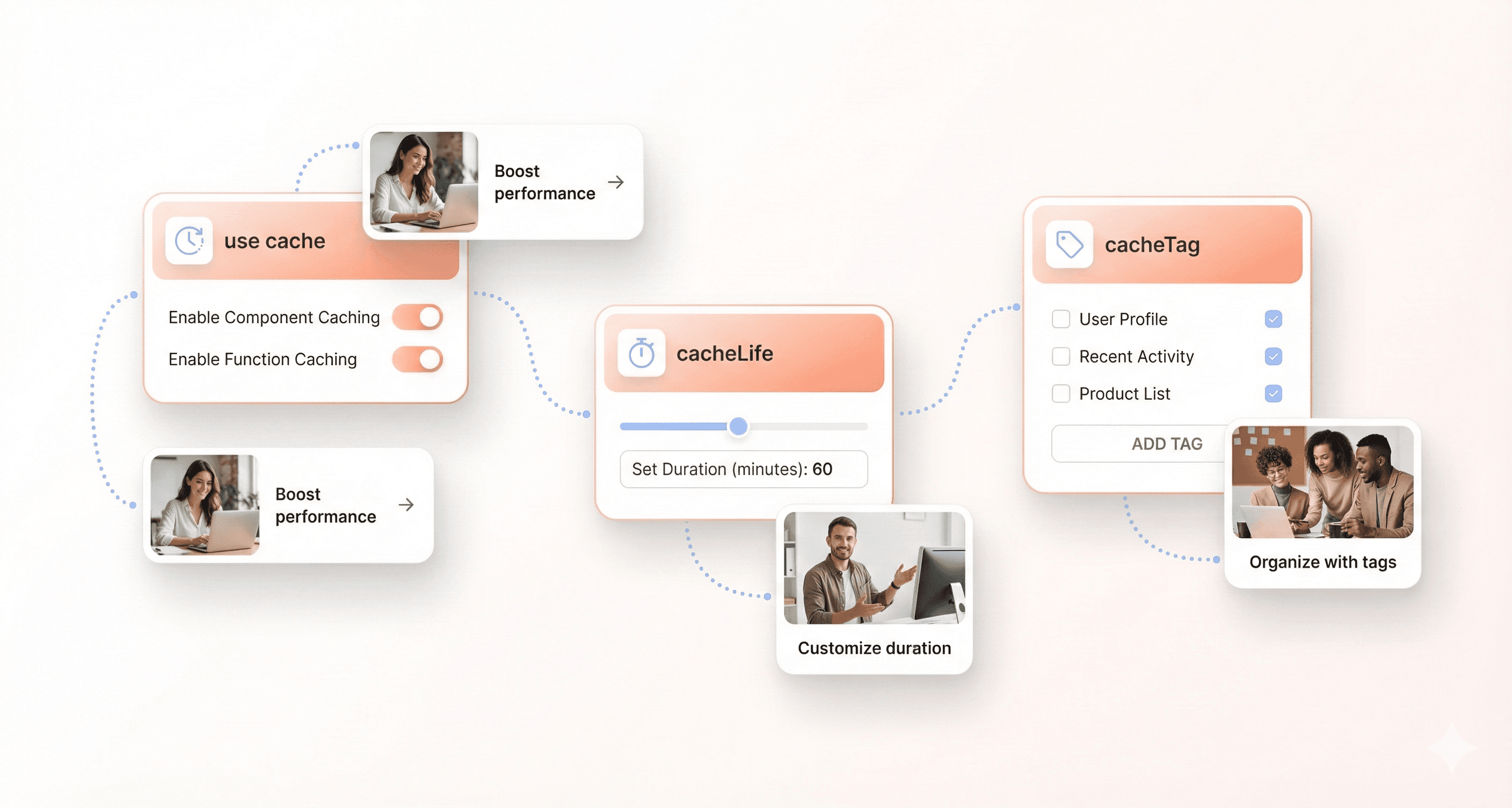
Cache Components are a new, opt-in set of caching features in Next.js 16 built around the "use cache" directive. You switch them on with cacheComponents: true in next.config.ts. Once enabled, caching is explicit: dynamic code in pages, layouts and API routes runs at request time by default, and you choose what to cache by marking pages, components or functions with "use cache".
This replaces the implicit caching of earlier App Router versions, where route-level settings such as dynamic, revalidate and fetchCache controlled whole pages. If you do not enable Cache Components, the previous caching model still applies, so you can upgrade first and adopt Cache Components later. See the Next.js caching docs for both models.
Using "use cache" with cacheLife and cacheTag
"use cache" caches the return value of async functions and components, and the compiler generates the cache keys for you. The use cache reference recommends pairing every cache directive with cacheLife() to set how long the entry lives; without one, the default profile applies. Use cacheTag() to label cached data so you can invalidate it later with updateTag() or revalidateTag().
Components that read request-time data such as cookies(), headers() or searchParams cannot be prerendered, so wrap them in a Suspense boundary.
Partial Prerendering: a static shell with streamed dynamic parts
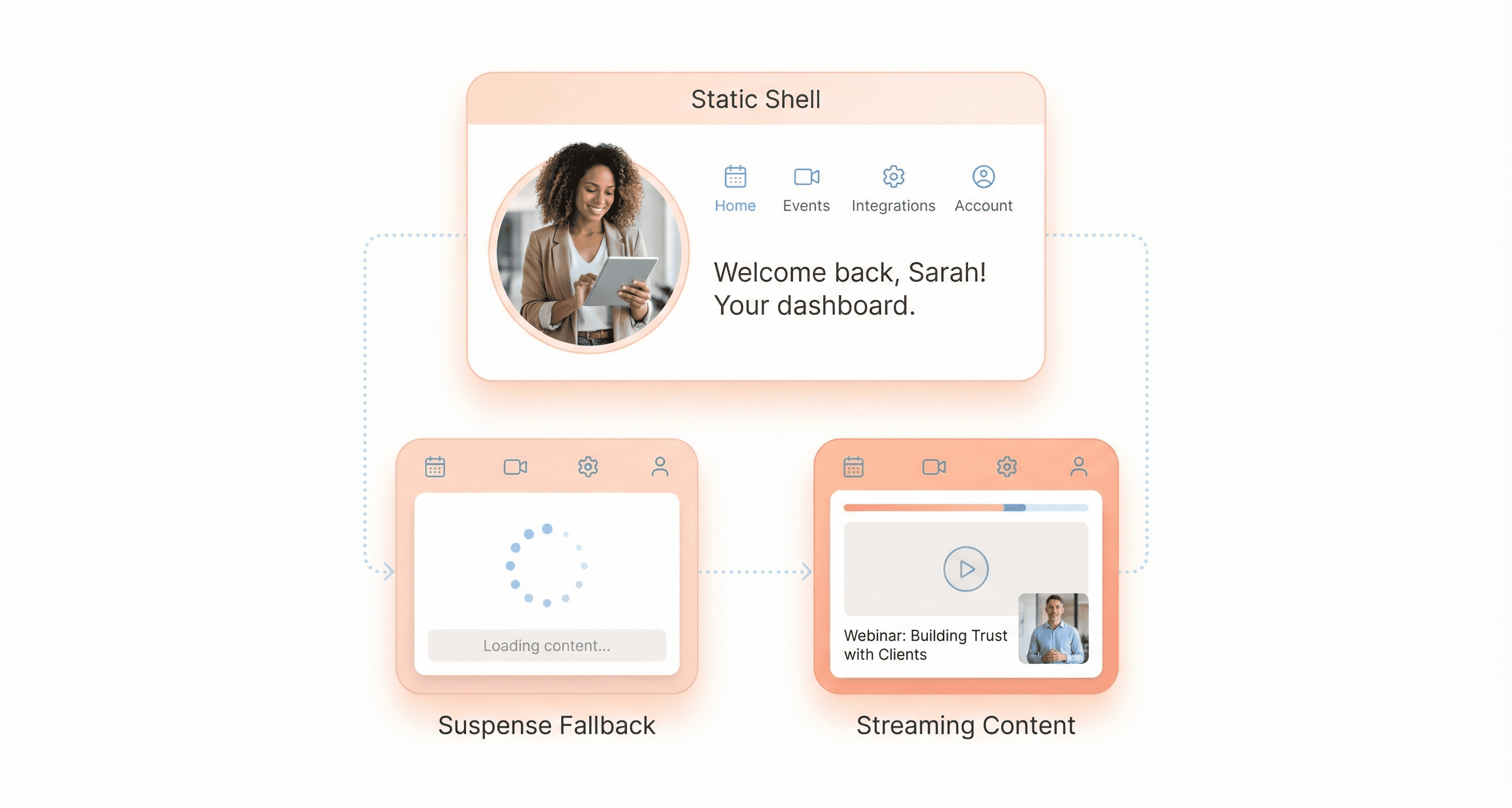
Cache Components complete Partial Prerendering (PPR), which Next.js first introduced in 2023. Before PPR, Next.js had to render each URL either statically or dynamically. With PPR, the server sends a static shell first, including any cached content, while dynamic sections wrapped in Suspense show a fallback and stream in when ready. You get the fast first load of a static page with fresh or personalised data where you need it, instead of the binary choice between fully static and fully dynamic pages.
If you used PPR in Next.js 15 canaries, note that the experimental.ppr flag and the route-level experimental_ppr export are removed. PPR in Next.js 16 works differently, and the upgrade guide advises staying on your current Next.js 15 canary until you migrate to Cache Components.
Next.js 16 Routing Improvements for Faster Navigation
Layout deduplication
When Next.js prefetches several links that share a layout, it now downloads that layout once instead of once per link. The Next.js team's example: a page with 50 product links now downloads the shared layout once instead of 50 times, which cuts the total transfer size.

Incremental prefetching
Next.js now prefetches only the parts of a page that are not already in its cache, rather than the whole page. The rewritten prefetch cache also:
Cancels requests when a link leaves the viewport
Prioritises prefetching on hover or when a link re-enters the viewport
Re-prefetches links when their data is invalidated
Works with Cache Components
The trade-off is that you may see more individual prefetch requests in the network panel, with a much lower total transfer size. These changes need no code changes, which makes them one of the easiest wins in the upgrade. As with any of the frontend performance myths we see, confirm the effect on your own pages with real-user data rather than assuming it.
New Caching APIs for Fine-Grained Data Revalidation
revalidateTag() now needs a cacheLife profile
revalidateTag() now takes a cacheLife profile as its second argument, which gives stale-while-revalidate behaviour: visitors get cached data immediately while Next.js refreshes it in the background. The single-argument form is deprecated and produces a TypeScript error.
The profile can be a built-in name such as 'max', 'hours' or 'days', a custom profile from next.config, or an inline { expire: number } object. Next.js recommends 'max' for most cases. Use revalidateTag() for content that can tolerate being briefly out of date.
updateTag() for read-your-writes
updateTag() is a new API that only works in Server Actions. It expires the tagged cache and reads fresh data within the same request, so users see their own changes straight away. Use it for forms, settings pages and other interactive applications where data consistency is critical.
refresh() for uncached data
refresh() is another Server Actions-only API. It does not touch the cache at all: it refreshes uncached data shown elsewhere on the page, such as a notification count or a live metric, after an action. It complements the client-side router.refresh().
Developer Experience Enhancements in Next.js 16
React Compiler support is stable, but off by default
Following React Compiler 1.0, built-in support is stable in Next.js 16: the reactCompiler option has moved out of experimental. The compiler memoises components automatically to reduce unnecessary re-renders. It is not enabled by default while Vercel gathers build performance data, and because it relies on Babel, compile times in development and builds will be higher when you turn it on.
Install the plugin with npm install -D babel-plugin-react-compiler, then test the app before relying on it in production.
Next.js DevTools MCP for AI-assisted debugging
Next.js 16 adds Next.js DevTools MCP, a Model Context Protocol integration that lets AI coding agents see inside your running app. According to the release post, it gives agents:
Next.js knowledge: routing, caching and rendering behaviour
Unified logs: browser and server logs without switching contexts
Automatic error access: detailed stack traces without manual copying
Page awareness: context about the active route
It requires Next.js 16 or later. Following the Next.js MCP guide, add the next-devtools-mcp package to your MCP client configuration, for example a .mcp.json file at the project root. It connects to your dev server when you start it:
Treat the agent's suggestions like any other code change: review them and run your tests.
Clearer build and request logs
Development request logs now split time into Compile (routing and compilation) and Render (running your code and React rendering), and the build output shows how long each step took. That makes it easier to see whether a slow page is a compilation or an application problem, a common source of hidden frontend technical debt. Example output from the release post:
Simplified create-next-app
create-next-app has a simpler setup flow, an updated project structure and new defaults: the App Router, a TypeScript-first configuration, Tailwind CSS and ESLint. Run npx create-next-app@latest to start a project with these defaults.

React 19.2 Features Now Available in Next.js 16
The App Router in Next.js 16 uses the latest React Canary release, which includes the React 19.2 features.
View Transitions
View Transitions animate elements that update inside a Transition or navigation, so a route change can move or morph an element rather than swapping it instantly.
useEffectEvent for non-reactive Effect logic
useEffectEvent moves non-reactive logic out of an Effect into an Effect Event function. The function always sees the latest props and state but does not belong in the dependency array, so changing a value like theme no longer reconnects the chat room in this example.
Activity for background UI
<Activity /> hides UI with display: none while keeping its state and cleaning up its Effects. It is useful for keeping a likely next screen ready, or for preserving state when users switch between sections.
React 19.2 also adds React Performance Tracks in Chrome DevTools, and it batches the reveal of server-rendered Suspense boundaries so streamed content appears together, matching client-side behaviour.
Breaking Changes and New Requirements in Next.js 16
The breaking changes most teams hit are the new minimum versions, fully async request APIs, Turbopack as the default bundler, the middleware.ts to proxy.ts rename and the removal of AMP and next lint. The official upgrade guide lists everything; the main items are below.
Minimum Node.js, TypeScript, React and browser versions
Node.js 20.9.0 (LTS) or later. Node.js 18 is no longer supported.
TypeScript 5.1.0 or later.
React: the upgrade guide installs
react@latestandreact-dom@latest, plus the latest@types/reactand@types/react-domfor TypeScript projects. The App Router uses React's Canary release with React 19.2 features.Browsers: Chrome 111+, Edge 111+, Firefox 111+ and Safari 16.4+.
Async request APIs are now required
Next.js 15 made params, searchParams, cookies(), headers() and draftMode() async but kept temporary synchronous access. Next.js 16 removes it, so you must await them. Image-generating functions (opengraph-image, twitter-image, icon, apple-icon) now receive params and id as promises, and sitemap functions receive id as a promise. Run npx @next/codemod@canary next-async-request-api . and use npx next typegen for typed PageProps and LayoutProps helpers.
proxy.ts replaces middleware.ts
middleware.ts is deprecated and renamed to proxy.ts to make the app's network boundary clearer. Rename the file and the exported function to proxy; the logic stays the same. Config flags with middleware in the name are renamed too, for example skipMiddlewareUrlNormalize becomes skipProxyUrlNormalize.
proxy.ts runs only on the Node.js runtime, which cannot be changed. If you need the Edge runtime, keep middleware.ts for now: it still works but is deprecated and will be removed in a future version. Renames like this are easy to miss in a large codebase, so plan them as part of a staged upgrade that does not break existing workflows. See the proxy.ts reference for details.
Removed features
These were deprecated earlier and are now gone, part of a wider modernisation effort across the framework:
AMP support, including
useAmpandexport const config = { amp: true }, with no replacementnext lint: use ESLint or Biome directly, and note thatnext buildno longer runs linting. Codemod:npx @next/codemod@canary next-lint-to-eslint-cli .serverRuntimeConfigandpublicRuntimeConfig: use environment variablesdevIndicatorsoptionsappIsrStatus,buildActivityandbuildActivityPositionexperimental.dynamicIO(renamedcacheComponents),experimental.pprand theexperimental_pprroute exportThe automatic
scroll-behavior: smoothoverride (adddata-scroll-behavior="smooth"to the html element to opt back in)unstable_rootParams()
Other behaviour changes to check
Parallel route slots need an explicit
default.jsfile; builds fail without one.next/imagedefaults:minimumCacheTTLrises from 60 seconds to 4 hours,qualitiesdefaults to[75], 16 is removed fromimageSizes, local images with query strings needimages.localPatterns, local IP optimisation is blocked by default and redirects are capped at 3.Deprecated:
next/legacy/image,images.domains(useimages.remotePatterns) and single-argumentrevalidateTag().@next/eslint-plugin-nextdefaults to the ESLint flat config format.next devandnext builduse separate output directories, so they can run at the same time.
How to upgrade to Next.js 16
The path the Next.js team recommends:
Move Node.js to 20.9 or later locally, in CI and in your hosting environment.
Run the upgrade codemod:
npx @next/codemod@canary upgrade latest. It updates the Turbopack config, migratesnext lintto the ESLint CLI and renames middleware to proxy.Run the async Request APIs codemod if you still use synchronous
params,cookies()orheaders().Or upgrade manually with
npm install next@latest react@latest react-dom@latest.Fix any custom webpack config, parallel route
default.jsfiles andnext/imagesettings, then run your tests and a full production build.Install the latest patch release (16.3.8 or newer at the time of writing) to pick up security fixes.
For large apps, upgrade on a branch, ship behind your usual release checks, and adopt optional features such as Cache Components and React Compiler one at a time. If you are still moving an older React app across, our Next.js migration services cover both steps.
Is Next.js 16 Worth Upgrading For?
For most teams, yes. Next.js 16 is stable, the 16.x line is the Active LTS release that receives security patches, and Turbopack, layout deduplication and incremental prefetching improve speed without code changes. The real work is in the breaking changes: Node.js 20.9, async request APIs, proxy.ts and any custom webpack config.
Treat Cache Components and React Compiler as optional next steps rather than part of the upgrade itself, and measure build times and Core Web Vitals before and after instead of relying on headline figures. If you are still choosing a framework, our Next.js vs React comparison covers the trade-offs, and for a wider plan to modernise your applications, upgrade the framework in small, tested steps.
Planning a Next.js 16 upgrade and want a second pair of eyes? Talk to Hashbyt's frontend team.





About the author
I’m the founder of Hashbyt, an AI-first frontend and UI/UX SaaS partner helping 200+ SaaS companies scale faster through intelligent, growth-driven design. My work focuses on building modern frontend systems, design frameworks, and product modernization strategies that boost revenue, improve user adoption, and help SaaS founders turn their UI into a true growth engine.


Is a clunky UI holding back your growth?
Is a clunky UI holding back your growth?
▶︎
Transform slow, frustrating dashboards into intuitive interfaces that ensure effortless user adoption.
▶︎
Transform slow, frustrating dashboards into intuitive interfaces that ensure effortless user adoption.
