

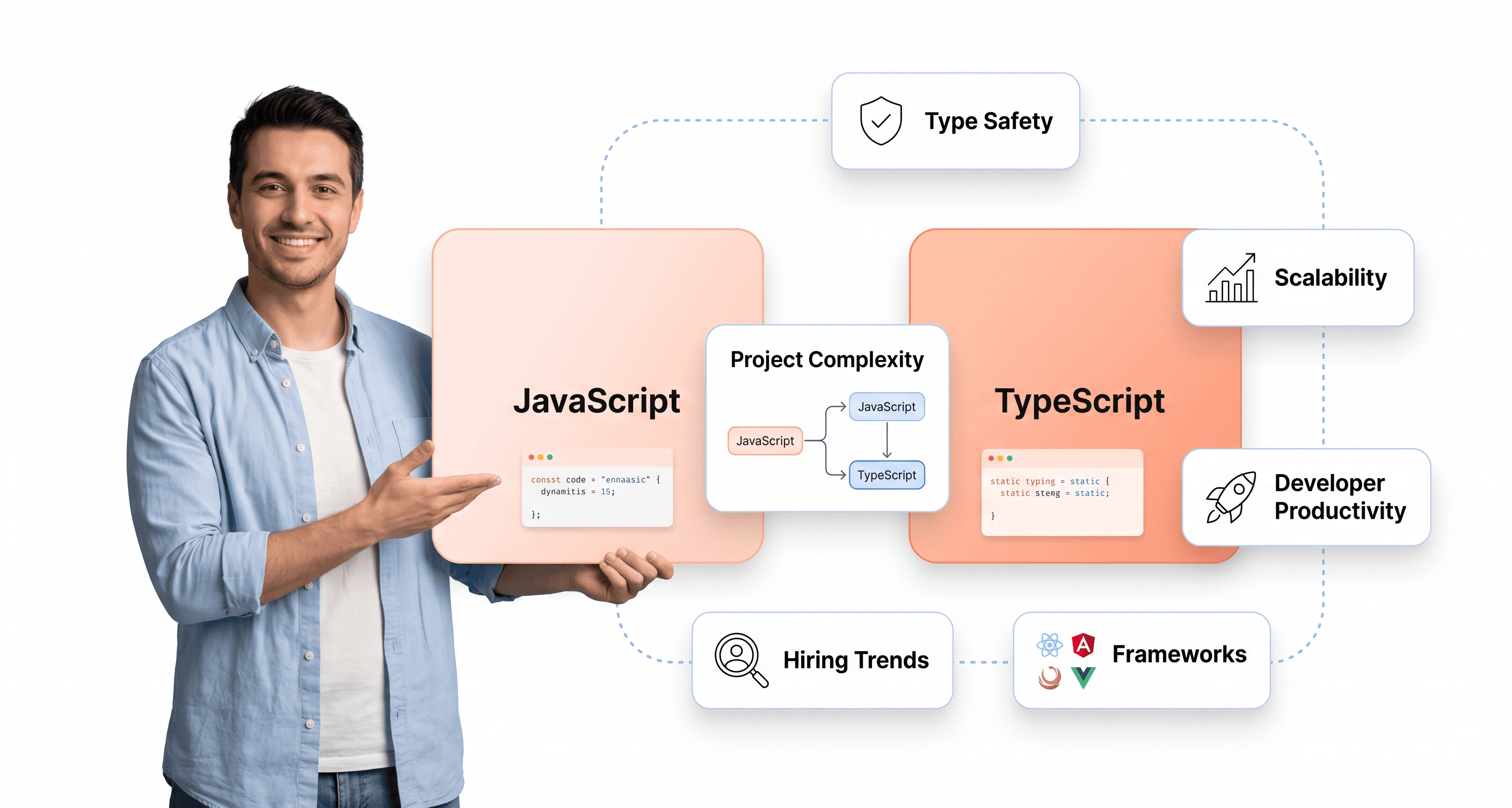
JavaScript is the language that browsers and Node.js actually run. TypeScript is JavaScript with a static type system on top: you write types, a compiler checks them, and they are removed before the code runs. So the real question is not which language is "better" but when the extra safety of types is worth the extra step.
This guide is for developers, team leads, and technical decision-makers who need to make informed choices about JavaScript vs TypeScript for their projects without the usual hype or religious debates.
It starts with a short answer and a side-by-side table, then covers the adoption data (with sources), the differences that affect daily coding, when each language is the better choice, framework support, a safe migration path and what TypeScript cannot do for you.
JavaScript vs TypeScript: the short answer
Quick answer: JavaScript is the language browsers and Node.js run; TypeScript is JavaScript plus static types that are checked before the code runs and then stripped out. Use TypeScript for production apps, team codebases, shared libraries and anything you will maintain for months. Use plain JavaScript for small scripts, quick prototypes and your first steps in programming.
JavaScript | TypeScript | |
|---|---|---|
What it is | The programming language of the web (ECMAScript) | A superset of JavaScript that adds static types; compiles to JavaScript |
Typing | Dynamic: types are known only at runtime | Static and gradual: types are checked before the code runs |
When type errors show up | At runtime, often in testing or production | In the editor and at build time |
Build step | None needed | A compiler or type stripping (Node.js 22.18+ runs .ts files directly, without type checking) |
Runtime speed | Baseline | Identical: types are removed, so there is no runtime cost |
Used in the past year (Stack Overflow 2025, professional developers) | 68.8% | 48.8% |
Admired by current users (Stack Overflow 2025) | 46.8% | 58.0% |
Latest release | Evolves yearly through TC39 and browser releases | TypeScript 7.0.2 (8 July 2026), the native Go compiler |
Best for | Scripts, prototypes, learning, small static sites | Production apps, teams, libraries and long-lived codebases |
Sources: Stack Overflow Developer Survey 2025 (usage and admired figures), TypeScript 7.0 announcement, Node.js TypeScript documentation.
Is TypeScript still relevant in 2026?
Yes, more than ever. Microsoft shipped TypeScript 7.0 on 8 July 2026, a native port of the compiler written in Go that the TypeScript team says is "often about 10 times faster than TypeScript 6.0". The typescript package was downloaded about 339 million times in the week of 22 to 28 September 2026 (npm registry API), and GitHub's Octoverse 2025 report names it the most used language on GitHub by monthly contributors.
Will TypeScript replace JavaScript?
No. TypeScript compiles to JavaScript, and browsers only run JavaScript, so every TypeScript project is still a JavaScript project underneath. The direction of travel is the reverse: Node.js now strips TypeScript types natively (on by default since v22.18.0 and v23.6.0, stable since v24.12.0 and v25.2.0), and the TC39 Type Annotations proposal (Stage 1) would let JavaScript engines ignore type syntax. Types are moving closer to JavaScript, not replacing it.
Is TypeScript the industry standard?
For new professional frontend and Node.js work, effectively yes. Angular is built on it, and the standard starters for React (Vite), Vue (create-vue) and Next.js (create-next-app) all offer TypeScript set-ups. In the State of JavaScript 2025 survey, 40% of respondents said they write only TypeScript and about 6% only JavaScript. Across all developers, though, JavaScript is still more widely used (68.8% vs 48.8% of professional developers in Stack Overflow 2025).
Is TypeScript in demand?
Yes. Most modern frontend stacks default to it, so React, Angular, Vue and Next.js roles increasingly expect it. Treat widely quoted salary-premium figures with caution: we could not trace them to a current, verifiable source. The reliable signals are usage (48.8% of professional developers) and GitHub activity, where TypeScript overtook Python and JavaScript in August 2025.
Is TypeScript worth learning?
Yes, once you are comfortable with JavaScript. Every TypeScript skill builds on JavaScript, so learn the language first (variables, functions, objects, async code, the DOM), then add types. Most developers pick up everyday annotations quickly; advanced generics take longer. Our TypeScript development page shows how we use it on client projects.
TypeScript adoption in 2026: what the data says
Adoption Rates Across Professional Developers and GitHub Usage
In the Stack Overflow Developer Survey 2025, 43.6% of all respondents and 48.8% of professional developers said they had used TypeScript in the past year. JavaScript is still ahead on the same measure: 66.0% of all respondents and 68.8% of professional developers.
The State of JavaScript 2025 survey, published in February 2026, tells a sharper story among JavaScript specialists: 40% of respondents (4,367 of 10,934) write only TypeScript, while about 6% (661) write only plain JavaScript. As Nuxt core team lead Daniel Roe put it in the survey conclusion: "TypeScript has won."
Developers who use TypeScript also tend to want to keep using it. In Stack Overflow 2025, 58.0% of TypeScript users said they want to continue with it (the survey's "admired" score), compared with 46.8% for JavaScript. It is not the most admired language, though: Rust leads at 72.4%.
GitHub's Octoverse 2025 report shows TypeScript became the most used language on GitHub by monthly contributors in August 2025, overtaking Python and JavaScript with about 2.6 million contributors, up 66% year on year. GitHub links part of that growth to AI-assisted coding, where types give tools more context.
The npm ecosystem reflects this adoption surge as well. The typescript package recorded about 339 million downloads in the week of 22 to 28 September 2026 (npm registry API). Libraries that do not ship their own types are covered by DefinitelyTyped, which publishes thousands of @types packages.
Job market demand for TypeScript skills

Employers follow the tooling. Because Angular, Next.js and the standard React and Vue starters default to or strongly support TypeScript, most modern frontend roles list it as required or preferred. Live listings change daily, so the most useful check is a search of React and TypeScript roles on Indeed in your own market.
For developers, TypeScript has moved from a nice-to-have to an expected skill for professional frontend work. For companies, a TypeScript codebase is easier to hand to new hires, because the types explain how the code fits together.
Framework Ecosystem Shift Toward TypeScript-First Development
The clearest sign of the shift is inside the frameworks themselves. Most major JavaScript frameworks are now written in TypeScript and treat type safety as a core feature rather than an add-on.
Angular led this charge early, essentially requiring TypeScript for meaningful development work. Teams evaluating Angular for a new or modernised product should read our complete guide to angular front end development. It covers how Angular's TypeScript-first architecture fits into legacy-to-modern migration projects.
The framework's CLI generates TypeScript by default, documentation examples use TypeScript syntax, and the entire ecosystem assumes typed development. This approach has proven successful enough that other frameworks are following suit.
React's ecosystem has embraced TypeScript too. Create React App was deprecated in February 2025, and the recommended starting points (Vite's react-ts template and Next.js) set up TypeScript out of the box. Vue 3 was rewritten in TypeScript with significantly improved TypeScript integration compared to Vue 2, making typed development a seamless experience rather than an afterthought.
Tooling has followed. Vite and Vitest compile .ts files with no extra setup, Node.js runs .ts files directly by stripping types, and Webpack and Jest support TypeScript through ts-loader, ts-jest or Babel. Note that most of these tools only remove types; you still run tsc (or your editor) to type-check.
The cumulative effect of these ecosystem changes is that TypeScript adoption often happens naturally as developers work with modern tooling and frameworks, rather than requiring a deliberate migration decision.
Understanding the Core Differences Between JavaScript and TypeScript
Type checking at compile-time versus runtime
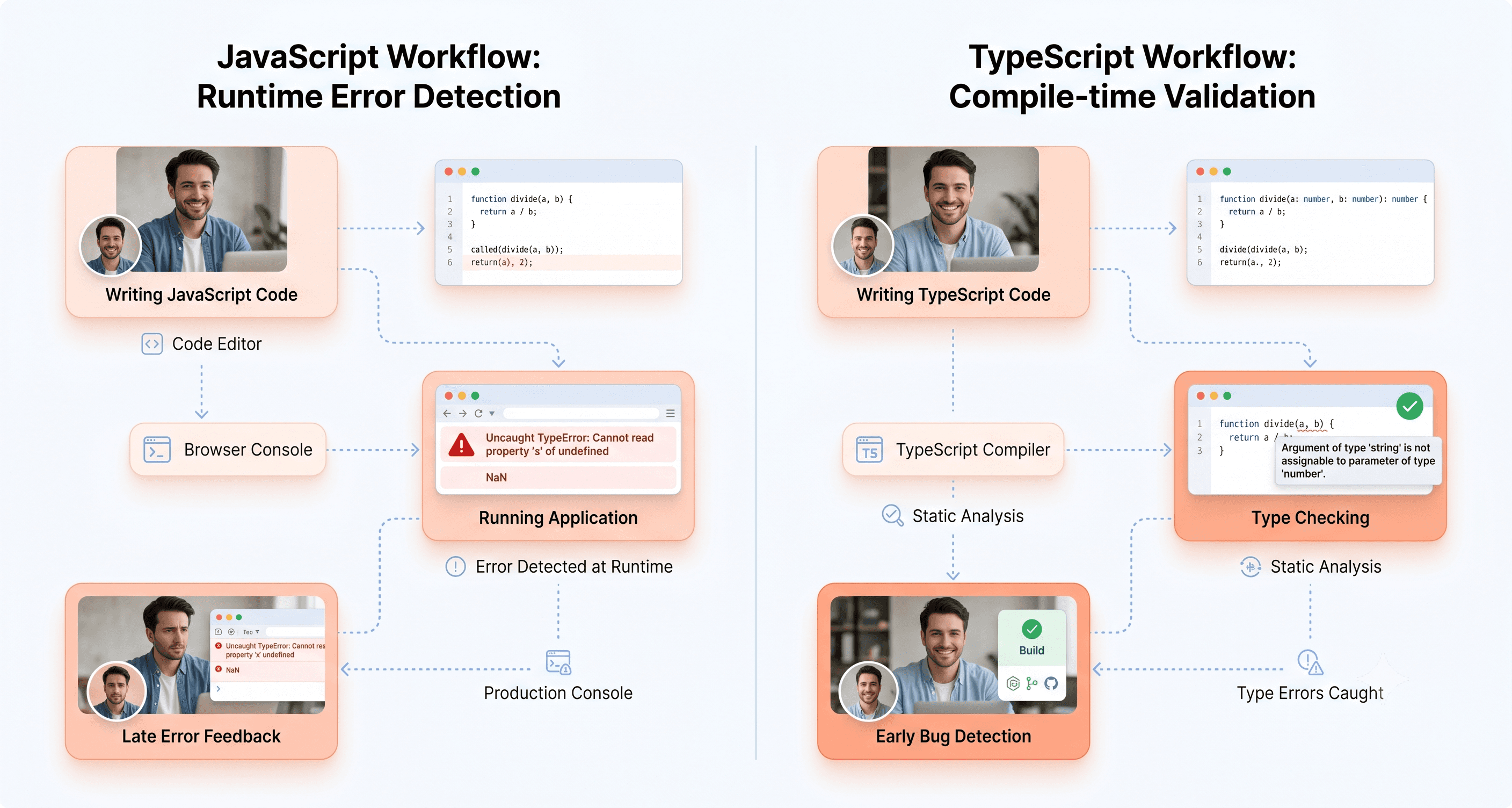
The fundamental distinction between TypeScript and JavaScript lies in when type checking occurs. JavaScript uses dynamic typing, where data types are determined during runtime rather than being explicitly defined in advance. This means that type-related issues are only caught when the code is executed, potentially leading to unexpected errors in production environments.
TypeScript, conversely, employs static typing where variable types are defined upfront and checked at compile time. This proactive approach catches errors before the code runs, significantly reducing the likelihood of runtime issues. For example, TypeScript flags a function call that passes a string where a number is expected, while JavaScript would only reveal the problem when the code runs:
This compile-time checking extends beyond basic type validation. TypeScript provides strict null checks that catch errors when trying to access properties on null or undefined values, a common source of bugs in JavaScript applications. The language also offers definite assignment checks and a strict mode (on by default since TypeScript 7.0) that catches errors such as uninitialized variables, making code more reliable and maintainable.
The practical impact becomes evident in function definitions. While JavaScript functions typically rely on comments or external documentation for type information, TypeScript allows developers to add type annotations directly to function inputs and outputs, ensuring consistency and reducing errors throughout the development process.
Enhanced IDE experience with autocomplete and refactoring tools

TypeScript's static typing system unlocks powerful development tools that dramatically improve the coding experience. Modern IDEs can leverage TypeScript's type information to provide intelligent autocompletion suggestions, helping developers discover available methods and properties without constantly referring to documentation.
The enhanced tooling extends to sophisticated refactoring capabilities. When renaming variables, functions, or properties in TypeScript projects, IDEs can safely update all references across the entire codebase with confidence. This level of automated refactoring is possible because TypeScript's type system provides the IDE with comprehensive understanding of code relationships and dependencies.
TypeScript's integration with development environments also enables advanced navigation features. Developers can easily jump to function definitions, find all usages of a particular variable or method, and explore type hierarchies. These capabilities become increasingly valuable as projects grow in size and complexity.
Error detection happens as developers type, with editors highlighting problems before the code is ever run. TypeScript 7's native compiler makes this feedback noticeably faster on large projects: Microsoft reports the time to show errors when opening the VS Code codebase fell from 17.5 seconds to under 1.3 seconds.
Self-documenting code through type definitions
TypeScript transforms code into living documentation through its type system. Type annotations serve as built-in documentation that remains synchronized with the actual implementation, eliminating the common problem of outdated comments and documentation that plague many JavaScript projects.
Consider how TypeScript interfaces define clear contracts for objects and functions. Instead of relying on external documentation or comments that may become stale, developers can immediately understand what properties an object should contain and what types those properties should be. This self-documenting nature makes codebases more accessible to new team members and reduces the time needed to understand existing functionality.
Generic types in TypeScript provide another layer of self-documentation. A function using generics like function identity<T>(arg: T): T clearly communicates that it accepts any type and returns the same type, maintaining type safety while preserving flexibility. JavaScript lacks this built-in generic capability, requiring developers to implement their own type checks or rely on external documentation.
The self-documenting aspect becomes particularly valuable in team environments where multiple developers work on the same codebase. Type definitions act as a contract between different parts of the application, ensuring that changes to one component don't unexpectedly break others. This built-in documentation reduces miscommunication and helps maintain consistency across large development teams.
When TypeScript Is the Better Choice
Large or growing codebases
For large-scale applications with extensive codebases, TypeScript delivers exceptional value through its static typing system and enhanced error detection capabilities. As a codebase grows past what one person can hold in their head, maintaining plain JavaScript becomes increasingly difficult due to the dynamic typing system that can lead to unexpected behavior and hard-to-find bugs.
TypeScript's static typing allows developers to catch type-related issues at compile time rather than runtime, significantly reducing the likelihood of production bugs. This becomes crucial in large codebases where tracking data structures and function signatures across thousands of lines becomes nearly impossible without proper type annotations.
The self-documenting nature of TypeScript makes code easier to read and maintain in extensive projects. With explicit type definitions for variables, function parameters, and return values, developers can quickly understand how different parts of the application interact without diving deep into implementation details.
Team projects with multiple developers

TypeScript enforces consistency across large development teams by ensuring every team member follows a consistent data model. Without enforced types, inconsistencies in function usage and data structures can lead to bugs, especially when multiple developers work on the same codebase simultaneously.
The type safety feature enhances collaboration by reducing cognitive load and promoting clearer communication between team members. Teams building SaaS products with multiple contributors should also ensure their new product development process accounts for TypeScript adoption costs in timeline and budget planning. Type definitions help developers easily understand how different components interact, making it easier for new team members to onboard and contribute effectively to existing workflows.
When Slack moved its desktop app to TypeScript, its engineers wrote that they were "surprised by the number of small bugs we found when converting our code" (TypeScript at Slack, 2017).
Long-term maintenance projects and public APIs
For projects with long lifecycles and multiple contributors, TypeScript's scalability advantages become apparent. The type system makes onboarding easier for new developers joining existing projects and helps prevent regressions as the codebase evolves over time.
Enterprise applications with extended maintenance cycles particularly benefit from TypeScript's structured approach. The explicit type definitions serve as living documentation, helping maintain code quality even as original developers leave and new ones join the project.
Open-source libraries especially benefit from TypeScript's type definitions, as they help other developers use the code more efficiently. The type system provides clear interfaces and expected data structures, reducing integration errors and improving the overall developer experience.
Critical business logic requiring error prevention
TypeScript's compile-time error detection is invaluable for applications handling critical business logic where runtime errors could have severe consequences. The static typing system prevents type mismatches that could lead to data corruption or system failures in production environments.
Node.js backend services requiring strict data validation particularly benefit from TypeScript's type safety features. The enhanced debugging capabilities through superior tooling and error reporting help developers quickly identify and resolve issues before they impact business operations.
The descriptive and actionable error messages provided by TypeScript enable faster problem resolution compared to JavaScript's more ambiguous error reporting, which matters most in applications where downtime or bad data is expensive.
Situations Where JavaScript Remains the Better Choice
Small scripts, prototypes, and MVP development

For quick prototypes and minimum viable products (MVPs), JavaScript's simplicity and speed make it the superior choice. When working under tight deadlines, the overhead of TypeScript's compilation process and type configuration can significantly slow down development velocity. JavaScript allows developers to rapidly iterate on ideas without the additional setup complexity that TypeScript introduces.
Small scripts particularly benefit from JavaScript's straightforward approach. For automation scripts, simple utilities, or one-off tools that won't require long-term maintenance, the type safety benefits of TypeScript don't justify the extra configuration burden. That gap is narrowing, though: Node.js 22.18 and later can run a .ts file directly, so a typed script no longer needs a build step (it just is not type-checked unless you run tsc).
Learning projects and simple static websites
JavaScript remains the better choice for educational purposes and simple static websites. Beginners learning web development should focus on mastering core programming concepts without the added complexity of static typing systems. JavaScript's familiar syntax and immediate execution provide a more accessible entry point into web development.
The best way to learn JavaScript is to build small, real things in the browser: a to-do list, a form with validation, a page that fetches data from an API. Work through a structured reference such as the MDN JavaScript Guide alongside, and add TypeScript once functions, objects, modules and async code feel natural.
For simple static websites that don't require complex state management or extensive code organization, JavaScript's lightweight nature is advantageous. These projects typically involve minimal code complexity where TypeScript's benefits wouldn't be realized, making the additional learning curve and tooling setup unnecessary overhead.
Highly dynamic code patterns and quick experiments
JavaScript excels in scenarios requiring highly dynamic code patterns and rapid experimentation. When building applications that rely heavily on runtime flexibility, such as configuration-driven UIs or dynamic feature toggles, JavaScript's dynamic typing becomes a strength rather than a limitation.
Quick experiments and exploratory programming benefit from JavaScript's ability to change variable types on-the-fly and its forgiving nature during development. This flexibility is particularly valuable when testing new APIs, building interactive prototypes, or working with uncertain requirements that may change frequently.
Teams lacking TypeScript buy-in or expertise
Team dynamics play a crucial role in technology adoption success. When team members lack TypeScript expertise or express resistance to adopting it, forcing implementation can lead to decreased productivity and code quality issues. JavaScript remains the safer choice for teams where members aren't comfortable with static typing concepts or don't see the value proposition.
Additionally, projects with limited budgets for training or onboarding may find JavaScript more cost-effective. The learning curve associated with TypeScript, while manageable, requires time investment that some organizations cannot afford. In such cases, sticking with JavaScript ensures consistent development velocity and team satisfaction.
TypeScript Support in React, Next.js, Vue and Angular
React Component Development with Type Safety
React paired with TypeScript transforms component development by providing comprehensive type safety that prevents common runtime errors before they reach production. For a deeper look at which React UI component libraries have the strongest TypeScript support in 2026, see our guide to the best React UI component libraries for scalable SaaS products. The integration offers developers type safety for props and state, enhanced tooling with autocompletion and IntelliSense in IDEs, and improved component reusability through clear interfaces that ensure predictable behavior.
Setting up a React project with TypeScript takes one command. Create React App is deprecated, so use Vite's TypeScript template (or npx create-next-app@latest for Next.js):
This seamless integration allows developers to define precise interfaces for component props, as demonstrated in this functional component example:
The TypeScript integration with React delivers significant advantages including easy integration into existing projects, robust support for popular libraries like Redux and React Router with strong types, and a whole class of prop and state bugs caught before tests even run (types complement tests; they do not replace them). This combination proves particularly valuable for scalable UI development where component interfaces must remain consistent across large development teams.
Next.js and Modern Full-Stack Applications
Next.js applications benefit tremendously from TypeScript integration, especially when building modern full-stack applications that require both client-side and server-side type safety. For a detailed comparison of Next.js against React and other frameworks for SaaS development, see our Next.js vs React guide for SaaS which covers rendering strategies, SEO, and developer productivity. The framework's built-in TypeScript support extends beyond traditional React components to include API routes, server-side rendering functions, and static generation methods.
TypeScript enhances Next.js development by providing type safety across the entire application stack. This includes strongly typed API endpoints, validated data fetching methods, and consistent interfaces between frontend and backend components. The integration ensures that data contracts remain consistent throughout the application lifecycle, from database queries to user interface rendering.
Modern full-stack applications built with Next.js and TypeScript demonstrate improved maintainability and developer productivity. The type system catches potential issues during development, reducing debugging time and improving code quality. Additionally, the enhanced IDE support provides better autocompletion and refactoring capabilities, making it easier for teams to work on complex applications with multiple interconnected components.
Vue 3 and Angular TypeScript Advantages
Vue 3 embraces TypeScript through official support that maintains Vue's characteristic simplicity while adding robust type checking capabilities. The Composition API, introduced in Vue 3, fully embraces TypeScript with superior type inference and support compared to the Options API. Create a typed Vue project with npm create vue@latest (the official, Vite-based create-vue tool; Vue CLI is no longer recommended) and choose TypeScript when prompted. For a framework-level comparison, see our React vs Vue vs Angular guide.
The Vue 3 TypeScript integration provides type safety in Vue components that improves maintainability and reduces runtime errors. The official Vue extension for VS Code provides IntelliSense and type checking inside .vue files. Here is a Vue component using <script setup> with typed props:
Angular represents the most comprehensive TypeScript integration among modern frameworks, as it's built with TypeScript and uses it as the default language. This tight integration ensures a robust development experience with strong typing that helps catch errors at compile time, making applications more reliable. Angular's use of decorators and metadata simplifies component and service creation, while dependency injection with strongly typed services and models improves maintainability.
The Angular CLI defaults to TypeScript when creating new projects with ng new my-angular-app, providing consistent coding standards, improved tooling, and powerful features like generics and interfaces that enhance code maintainability. Angular's enterprise-focused architecture benefits significantly from TypeScript's structural approach to large-scale application development.
Framework | Integration Level | Learning Curve | Tooling Support | Component Structure |
|---|---|---|---|---|
Angular | Default and built-in | Steeper (more structured) | Angular CLI, strong IDE support | Class-based components with decorators |
React | Optional but recommended | Moderate (flexible) | Vite and Next.js templates, strong IDE support | Functional (hooks) |
Vue | Optional but well-supported | Low to moderate (intuitive) | create-vue (Vite), Vue VS Code extension | Options API or Composition API |

Migration Strategy from JavaScript to TypeScript
Gradual conversion approach and timeline

The most effective approach to TypeScript migration follows a gradual, incremental strategy that minimizes disruption while maximizing benefits. Start by installing TypeScript and initializing your project with npm install --save-dev typescript followed by npx tsc --init to create the foundational tsconfig.json file. Since July 2026 this installs TypeScript 7; if a tool in your chain is not ready for it yet, the @typescript/typescript6 package lets you run TypeScript 6.0 alongside it. If you would rather have specialists run the migration, our frontend development services team does this work for SaaS products.
Begin with enabling JavaScript compatibility by setting allowJs: true and checkJs: true in your TypeScript configuration. This allows you to type-check existing .js files without converting them immediately, providing immediate value through error detection and improved tooling support.
The file conversion process should follow a strategic order:
Start with utility functions and isolated modules
Progress to non-UI logic components
Handle complex, interconnected files last
Rename files from .js to .ts (or .jsx to .tsx for React components) one at a time rather than attempting a mass conversion. This incremental approach makes debugging significantly easier and allows your team to adapt gradually to TypeScript patterns.
For files not yet ready for conversion, leverage JSDoc annotations to introduce typing without renaming:
How long this takes depends on codebase size, test coverage and how strict you want the compiler to be. Plan the work as small, reviewable batches that ship alongside feature work rather than as one big-bang conversion.
Team preparation and skill development requirements
Successfully migrating to TypeScript requires comprehensive team preparation and skill development. Team members need training on TypeScript fundamentals, including type annotations, interfaces, generics, and advanced type features. Set aside a short, focused training block before the first files are converted, covering both syntax and team conventions.
Key skills your team needs to develop include:
Understanding TypeScript's type system and type inference
Writing effective interfaces and type aliases
Handling complex typing scenarios like function overloads
Debugging type-related errors effectively
Leveraging TypeScript tooling in their development environment
Establish coding standards early in the process. Define conventions for type annotations, naming patterns, and when to use specific TypeScript features. Create documentation covering common migration patterns and solutions to frequently encountered typing challenges.
Assign TypeScript champions within your team who can provide guidance and code reviews during the transition. These individuals should have deeper TypeScript expertise and can help resolve complex typing issues that arise during migration.
Plan for slower delivery at first while the team adapts to TypeScript workflows, and protect the migration from deadline pressure so that any does not become the default escape hatch.
Configuration setup for mixed codebases
Managing mixed JavaScript and TypeScript codebases requires careful configuration to ensure smooth interoperability. Your tsconfig.json should accommodate both file types during the transition period:
This configuration compiles cleanly with TypeScript 7.0.2. The older "target": "es5" and "moduleResolution": "node" settings found in many tutorials now fail with error TS5108, because TypeScript 7 removed them.
Directory structure becomes crucial during migration. Maintain clear separation between input and output directories to prevent TypeScript from overwriting source files:
For projects using multiple build tools, configure each appropriately:
Webpack: Install
ts-loaderandsource-map-loaderfor TypeScript processingBabel: Add
@babel/preset-typescriptto your preset configurationJest: Implement
ts-jestor configurebabel-jestfor TypeScript test files
Choose module settings to match how the code runs: "module": "nodenext" for code that Node.js runs directly, or "module": "preserve" with "moduleResolution": "bundler" for apps built with Vite, webpack or Next.js. The old amd, umd and system formats and "moduleResolution": "node" are no longer supported in TypeScript 7.
Install type definitions for third-party libraries using npm install --save-dev @types/[library-name] as needed. For libraries without available types, create custom declaration files to maintain type safety across your mixed codebase.
Configure your build pipeline to handle both JavaScript and TypeScript files seamlessly, ensuring that existing JavaScript functionality remains unaffected while new TypeScript files integrate properly into your application architecture.
Performance and Cost-Benefit Analysis
Start with runtime performance, because it is the most common misunderstanding: TypeScript has no runtime cost. Types are removed before the code runs, so a TypeScript app and the equivalent JavaScript app run at the same speed. The costs are in build time and people's time, and TypeScript 7's native compiler cuts the first of those sharply (Microsoft reports 8 to 12 times faster full builds on large projects).
Development time trade-offs and learning curve investment
The learning curve is the main cost for teams moving from JavaScript. Everyday annotations (primitives, object types, function signatures) come quickly to experienced JavaScript developers; advanced features such as generics, conditional types and utility types take considerably longer to master.
The upfront time investment manifests in several areas: configuring TypeScript compiler settings, defining type definitions for existing codebases, and establishing team conventions for type usage. Expect a temporary slowdown while the team learns; the payback comes later, through safer refactoring, better autocomplete and fewer "undefined is not a function" bugs.
Code review processes require additional time investment, as teams must evaluate both functionality and type safety. Reviews take longer at first, though this overhead shrinks as the team gains experience and the types start doing part of the reviewer's job.
What the research says about bug reduction
The best-known study is "To Type or Not to Type" (Gao, Bird and Barr, ICSE 2017). The researchers took bugs that had already shipped in public JavaScript projects, added type annotations, and found that TypeScript 2.0 and Flow would each have flagged about 15% of them. Because those bugs had already survived testing and review, the authors describe the figure as conservative.
For enterprise teams evaluating the broader modernisation investment beyond TypeScript adoption, our enterprise app modernization guide covers the full ROI framework, portfolio assessment, and phased implementation planning.
The safety improvements extend beyond bug reduction. TypeScript's compile-time validation catches null reference errors, property access mistakes, and function signature mismatches before deployment. Fewer of those mistakes reach production, which means fewer emergency fixes.
When the investment pays off, by project type
Short-lived projects (throwaway prototypes, one-off scripts, campaign microsites) often end before TypeScript's setup and learning costs are repaid, which is why plain JavaScript is still a sensible choice there.
Growing products with several developers usually recover the cost as soon as the team starts refactoring shared code, because the compiler finds every call site that needs to change. Large, multi-team codebases gain the most, since type safety compounds across modules that no single person understands end to end.
Long-term maintenance projects exhibit the most favorable economics. Applications expected to live for years benefit through lower technical debt, simpler refactoring and faster onboarding, because the type system acts as documentation that cannot drift out of date.
Common TypeScript Misconceptions and Realistic Expectations
Limitations in bug detection and what TypeScript cannot prevent
While TypeScript significantly improves code quality and catches many potential issues, it's crucial to understand its limitations. TypeScript excels at preventing type-related errors at compile time, but it cannot catch all categories of bugs that plague modern applications.
Logic errors remain entirely outside TypeScript's detection capabilities. If your algorithm is fundamentally flawed or your business logic contains mistakes, TypeScript won't identify these issues. For instance, an off-by-one error in a loop or incorrect mathematical calculations will pass TypeScript's type checking without any warnings.
Runtime errors also fall beyond TypeScript's scope. Issues like network failures, API responses that do not match their declared types, or unexpected user behaviour cannot be predicted by static type analysis; validate external data at runtime with a schema library if it matters. TypeScript operates purely at compile time and has no visibility into what happens when your application actually runs in production.
Additionally, TypeScript cannot prevent regressions caused by external dependencies or third-party library changes. When a library updates its implementation while maintaining the same type signature, TypeScript won't detect functional breaking changes that could impact your application's behavior.
The role of good JavaScript practices versus TypeScript benefits
TypeScript is not a substitute for fundamental programming best practices. Many developers mistakenly believe that adopting TypeScript eliminates the need for disciplined coding standards and thorough code reviews.
Strong JavaScript practices remain the foundation of quality software development. Proper error handling, comprehensive testing strategies, clear code organization, and consistent naming conventions are just as critical in TypeScript projects as they are in pure JavaScript applications.
A common objection is: "If you just enforce prop type standards, TypeScript isn't necessary." Strict conventions are valuable, but few organisations can guarantee that every line of code is reviewed thoroughly. TypeScript provides automated enforcement that human processes cannot reliably maintain at scale.
However, TypeScript should complement, not replace, existing quality practices. Code reviews become more focused on business logic and architecture when type safety is automated. Testing strategies should still include comprehensive unit tests, integration tests, and end-to-end testing scenarios.
Avoiding the "any" type abuse and maintaining type safety
The most important habit for keeping TypeScript's benefits is avoiding overuse of the any type. The any type essentially disables TypeScript's type checking, creating blind spots in your type safety net.
Legitimate use cases for any are rare. The two most common are: integrating with third-party JavaScript libraries that have no typings, and working with libraries that have incorrect type definitions. In these cases, contributing proper type definitions back to the library's repository should be considered.
Teams serious about type safety can configure their TypeScript setup to prevent any abuse entirely. Enable the @typescript-eslint/no-explicit-any lint rule (TSLint, still quoted in older guides, has been deprecated since 2019) and keep "noImplicitAny" on. The "strict": true option switches on the full set of strict checks, and TypeScript 7 enables it by default.
The key insight is that TypeScript's value increases incrementally with stricter typing. Teams can gradually improve their type coverage over time without dedicating entire development cycles to TypeScript migration. This incremental approach allows developers to experience TypeScript's benefits while learning to use it as a powerful development tool rather than a set of restrictions that slows them down.

Conclusion
The data is clear: TypeScript is now the default for professional frontend and Node.js work. It is the most used language on GitHub by contributors, it shipped a 10x faster native compiler in July 2026, and 48.8% of professional developers used it in the past year. That does not make JavaScript less relevant, because every TypeScript program runs as JavaScript. The choice between these technologies should be driven by your specific project needs rather than industry trends alone.
For quick prototypes, learning projects, and small scripts, JavaScript remains the faster and more practical choice. Its zero-setup nature and immediate execution make it perfect for experimentation and rapid iteration. But when you're building production applications with teams, planning long-term maintenance, or working with modern frameworks like Next.js and tRPC, TypeScript's compile-time safety, superior refactoring capabilities, and self-documenting nature usually outweigh the initial learning investment. If you are planning a new build or a migration, our frontend development services page explains how we deliver typed React, Next.js and Angular frontends.
The real winner in 2026 isn't TypeScript or JavaScript; it's knowing when to use each. Start with JavaScript to master the fundamentals, then graduate to TypeScript when your projects demand the reliability and team collaboration benefits it provides. Both technologies will continue to coexist, serving different but equally important roles in the development ecosystem.





About the author
I’m the founder of Hashbyt, an AI-first frontend and UI/UX SaaS partner helping 200+ SaaS companies scale faster through intelligent, growth-driven design. My work focuses on building modern frontend systems, design frameworks, and product modernization strategies that boost revenue, improve user adoption, and help SaaS founders turn their UI into a true growth engine.



Is a clunky UI holding back your growth?
Is a clunky UI holding back your growth?
▶︎
Transform slow, frustrating dashboards into intuitive interfaces that ensure effortless user adoption.
▶︎
Transform slow, frustrating dashboards into intuitive interfaces that ensure effortless user adoption.
