

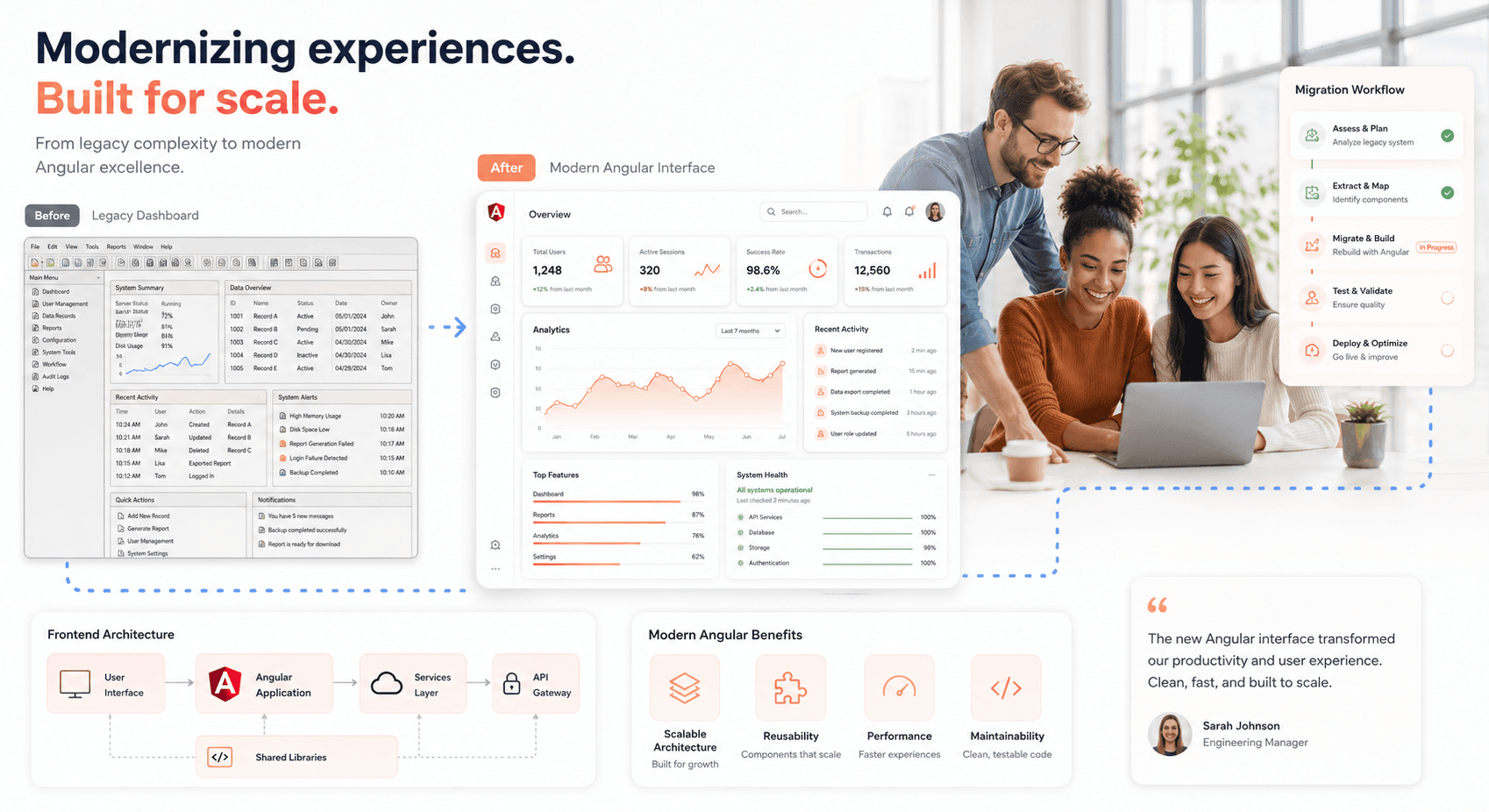
Modernizing legacy JavaScript applications to Angular has become a critical challenge for development teams maintaining aging codebases. This guide is designed for frontend developers, technical leads, and engineering managers who need to upgrade their applications without breaking production systems or disrupting business operations.
Legacy applications often suffer from outdated dependencies, poor performance, and mounting technical debt that makes hiring and retaining developers increasingly difficult. Rather than facing the risk and expense of a complete rewrite, teams can modernize their frontends systematically using proven migration strategies.
We'll walk through planning your modernization approach to minimize risk and maximize success. You'll learn how to choose Angular as your target framework and evaluate alternatives based on your specific requirements. Finally, we'll cover practical techniques for refactoring legacy code into modern Angular components while maintaining backward compatibility during the transition.
Introduction to Legacy Frontend Modernization
Understanding legacy frontend systems and their challenges
Legacy frontend systems represent the accumulated technical debt of applications built for previous eras that now struggle to meet 2026's demands for AI integration, cloud scalability, and rapid deployment. These systems weren't poorly designed initially, they were exactly right for their time. However, modern requirements for AI-powered insights, microservices architectures, and real-time data pipelines expose fundamental limitations that incremental improvements cannot solve.
The financial burden of maintaining legacy frontends has reached critical levels. Organizations typically spend 60-70% of IT budgets just keeping aging systems operational, managing workarounds, and explaining to business leaders why simple feature requests take months to implement. This resource misallocation prevents investment in competitive advantages while maintenance costs compound quarterly without delivering strategic value.
Technical challenges multiply as legacy frontends lack modern security frameworks, cannot integrate with cloud-native backends, and require specialized knowledge that becomes increasingly scarce. The talent market has shifted decisively toward cloud-native skills, with compensation for legacy expertise escalating 25-35% while organizations struggle to find engineers willing to maintain outdated technology stacks.
Common mistakes when modernizing legacy frontend
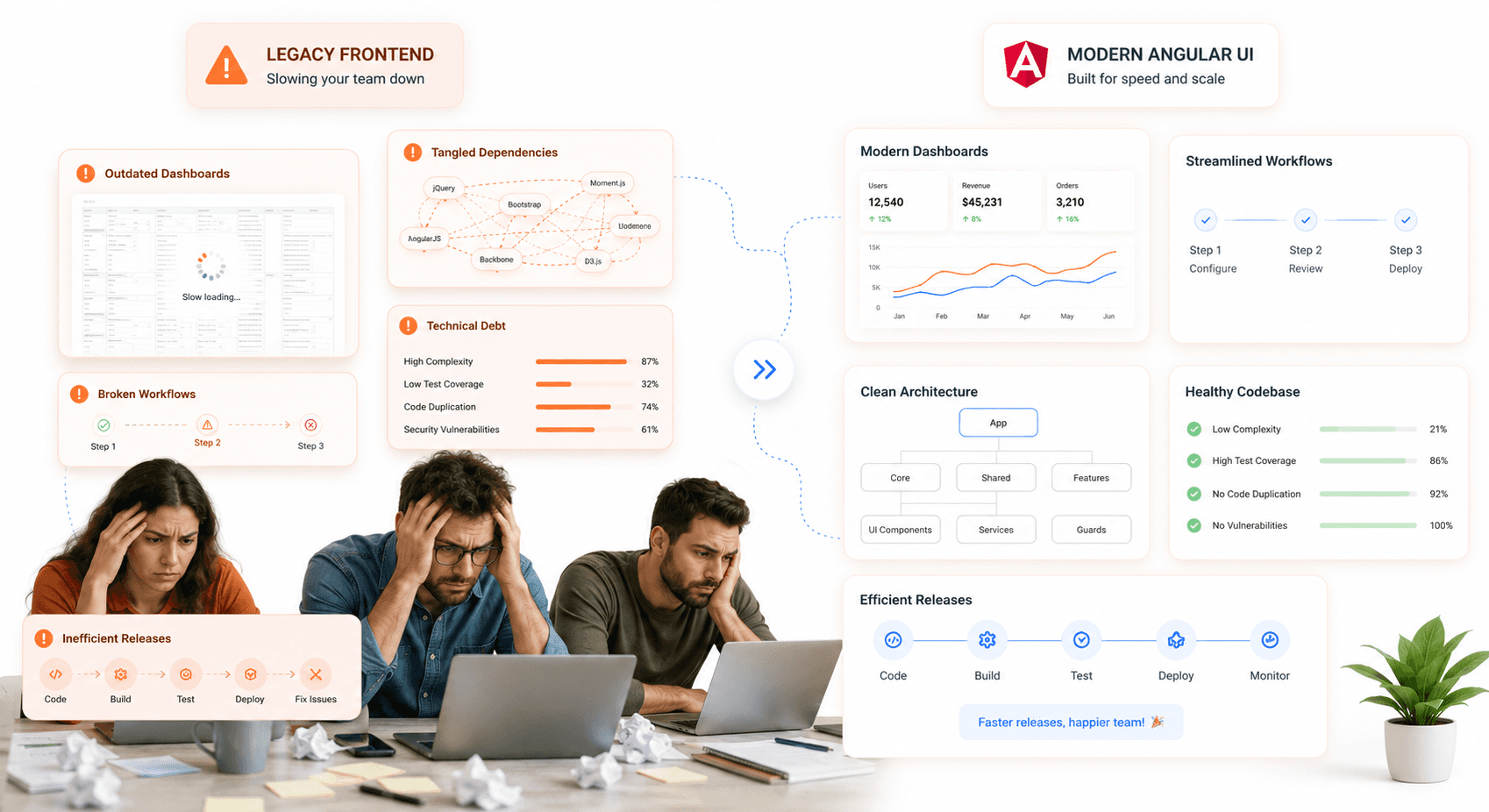
The most critical mistake organizations make is attempting AI integration or advanced analytics on legacy frontend infrastructure without addressing foundational architectural constraints. Legacy systems built on batch processing and monolithic architectures fundamentally cannot support AI workloads requiring real-time data access and elastic compute scaling, leading to project failures and wasted investment.
Resource allocation errors compound modernization challenges when organizations underestimate the full scope of technical debt. Focusing solely on visible frontend components while ignoring backend dependencies, data integration requirements, and security framework updates creates partial solutions that fail to deliver expected benefits. Comprehensive modernization requires systematic evaluation of the entire technology stack, not just user-facing elements.
Risk assessment failures occur when organizations inadequately plan for implementation complexities, stakeholder alignment requirements, and potential disruption to business operations. Successful modernization demands phased rollout strategies, continuous performance monitoring, and comprehensive risk mitigation planning that accounts for both technical and business continuity factors.
Factors to consider before starting the modernization process
Financial justification forms the foundation of successful modernization initiatives, requiring comprehensive Total Cost of Ownership (TCO) analysis over 3-5 year investment periods. Organizations must quantify current legacy maintenance costs not just invoices, but the full operational burden including specialized personnel, security vulnerabilities, and lost productivity. Realistic ROI calculations should account for infrastructure savings (typically 25-35% annually), operational efficiency gains (30-50% maintenance cost reduction), and strategic value creation through enabled capabilities.
For IT leaders evaluating the broader business case, our enterprise app modernization guide covers the full ROI framework, portfolio assessment, and phased roadmap planning.
Business impact assessment must evaluate how modernization aligns with strategic objectives and competitive positioning requirements. Organizations achieving successful modernization report revenue growth advantages of 17.3 percentage points above industry average while maintaining superior operational efficiency. The analysis should consider market responsiveness improvements (40-60% faster release cycles), customer experience enhancements, and competitive agility gains that modernization uniquely enables.
Risk tolerance and implementation capacity evaluation ensures realistic project scoping and timeline expectations. Organizations must assess their ability to manage change, allocate necessary resources, and maintain business continuity during transition periods. Industry-specific factors—regulatory requirements in healthcare and financial services, operational continuity demands in manufacturing, significantly influence modernization approach and success metrics.
Different approaches to modernize legacy frontend
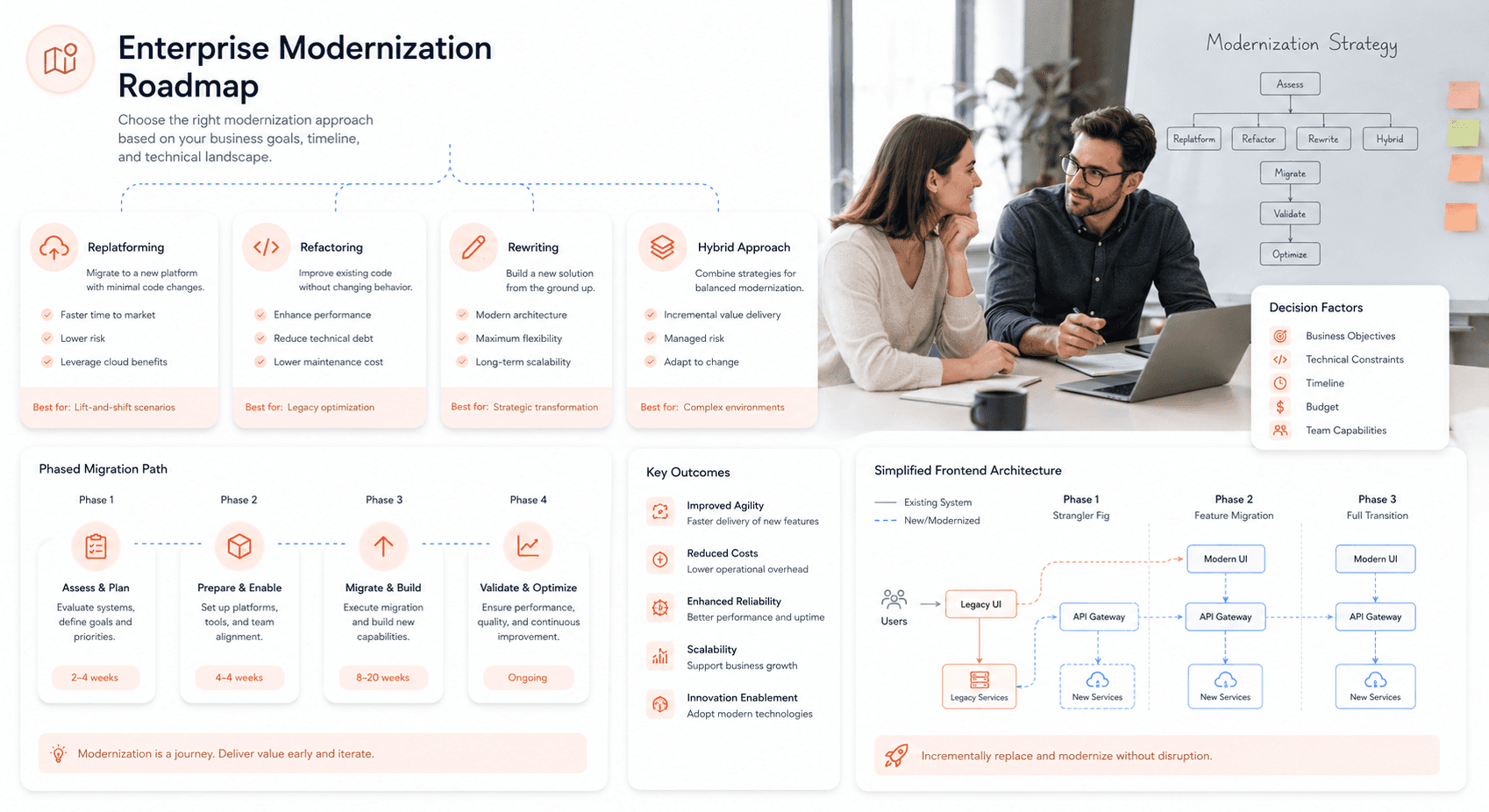
Replatforming Strategy involves migrating existing frontend applications to modern cloud platforms with minimal code changes, focusing on infrastructure modernization while preserving business logic. This approach delivers immediate infrastructure cost savings (15-35% annually) and improved operational efficiency without extensive application rewriting. Organizations utilizing Platform-as-a-Service (PaaS) approaches often achieve 6-12 month payback periods through reduced hosting costs and automated scaling capabilities.
Refactoring and Rewriting represents comprehensive application reconstruction using modern frameworks like Angular, enabling full exploitation of cloud-native capabilities and contemporary development practices. While requiring greater initial investment, this approach delivers maximum strategic value through enhanced scalability, improved security frameworks, and seamless integration with AI and analytics platforms. Organizations report 40-60% productivity improvements and superior long-term maintainability.
Hybrid Modernization combines selective component updates with strategic system preservation, allowing organizations to modernize critical user-facing elements while maintaining stable backend systems. This phased approach reduces implementation risk and enables gradual capability enhancement, particularly valuable for organizations with complex legacy dependencies or limited modernization budgets.
Microservices Transition involves decomposing monolithic frontend applications into independently deployable services that can scale and evolve separately. This architectural approach enables API-first development, supports modern DevOps practices, and provides the foundational infrastructure necessary for AI integration and real-time analytics capabilities that define competitive advantage in 2026's digital economy.
Planning for Legacy Frontend Modernization
Assessing the current frontend architecture and technologies
A comprehensive assessment of your existing AngularJS architecture forms the foundation of successful modernization planning and a structured AngularJS to Angular migration strategy is what separates teams that ship on time from teams that stall mid-transition. This evaluation should begin with a detailed inventory of your current technology stack, including the specific AngularJS version (typically 1.x), build tools like Gulp, Bower, or webpack, and any supporting libraries. As noted in migration experiences, AngularJS projects often contain scattered configurations across various files, making this assessment particularly challenging but essential.
Examine your application's structure, identifying whether it follows component-based patterns or relies heavily on controllers and directives. Document your dependency injection patterns, routing implementation (ui-router or ngRoute), and how services and factories are organized. This technical audit will reveal potential compatibility issues with older libraries that commonly plague legacy systems, helping you understand the complexity of your migration path.
Identifying key features and functionalities to be retained
During the planning phase, catalog your application's core business functionalities and determine which features must be preserved during migration. Focus on identifying critical user workflows, essential integrations, and performance-sensitive components that cannot afford downtime. This inventory becomes crucial when deciding between incremental migration strategies using tools like ngUpgrade or a complete rewrite approach.
Consider the business value of each feature and its technical complexity. Some legacy components might benefit from being redesigned rather than directly migrated, especially if you're planning a complete rewrite. Document any custom directives, complex data binding patterns, and specialized business logic that will require careful translation to Angular's component-based architecture.
Creating a timeline and budget for the modernization process
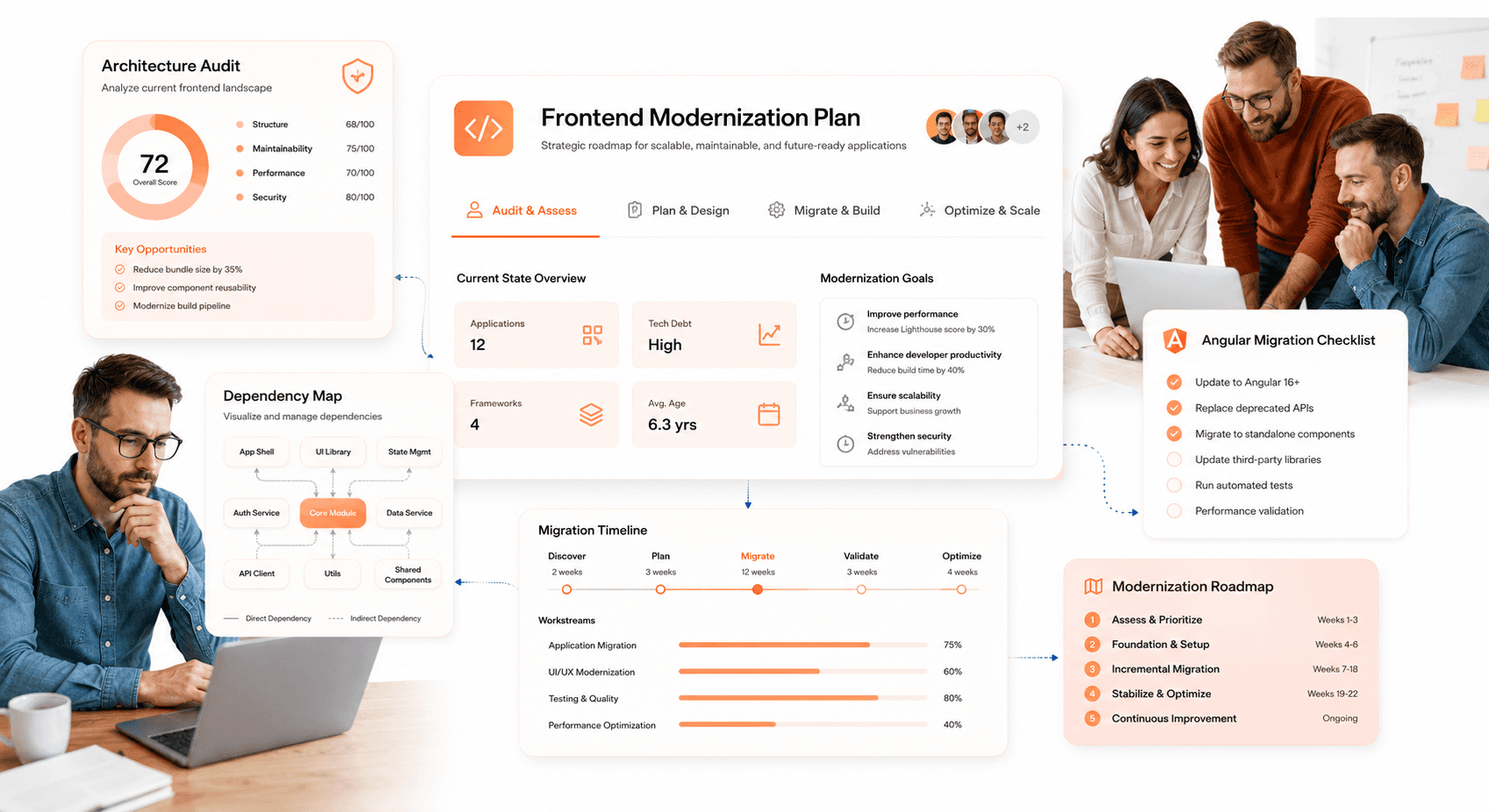
Migration timeline planning should align with your chosen strategy—incremental updates typically require longer timeframes but allow for parallel feature development, while complete rewrites demand more intensive resource allocation over shorter periods. Based on migration experiences, incremental approaches work best for large, complex systems where maintaining business continuity is critical.
Budget considerations must account for potential dual-system maintenance periods, where you'll simultaneously support both AngularJS and Angular versions. Factor in developer training costs, as team members may need to familiarize themselves with TypeScript, Angular's component architecture, and modern development practices. Consider the recruitment advantages of modernization—newer technologies significantly improve your ability to attract and retain talented developers, as AngularJS is consistently ranked among the most dreaded frameworks in developer surveys.
Evaluating potential impact on business processes
Assess how the modernization will affect your current development workflows, deployment processes, and maintenance procedures. Consider the impact on ongoing feature development, incremental migration allows you to continue delivering new functionality while upgrading, whereas complete rewrites may require feature freezes during development periods.
Evaluate the security implications of your current AngularJS system, particularly given that long-term support ended in December 2021. Legacy systems face increasing vulnerability risks without security updates, making modernization not just a technical improvement but a security imperative. Plan for potential performance improvements, as Angular applications can be up to five times faster than their AngularJS counterparts when properly implemented.
Collaborating with stakeholders and teams for successful modernization
Effective stakeholder alignment is crucial for migration success, requiring clear communication about timelines, resource requirements, and expected benefits. Present the business case for modernization, emphasizing improved developer recruitment capabilities, enhanced security posture, and long-term maintainability advantages.
Establish cross-functional collaboration between development teams, QA, DevOps, and business stakeholders. If using an incremental approach, coordinate how different team members will handle various components you can deploy an "empty" Angular application and distribute migration tasks across team members, adding features as modules are completed. This collaborative approach ensures smooth integration while maintaining system stability throughout the modernization process.
Choosing the Right Frontend Framework for Modernization
Introduction to Angular and its benefits for modernization
Angular represents a fundamental shift from the outdated AngularJS architecture, offering enterprises a modern, component-based framework designed for today's application demands. Unlike AngularJS's MVC architecture, Angular 21 introduces a fully component-based system with zoneless change detection as the default, eliminating the performance bottlenecks associated with Zone.js dependency.
The framework's TypeScript foundation provides static typing that prevents runtime errors, while the Angular CLI automates development workflows and includes native AI tooling through Model Context Protocol (MCP) integrations. This built-in intelligence enables context-aware analysis and code recommendations directly within the development environment.
For legacy modernization, Angular delivers significant performance improvements through optimized change detection and efficient dependency injection. The framework's modular architecture supports lazy loading, enabling applications to scale effectively while maintaining fast load times. Additionally, Angular Universal provides server-side rendering capabilities for improved SEO, addressing a critical limitation of legacy AngularJS applications.
Security compliance is built into Angular's core, with OWASP-compliant standards helping enterprises meet regulatory requirements. The framework's active support cycle ensures regular updates and patches, contrasting sharply with AngularJS's end-of-life status since December 2021.
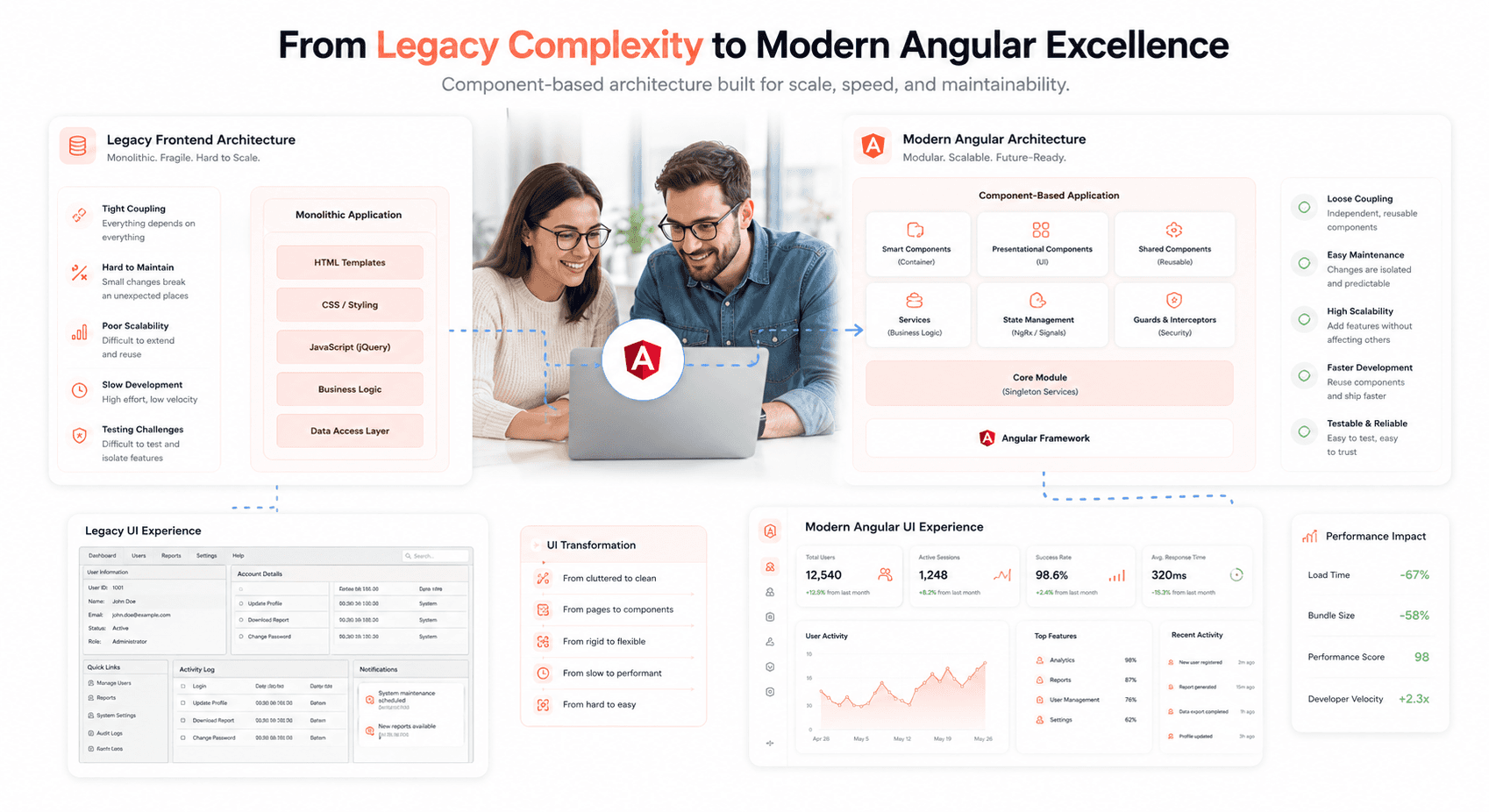
Comparison of Angular with other frontend frameworks
When evaluating Angular against other modern frontend frameworks, several key differentiators emerge that make it particularly suitable for enterprise modernization projects. Angular's opinionated architecture provides a structured development approach that scales well across large development teams, unlike more flexible but potentially inconsistent alternatives.
For a detailed comparison of Angular against React, Vue, Svelte, and emerging frameworks, see our guide to the best frontend frameworks for SaaS in 2026.
The framework's comprehensive ecosystem includes built-in routing, forms handling, HTTP client capabilities, and testing utilities. Angular 21 introduces Vitest as the default test runner, replacing Karma with faster execution, native TypeScript support, and improved CI performance. This integrated approach reduces dependency management complexity compared to frameworks that require assembling multiple third-party libraries.
Angular's enterprise-focused features distinguish it from other popular frameworks. The hierarchical dependency injection system provides powerful service management capabilities, while the component-based architecture ensures reusability and maintainability. The framework's commitment to backward compatibility and structured upgrade paths provides enterprises with long-term stability.
Performance characteristics also favor Angular for complex applications. The zoneless change detection in Angular 21 eliminates the digest cycle bottlenecks that plagued AngularJS, while Signals-driven updates provide more predictable rendering behavior than many competing frameworks.
Assessing compatibility of existing code with Angular
Now that we understand Angular's advantages, evaluating existing AngularJS code compatibility requires a systematic assessment of architectural differences and migration complexity. The fundamental shift from MVC to component-based architecture means there is no direct upgrade path migration requires structured refactoring rather than version upgrades.
Key compatibility factors include dependency injection patterns, where AngularJS's limited and less flexible system must be restructured for Angular's powerful hierarchical approach. Data binding mechanisms also require significant changes, transitioning from AngularJS's digest cycle-based two-way binding to Angular's optimized binding with unidirectional data flow.
Routing represents another major compatibility consideration. Applications using $routeProvider must be completely restructured to use Angular Router, though this migration enables powerful features like lazy loading and guards. Similarly, HTTP requests using $http require conversion to Angular's HttpClient, which provides improved error handling, request caching, and observability.
Third-party library compatibility presents additional challenges. Many AngularJS-specific libraries lack Angular equivalents, requiring identification and replacement with compatible alternatives. Form handling transitions from ng-model to Angular's reactive forms system, fundamentally changing how user input is processed and validated.
Code analysis tools like ESLint with Angular ESLint ruleset can automate compatibility assessment, identifying patterns that require manual intervention versus those suitable for automated conversion.
Understanding the learning curve for Angular development
With compatibility assessment complete, development teams must prepare for Angular's learning curve, which varies significantly based on existing JavaScript experience and familiarity with modern development patterns. The transition from JavaScript ES5 to TypeScript represents the most immediate challenge, requiring developers to adapt to static typing, interfaces, and compile-time error checking.
Angular's component-based architecture introduces new concepts like lifecycle hooks, decorators, and component communication patterns. Teams familiar with AngularJS controllers and $scope must learn to think in terms of component hierarchies, property binding, and event emitters. This paradigm shift typically requires 2-3 weeks of focused learning for experienced JavaScript developers.
RxJS for reactive programming represents another steep learning curve aspect. Moving from AngularJS's promise-based approach to Observable streams requires understanding operators, subscription management, and reactive patterns. This knowledge becomes essential for effective HTTP handling, form management, and state management in Angular applications.
The Angular CLI introduces new workflow concepts around code generation, build optimization, and testing automation. While these tools ultimately increase productivity, initial adoption requires learning new commands, configuration patterns, and deployment strategies. Testing approaches also change significantly, with Vitest replacing familiar tools and requiring new patterns for component testing, service mocking, and end-to-end validation.
Migrating existing code to Angular: best practices and challenges
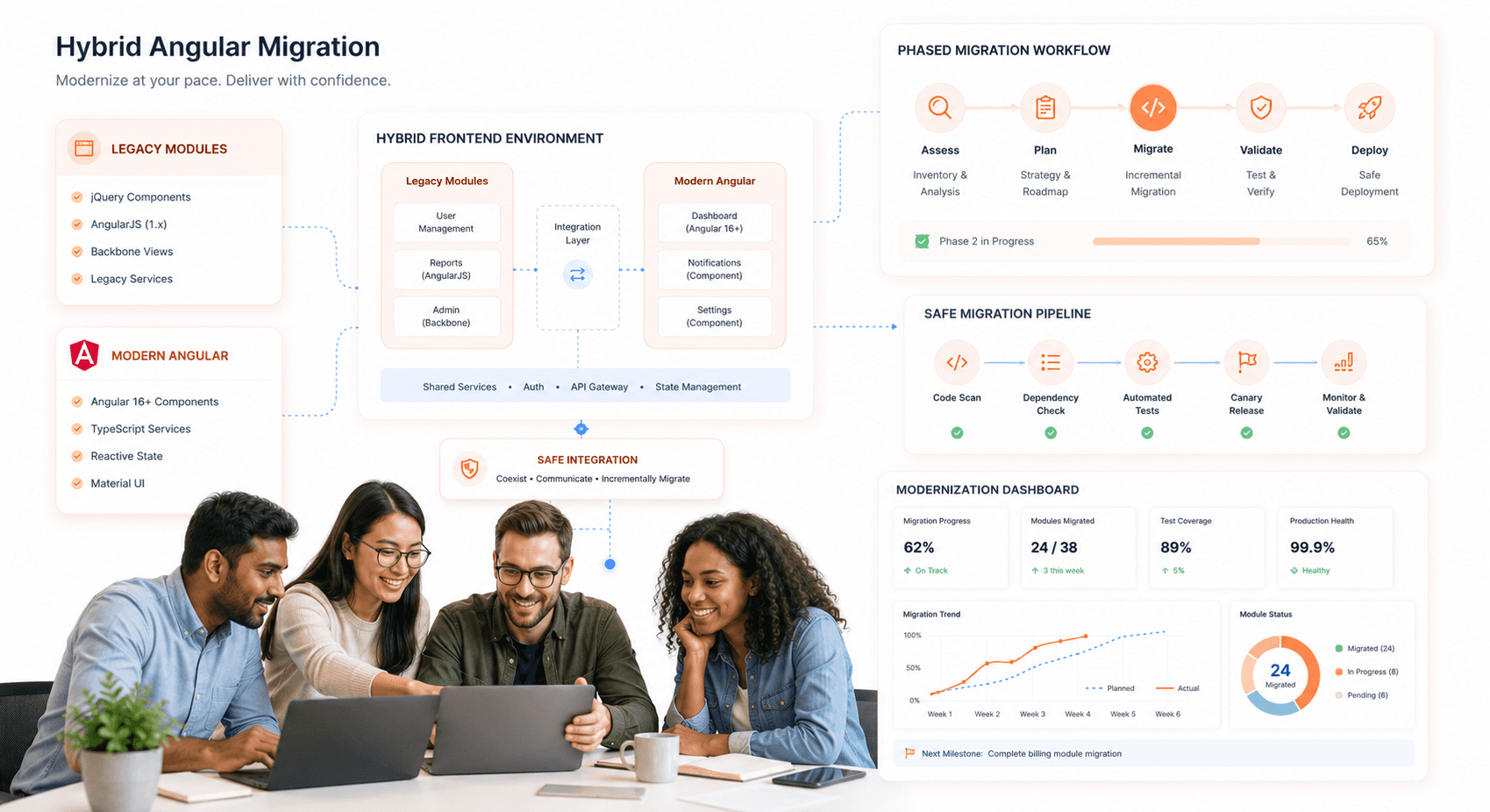
Previously, we've established the compatibility requirements and learning curve considerations. The actual migration process follows two primary approaches: incremental hybrid migration using ngUpgrade, or complete application rewrites. Each approach presents distinct challenges and requires specific best practices for successful execution.
Hybrid migration allows AngularJS and Angular to coexist within the same application, providing a phased transition approach. However, this creates performance overhead from running both frameworks simultaneously, increased memory consumption, and duplicate event bindings. Managing routing between the two frameworks requires careful coordination to prevent conflicts and ensure consistent user experience.
The full rewrite approach eliminates legacy dependencies but demands comprehensive planning and validation. Critical challenges include maintaining feature parity during development, ensuring data integrity throughout the transition, and managing business disruption during the cutover period. Testing becomes particularly complex, requiring validation that the new Angular implementation matches existing AngularJS behavior exactly.
Common migration pitfalls include underestimating the effort required for third-party library replacements, inadequate testing coverage leading to regression issues, and performance problems from inefficient Angular implementations. Teams often struggle with converting complex AngularJS directives to Angular components, particularly those with heavy DOM manipulation or unique binding patterns.
Best practices for successful migration include conducting thorough dependency mapping before starting, implementing automated testing at multiple levels, and establishing clear feature parity validation processes. Code quality improvements should be integrated throughout the migration rather than deferred, ensuring the final Angular application meets modern development standards.
Refactoring and Rewriting Legacy Code for Angular
Identifying Code Modules for Refactoring and Rewriting
When beginning the transition from legacy AngularJS to Angular, start by organizing your existing codebase into a clear structure. Generate a new Angular workspace using ng new hybrid-app --routing --style=scss and move your legacy AngularJS code into a dedicated src/legacy/ directory. This separation provides a foundation for systematic analysis and migration planning.
Focus on identifying leaf nodes in your application tree first - these are components or directives that don't have dependencies below them. These represent the safest starting points for migration as they only require managing relationships with their parent components. Begin with simple, self-contained modules like utility directives, basic UI components, or standalone services that have minimal interdependencies.
Create an inventory of your AngularJS modules, controllers, and services to understand the scope of your migration. Document the relationships between components to identify which modules can be migrated independently versus those that require coordinated migration efforts.
Strategies for Refactoring and Rewriting Legacy Code
The hybrid approach using Angular's UpgradeModule enables gradual migration without downtime. Install the required packages: npm install angular@1.8.3 and npm install @angular/upgrade @angular/upgrade/static. These packages facilitate interoperability between AngularJS and Angular during the transition period.
Implement the Shell Strategy by wrapping your root AngularJS module in an Angular module. In your main Angular module, integrate the UpgradeModule:
Follow a bottom-up migration strategy, starting with leaf components and working toward the root. Use downgradeComponent to make Angular components available in AngularJS:
Ensuring Code Quality and Performance During Refactoring and Rewriting
Maintain continuous functionality throughout the migration by keeping the application in a deployable state at all times. Limit global dependencies by moving shared utilities into Angular services rather than relying on global variables or functions.
Manage script loading order carefully to prevent conflicts. Ensure legacy scripts load in the correct sequence: AngularJS first, then your application scripts, then the Angular bundle. Configure this in your angular.json file:
Create legacy wrapper components to integrate legacy views seamlessly:
Unit and Integration Testing for Refactored and Rewritten Code
Incrementally add Angular tests while maintaining existing Jasmine/Karma tests for legacy components. This dual testing approach ensures that both old and new code continue to function correctly during the transition period.
Test the integration points between AngularJS and Angular components thoroughly, particularly focusing on data flow and event handling across the upgrade/downgrade boundaries. Verify that upgraded AngularJS components work correctly within Angular contexts and that downgraded Angular components function properly within AngularJS templates.
Incorporating Angular Best Practices and Design Patterns in the New Code
When migrating services, choose appropriate strategies based on your specific requirements. For shared services between both applications, you have three viable approaches: re-implement the service in Angular while maintaining the AngularJS version, migrate to Angular and use downgrade wrappers, or upgrade the AngularJS service for use in Angular components.
Implement service upgrades using the provider pattern:
Create Angular wrapper services that delegate to AngularJS services initially, making future migration easier when the time comes to fully replace the legacy service implementation. Follow feature-by-feature migration rather than attempting to convert everything at once, and maintain clear documentation of migrated components to track progress and avoid confusion among team members.
Implementing Responsive Design and Cross-Browser Compatibility with Angular
Importance of responsive design in modern web applications
With the evolution of Angular and its modern architecture patterns, responsive design has become a fundamental requirement rather than an optional feature. During Angular migration projects, teams often discover that legacy frontend systems lack proper responsive capabilities, creating significant user experience gaps across different devices and screen sizes. As organizations modernize their Angular applications from older versions to newer ones, implementing responsive design becomes crucial for maintaining competitive digital services.
The shift toward standalone components and signal-based reactivity in modern Angular versions provides enhanced opportunities for building responsive interfaces. These architectural improvements allow developers to create more granular, reusable components that can adapt seamlessly across various viewport sizes while maintaining optimal performance through Angular's improved change detection strategies.
Using Angular's built-in features for responsive design
Modern Angular versions offer several built-in features that simplify responsive design implementation during migration projects. The framework's component-based architecture naturally supports responsive patterns, allowing teams to refactor legacy code into modular, device-aware components during the modernization process.
Angular's dependency injection system enables responsive services that can detect viewport changes and adapt component behavior accordingly. When migrating from NgModules to standalone components, developers can leverage Angular's reactive programming capabilities based on RxJS to create responsive layouts that react to screen size changes in real-time.
The framework's improved lazy loading strategies in newer versions also support responsive design by enabling conditional loading of components based on device capabilities. This becomes particularly valuable during migration projects where teams need to optimize bundle sizes while maintaining cross-device compatibility.
Strategies for ensuring cross-browser compatibility with Angular
Cross-browser compatibility becomes a critical consideration during Angular migration, especially when moving from older versions that may have different browser support requirements. Modern Angular versions provide enhanced toolchain compatibility that addresses many legacy browser issues through improved build systems utilizing esbuild and ESM-first architecture.
The migration to newer Angular versions often resolves existing cross-browser compatibility issues by leveraging updated TypeScript versions and modern JavaScript features that are better supported across browsers. When upgrading incrementally through major Angular versions, teams can systematically address browser-specific issues while taking advantage of Angular's built-in polyfills and compatibility layers.
Handling legacy code and third-party dependencies for cross-browser compatibility
During Angular migration projects, legacy code and outdated third-party dependencies often present the most significant cross-browser compatibility challenges. The assessment phase of migration should include identifying deprecated Angular APIs and outdated libraries that may not support modern browser features or may conflict with newer Angular versions.
When migrating from AngularJS to Angular using hybrid approaches like ngUpgrade, teams must carefully manage browser compatibility across both frameworks simultaneously. This requires strategic planning to ensure that legacy components continue functioning while new Angular components maintain modern browser support.
Third-party library compatibility becomes particularly important when updating Angular Material, NgRx, and other UI components during migration. Teams should validate peer dependency requirements and test extensively across target browsers to ensure that updated libraries maintain expected functionality.
Testing and troubleshooting for responsive design and cross-browser compatibility issues
Comprehensive testing strategies are essential for validating responsive design and cross-browser compatibility during Angular migration. The migration process should include updating test runners and frameworks, as newer Angular versions encourage modern testing tools like Jest or Vitest rather than traditional Karma-based testing.
Post-migration validation should include performance testing across different devices and browsers to ensure that the modernized application maintains or improves upon previous performance metrics. This includes evaluating bundle sizes, change detection performance, and SSR hydration capabilities across various environments.
Teams should establish regression testing procedures that validate responsive behavior and cross-browser functionality after each incremental migration step. This systematic approach helps identify issues early in the migration process rather than discovering them during final deployment phases.
Integrating APIs and Backend Systems with Angular
Understanding API integration and its importance in modern web applications
API integration serves as the backbone of modern web applications, enabling seamless communication between the frontend Angular application and various backend services. In legacy-to-Angular modernization projects, effective API integration becomes crucial for maintaining data flow while transitioning from older systems to modern architectures.
APIs facilitate the separation of concerns between frontend presentation and backend business logic, allowing Angular applications to consume data from multiple sources efficiently. This architectural approach enables better scalability, maintainability, and the ability to iterate on frontend and backend components independently. For SaaS teams building on top of these patterns, our guide to AI-driven UI/UX design for SaaS covers how modern Angular applications are incorporating AI-first interface architecture alongside API-driven backends.
During modernization efforts, APIs act as the bridge that allows legacy systems to continue operating while new Angular components gradually replace older frontend technologies.
The importance of proper API integration extends beyond basic data retrieval. Modern Angular applications require robust error handling, caching mechanisms, and optimized data loading strategies to deliver responsive user experiences. APIs also enable features like real-time updates, offline capabilities, and progressive data loading that users expect from contemporary web applications.
Different methods for integrating APIs with Angular
Angular provides multiple approaches for API integration, each suited to different use cases and performance requirements. The most fundamental method utilizes Angular's HttpClient service, which offers a streamlined interface for making HTTP requests with built-in support for request and response transformations.
HTTP Client Implementation
The HttpClient service provides the foundation for API communication in Angular applications. This service supports various HTTP methods (GET, POST, PUT, DELETE) and includes features like request/response interceptors, error handling, and automatic JSON parsing. When migrating from legacy systems, HttpClient offers a clean abstraction layer that can gradually replace older AJAX implementations.
Observable Patterns with RxJS
Angular's integration with RxJS enables sophisticated data flow management through observables. This pattern is particularly beneficial when replacing legacy callback-based systems, as observables provide better error handling, cancellation support, and composability. The async pipe in templates automatically manages subscriptions, reducing memory leaks and improving performance.
To optimize performance, avoid multiple async pipe subscriptions to the same observable within templates. Instead, use techniques like storing the observable result in a template variable to prevent duplicate HTTP requests and unnecessary change detection cycles.
State Management Integration
For complex applications transitioning from legacy systems, integrating APIs with state management solutions like NgRX provides centralized data handling. NgRX Effects can manage API calls while maintaining predictable state updates. Use NgRX selectors to leverage memoization capabilities, ensuring computed values are cached efficiently and reducing unnecessary recalculations.
When implementing selectors, avoid parameterized selectors that can't take advantage of memoization. Instead, structure your state to accommodate normal selectors that can cache results effectively.
Securing API calls and handling authentication with Angular
Security considerations become paramount when integrating APIs, especially during modernization projects where legacy systems may have different security models. Angular provides several mechanisms for implementing secure API communication and managing authentication flows.
HTTP Interceptors for Authentication
HTTP interceptors offer a centralized approach for handling authentication tokens, request headers, and security-related transformations. During modernization, interceptors can manage the transition between legacy authentication systems and modern token-based approaches without requiring changes throughout the application codebase.
Interceptors can automatically attach authorization headers, handle token refresh scenarios, and redirect users when authentication expires. This centralized approach ensures consistent security implementation across all API calls.
Token Management Strategies
Modern Angular applications typically implement JWT-based authentication, which differs significantly from session-based authentication common in legacy systems. During modernization, applications may need to support both approaches simultaneously while migrating users to the new system.
Consider implementing secure token storage mechanisms, automatic token refresh, and proper logout procedures that clear all authentication data. Angular services can encapsulate authentication logic, providing a clean interface for components while hiding the complexity of token management.
CORS and Cross-Origin Considerations
Legacy systems often operate under different domain structures, requiring careful CORS configuration during modernization. Angular's development server can proxy requests to legacy backends, while production deployments may require server-side CORS configuration or API gateway implementations.
Strategies for integrating legacy backend systems with Angular
Legacy system integration presents unique challenges that require careful architectural planning and gradual migration strategies. The key is maintaining system functionality while progressively modernizing components.
API Gateway Pattern
Implementing an API gateway can provide a unified interface between Angular and multiple legacy systems. This approach allows for gradual migration of backend services while maintaining a consistent API contract for the frontend. The gateway can handle authentication, routing, and data transformation between legacy and modern systems.
Data Normalization and Transformation
Legacy systems often return data in formats that don't align with modern frontend requirements. Angular services can transform legacy API responses into normalized structures that work efficiently with modern state management patterns. Consider using libraries like Normalizr to convert nested data into flat, normalized structures that integrate well with NgRX entities.
When dealing with large datasets from legacy systems, implement virtual scrolling and pagination strategies to avoid loading excessive data. This approach reduces initial load times and improves memory management, particularly important when migrating from systems that may not have been designed with modern performance considerations.
Caching Strategies
Legacy systems may not implement efficient caching mechanisms, requiring frontend-side caching to improve performance. Angular's HTTP interceptors can implement caching strategies for read-only data, while service workers can provide offline capabilities for critical application functions.
Consider implementing both in-memory caching for frequently accessed data and persistent caching for offline scenarios. This dual approach ensures responsive user experiences while reducing load on legacy backend systems.
Testing and troubleshooting for API integration and backend system compatibility
Comprehensive testing becomes essential when integrating Angular applications with legacy systems, as compatibility issues may not surface until runtime or under specific conditions.
API Mock Strategies
During development and testing, implement comprehensive API mocking strategies that simulate both legacy and modern backend responses. This approach enables frontend development to proceed independently while backend modernization occurs in parallel.
Angular's HTTP testing utilities provide mechanisms for mocking API responses, enabling unit tests that verify component behavior without requiring actual backend connections. This isolation improves test reliability and execution speed.
Error Handling and Resilience
Legacy systems may exhibit unpredictable behavior, requiring robust error handling and retry mechanisms. Implement exponential backoff strategies for failed requests, circuit breaker patterns for unreliable services, and graceful degradation when backend services become unavailable.
Angular's HTTP error handling can be centralized through interceptors, providing consistent error reporting and user notification across the application. This approach ensures users receive meaningful feedback when integration issues occur.
Performance Monitoring and Optimization
Monitor API performance during migration to identify bottlenecks and compatibility issues. Use browser developer tools to analyze network requests, response times, and data transfer volumes. Legacy systems may require optimization strategies like request batching, response compression, or data pagination to work effectively with modern Angular applications.
Consider implementing client-side performance monitoring to track real-world API integration performance, identifying issues that may not appear during development or testing phases.
Enhancing User Experience with Angular Components and Features
Introduction to Angular components and their role in modern frontend development
Angular components serve as the fundamental building blocks of modern frontend applications, representing a significant advancement from legacy monolithic architectures. When migrating from older systems to Angular, components provide a modular, reusable approach that transforms how user interfaces are constructed and maintained.
The component-based architecture in Angular enables developers to break down complex legacy interfaces into smaller, manageable pieces. Each component encapsulates its own template, styles, and business logic, creating self-contained units that can be easily tested, maintained, and reused across different parts of the application. This architectural shift is particularly beneficial when modernizing legacy systems that often suffer from tightly coupled code and scattered functionality.
The foundational principles of modernised determine how effectively users navigate and adopt these components from day one.
Modern Angular components leverage TypeScript's strict typing system, providing enhanced developer productivity through better IDE support, compile-time error detection, and improved code maintainability. The introduction of standalone components in recent Angular versions further simplifies the development process by reducing boilerplate code and eliminating the need for NgModules in many scenarios.
Using Angular Material and other UI libraries for consistent and efficient development
Angular Material emerges as a crucial tool for maintaining consistency during legacy modernization projects. This comprehensive UI component library provides pre-built, accessible components that follow Material Design principles, ensuring a cohesive user experience across the entire application.
When transitioning from legacy systems, Angular Material offers several advantages for development teams. The library includes components for common UI patterns such as navigation drawers, data tables, form controls, and dialog boxes, significantly reducing development time compared to building custom components from scratch. These components come with built-in accessibility features, responsive design capabilities, and consistent styling that helps maintain visual coherence throughout the modernized application.
Beyond Angular Material, the Angular ecosystem supports numerous third-party UI libraries that can accelerate the modernization process. Libraries like PrimeNG, Ng-Bootstrap, and Nebular provide additional component options and design systems that teams can leverage based on their specific requirements and design preferences.
The integration of these UI libraries during migration requires careful consideration of compatibility with the target Angular version. Teams must verify that their chosen libraries support the Angular version they're upgrading to, as incompatibilities with third-party UI libraries are among the most common migration challenges encountered during modernization projects.
Implementing advanced frontend features such as animations, routing, and forms with Angular
Modern Angular provides sophisticated capabilities for implementing advanced frontend features that significantly enhance user experience compared to legacy systems. The framework's animation system enables smooth transitions and interactive feedback that were often difficult to achieve in older technologies.
Angular's reactive forms system represents a substantial improvement over traditional form handling approaches. This system provides powerful validation capabilities, dynamic form generation, and seamless integration with TypeScript's type system. When migrating from legacy systems, reactive forms offer better error handling, more intuitive user feedback, and simplified form state management.
The routing system in Angular enables sophisticated navigation patterns including lazy loading, route guards, and nested routing structures. These features allow modernized applications to implement complex navigation flows while maintaining optimal performance through code splitting and on-demand loading strategies. The routing system also supports features like route resolvers and canActivate guards that enhance security and data management.
Angular's dependency injection system facilitates the implementation of advanced architectural patterns such as service-oriented architectures and state management solutions. This enables teams to create more maintainable and testable applications compared to their legacy counterparts.
Strategies for enhancing legacy frontend features and functionalities with Angular
Now that we have covered the foundational components and UI libraries, implementing effective enhancement strategies becomes crucial for successful legacy modernization. The migration process should focus on incrementally improving existing functionality while introducing modern Angular capabilities.
One effective strategy involves the gradual introduction of Angular's reactive programming patterns using RxJS. Legacy applications often rely on imperative programming approaches that can be systematically replaced with observable streams, providing better error handling, composition capabilities, and asynchronous data management.
The implementation of state management solutions like NgRx or Akita can significantly improve how legacy applications handle complex data flows. These solutions provide predictable state updates, time-travel debugging capabilities, and better separation of concerns compared to traditional state management approaches found in legacy systems.
Performance optimization represents another critical enhancement area. Modern Angular applications benefit from features like OnPush change detection strategies, lazy loading modules, and tree-shaking capabilities that weren't available in older frameworks. These optimizations can dramatically improve application performance and user experience.
Usability testing and gathering user feedback for continuous improvement
With the technical implementation complete, establishing robust feedback mechanisms becomes essential for validating the success of the modernization effort. Usability testing should compare the modernized Angular application against the legacy system to ensure that improvements are meaningful and measurable. Teams that have not yet established a structured evaluation process should conduct a UX audit before usability testing begins, it surfaces friction patterns across the full interface before formal testing sessions start
User feedback collection strategies should include both quantitative metrics and qualitative insights. Performance metrics such as Core Web Vitals, load times, and interaction responsiveness provide objective measures of improvement. These metrics are particularly important for demonstrating the business value of the modernization investment.
Continuous improvement processes should leverage Angular's development tooling to implement rapid iterations based on user feedback. The framework's CLI tools, hot reloading capabilities, and comprehensive testing infrastructure enable development teams to quickly respond to user needs and implement improvements without disrupting the overall application stability.
Regular performance monitoring using Angular's built-in profiling tools helps identify areas for ongoing optimization. This proactive approach ensures that the modernized application continues to deliver improved user experiences over time while maintaining the technical advantages gained through the migration to Angular.
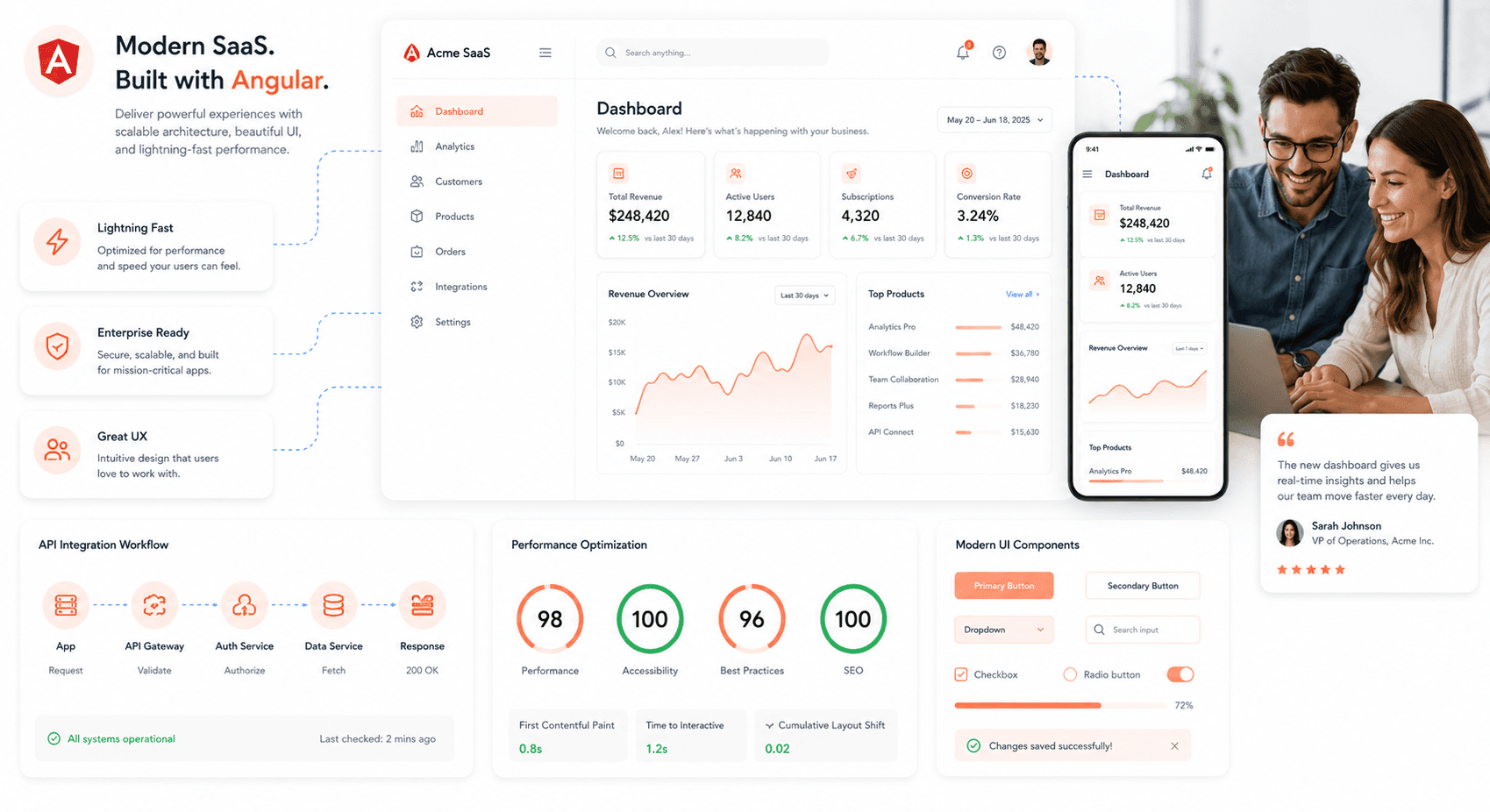
Compatibility Testing and Compatibility with Legacy Systems
Importance of compatibility testing in legacy frontend modernization
Compatibility testing serves as the safety net for your Angular modernization project. When you're migrating from legacy systems to Angular, you're essentially building bridges between different technological eras. The stakes are high – one broken integration can cascade into system-wide failures that impact your users and business operations.
The importance becomes crystal clear when you consider the typical enterprise landscape. Your new Angular frontend needs to communicate seamlessly with existing backend APIs, third-party services, legacy databases, and authentication systems that may have been built years or even decades ago. These systems often use different protocols, data formats, and security standards. Without thorough compatibility testing, you're essentially flying blind.
Different types of compatibility testing and when to use each type
Browser Compatibility Testing should kick off early in your development cycle. Modern Angular applications need to work across Chrome, Firefox, Safari, and Edge, but your legacy users might still be on older browser versions. Test your Angular components against your target browser matrix at least weekly during development.
API Compatibility Testing becomes critical when your Angular app consumes existing REST or SOAP services. Run these tests whenever you modify data handling logic or when backend teams deploy API updates. Focus on request/response formats, authentication flows, and error handling scenarios.
Device Compatibility Testing covers mobile, tablet, and desktop experiences. Since Angular applications are responsive by default, test across different screen sizes and touch interfaces. Schedule these tests after major UI component updates.
Database Compatibility Testing ensures your Angular app can handle data from legacy databases without corruption or performance issues. This testing type is essential when migrating from older frontend technologies that might have handled data differently.
Strategies for ensuring compatibility between modernized frontend and legacy systems
Create a compatibility matrix that maps out all integration points between your Angular application and existing systems. Document API versions, authentication methods, data formats, and supported browser versions. This matrix becomes your testing roadmap and helps identify potential conflict zones.
Build adapter layers or middleware services that act as translators between your modern Angular frontend and legacy backends. These adapters can handle data format conversions, protocol translations, and authentication bridging without modifying the legacy systems themselves.
Implement feature toggles in your Angular application to gradually roll out new functionality while maintaining fallbacks to legacy behavior. This approach lets you test compatibility in production with real user traffic while minimizing risk.
Use contract testing tools like Pact to establish clear agreements between your Angular frontend and backend services. These contracts define expected data structures and API behavior, making it easier to catch compatibility issues before they reach production.
Dealing with compatibility issues and challenges during the testing process
When compatibility issues surface, resist the urge to make quick fixes that might break other integrations. Instead, create a systematic approach to issue resolution. Document each problem with specific error messages, affected components, and reproduction steps.
Common challenges include CORS issues when Angular tries to communicate with legacy APIs, authentication token incompatibilities, and data format mismatches. For CORS problems, work with your backend teams to configure proper headers or implement proxy solutions during development.
Session management often creates headaches when migrating from server-side rendered applications to single-page Angular apps. Legacy systems might expect specific cookie structures or session timing that don't align with Angular's client-side state management. Consider implementing session bridging mechanisms or gradual migration strategies.
Version conflicts between dependencies can derail compatibility efforts. Maintain detailed dependency trees and use tools like npm audit to identify potential security and compatibility issues before they impact your testing cycles.
Best practices for ongoing compatibility testing and maintenance
Establish automated testing pipelines that run compatibility tests on every code deployment. Your CI/CD pipeline should include browser testing, API integration tests, and performance checks against your defined compatibility matrix.
Set up monitoring and alerting systems that track compatibility metrics in production. Monitor API response times, error rates, and user agent patterns to catch compatibility issues that might slip through testing.
Schedule regular compatibility audits, especially when legacy systems receive updates or when new browser versions are released. Create a monthly review process where you evaluate your compatibility matrix and update testing scenarios based on real-world usage patterns.
Maintain clear communication channels between your Angular development team and legacy system maintainers. Establish notification protocols for planned updates, security patches, and deprecation schedules that might affect compatibility.
Build a compatibility knowledge base that captures common issues, solutions, and workarounds. This documentation becomes invaluable when onboarding new team members or troubleshooting similar issues in the future.
Deployment and Maintenance of Modernized Frontend
Understanding the Deployment Process for Modernized Frontend
Moving your Angular application from development to production requires a well-structured deployment pipeline. Teams building new SaaS products alongside a modernization effort should also reference our SaaS product development checklist to ensure infrastructure, security, and CI/CD requirements are covered before launch.
The process typically starts with building your application using Angular CLI commands like ng build --prod, which creates optimized, minified bundles ready for production. These build artifacts need to be served through a web server, whether that's Nginx, Apache, or a cloud-based solution like AWS S3 with CloudFront.
Container-based deployments using Docker offer consistency across environments. Create a Docker image with your built Angular application and deploy it using orchestration tools like Kubernetes or Docker Swarm. This approach ensures your application runs the same way in development, staging, and production environments.
Cloud platforms like Vercel, Netlify, or AWS Amplify provide streamlined deployment workflows specifically designed for frontend applications. These platforms often include automatic builds triggered by Git commits, making the deployment process seamless and reducing manual intervention.
Strategies for Minimizing Downtime During Deployment
Blue-green deployment is one of the most effective strategies for zero-downtime deployments. This approach involves maintaining two identical production environments - blue (current) and green (new). You deploy your updated Angular application to the green environment, test it thoroughly, and then switch traffic from blue to green instantly.
Rolling deployments work well with containerized Angular applications. Instead of replacing all instances at once, you gradually update containers one by one. Load balancers route traffic away from containers being updated, ensuring continuous service availability.
Feature flags provide another layer of control during deployments. You can deploy new Angular components or features in a disabled state and enable them gradually for specific user groups. This approach allows you to test new functionality in production without affecting all users simultaneously.
Implementing Version Control and Continuous Integration for Ongoing Maintenance
Git-based workflows form the foundation of modern Angular application maintenance. Implement branching strategies like GitFlow or GitHub Flow that separate feature development, bug fixes, and releases. Pull requests should trigger automated testing and code review processes before merging changes.
Continuous Integration (CI) pipelines automatically build, test, and validate your Angular code with every commit. Tools like Jenkins, GitHub Actions, or GitLab CI can run unit tests, end-to-end tests, and linting checks. Set up quality gates that prevent deployment if tests fail or code coverage drops below acceptable thresholds.
Automated dependency updates using tools like Dependabot or Renovate keep your Angular application secure and up-to-date. These tools create pull requests for dependency updates, allowing you to review and test changes before merging them into your codebase.
Monitoring and Troubleshooting Performance Issues in the Modernized Frontend
Real User Monitoring (RUM) tools like Google Analytics, New Relic, or DataDog provide insights into actual user experiences. These tools track metrics like page load times, Core Web Vitals, and user interactions specific to your Angular application. Set up alerts for performance degradation to catch issues before they impact users significantly.
Angular-specific monitoring involves tracking bundle sizes, lazy loading effectiveness, and component rendering performance. Tools like webpack-bundle-analyzer help identify large dependencies that might slow down your application. Angular DevTools provides runtime performance insights and helps optimize component change detection.
Error tracking services like Sentry or Rollbar capture JavaScript errors and exceptions in your Angular application. These tools provide stack traces, user context, and error frequency data that help you prioritize and fix issues quickly.
Browser developer tools remain essential for troubleshooting. Use the Network tab to identify slow API calls, the Performance tab to analyze runtime behavior, and the Angular DevTools extension to debug component state and performance issues.
Strategies for Incorporating New Features and Functionalities in the Modernized Frontend
Modular architecture makes adding new features manageable in Angular applications. Design your application with feature modules that can be developed, tested, and deployed independently. Lazy loading ensures new features don't impact the initial bundle size or loading performance.
Progressive feature rollouts using feature flags allow you to release new Angular components to small user groups first. This approach lets you gather feedback and identify issues before full deployment. Tools like LaunchDarkly or Split.io integrate well with Angular applications for feature flag management.
Regular Angular updates should be part of your maintenance strategy. Plan for major Angular version updates every 6-12 months, and stay current with minor releases for security patches and bug fixes. Use the Angular Update Guide and automated migration tools to streamline the upgrade process.
Component libraries and design systems enable consistent feature development across teams. Build reusable Angular components that follow your design guidelines and make them available through npm packages or internal repositories. This approach speeds up feature development while maintaining visual and functional consistency.
Future-Proofing the Modernized Frontend
Anticipating and planning for future changes in frontend technologies
The frontend landscape changes rapidly, with new frameworks, tools, and paradigms emerging regularly. Building a modernized Angular application means thinking beyond today's requirements and preparing for tomorrow's challenges. Start by creating a technology roadmap that spans 3-5 years, identifying likely evolution paths for your current stack. Monitor industry trends through developer surveys, conference presentations, and thought leadership content from major tech companies.
Establish a quarterly technology review process where your team evaluates emerging tools, browser capabilities, and performance standards. This isn't about jumping on every new trend, but rather understanding which developments align with your business goals. Consider factors like market adoption, community support, and compatibility with existing systems when assessing new technologies.
Create documentation standards that capture architectural decisions and their rationale. Future developers will thank you for explaining why certain patterns were chosen over alternatives. This historical context becomes invaluable when evaluating whether to adopt new approaches or maintain existing ones.
Strategies for future-proofing code and avoiding legacy issues in the future
Write modular, loosely coupled code that can evolve independently. Angular's component-based architecture naturally supports this approach, but you need to be intentional about component boundaries and data flow patterns. Avoid deep component hierarchies and complex state sharing that create tight coupling between unrelated parts of your application.
Implement clean coding principles consistently across your codebase:
SOLID principles: Single responsibility, open-closed, Liskov substitution, interface segregation, and dependency inversion
DRY (Don't Repeat Yourself): Extract common functionality into shared services and utilities
Composition over inheritance: Favor Angular services and composition patterns over complex class hierarchies
Clear naming conventions: Use descriptive names that communicate intent without requiring deep context
Embrace TypeScript's type system fully. Strong typing prevents many runtime errors and makes refactoring safer as your application grows. Define interfaces for all data structures and use union types, generics, and mapped types to create flexible yet safe APIs.
Build comprehensive test coverage from the start. Unit tests for components and services, integration tests for user workflows, and end-to-end tests for critical business processes. Automated testing gives you confidence to refactor and upgrade dependencies without breaking existing functionality.
Keeping up with updates and enhancements in Angular and other frontend frameworks
Angular follows a predictable six-month release cycle, making it easier to plan upgrades. Subscribe to the Angular blog and follow the core team on social media to stay informed about upcoming changes. The Angular Update Guide provides step-by-step instructions for migrating between versions, highlighting breaking changes and recommended migration paths.
Set up automated dependency monitoring using tools like Renovate or Dependabot. These services create pull requests when new versions of your dependencies become available, complete with changelogs and compatibility information. Schedule regular dependency review sessions to evaluate and test these updates in your development environment.
Participate in the Angular community through conferences, meetups, and online forums. The Angular community is active and helpful, sharing real-world experiences with new features and migration strategies. Contributing to open source projects or Angular itself deepens your understanding of the framework's direction and best practices.
Create a staging environment that mirrors your production setup for testing Angular updates. Run your full test suite against beta and release candidate versions to catch potential issues early. Document any custom configurations or workarounds needed for new versions.
Incorporating scalability and flexibility in the modernized frontend for future growth
Design your application architecture to handle growth in both functionality and user base. Use lazy loading to split your application into feature modules that load only when needed. This keeps initial bundle sizes small and allows different parts of your application to evolve independently.
Implement state management patterns that scale with complexity. For simpler applications, Angular services with RxJS might suffice. As complexity grows, consider NgRx or Akita for predictable state management. Choose patterns that your team understands and can maintain consistently.
Plan for internationalization (i18n) from the beginning, even if you only support one language initially. Angular's i18n package makes localization straightforward, but retrofitting internationalization into an existing application requires significant refactoring. Structure your content and date/number formatting to support multiple locales.
Consider microfrontend architectures for large applications or organizations with multiple teams. Tools like Module Federation allow different parts of your application to be developed, deployed, and updated independently. This approach requires careful planning but provides maximum flexibility for future growth.
Continuous improvement and maintenance strategies to keep the frontend modern and efficient
Establish performance budgets and monitoring to prevent regression over time. Use tools like Lighthouse CI in your deployment pipeline to catch performance issues before they reach users. Set specific metrics for bundle size, load times, and core web vitals that align with your user experience goals.
Implement feature flags to enable gradual rollouts and A/B testing of new functionality. This allows you to validate changes with real users before full deployment and provides quick rollback capabilities if issues arise. Angular's environment configuration can manage simple feature flags, while services like LaunchDarkly provide more sophisticated targeting and analytics.
Schedule regular code reviews focused on maintainability rather than just functionality. Look for opportunities to simplify complex code, extract reusable components, and improve documentation. Dedicate time each sprint to technical debt reduction and code quality improvements.
Create a culture of continuous learning within your team. Allocate time for experimentation with new Angular features, attending conferences, and sharing knowledge through internal presentations or blog posts. Teams that stay current with best practices deliver higher quality software and adapt more quickly to changing requirements.
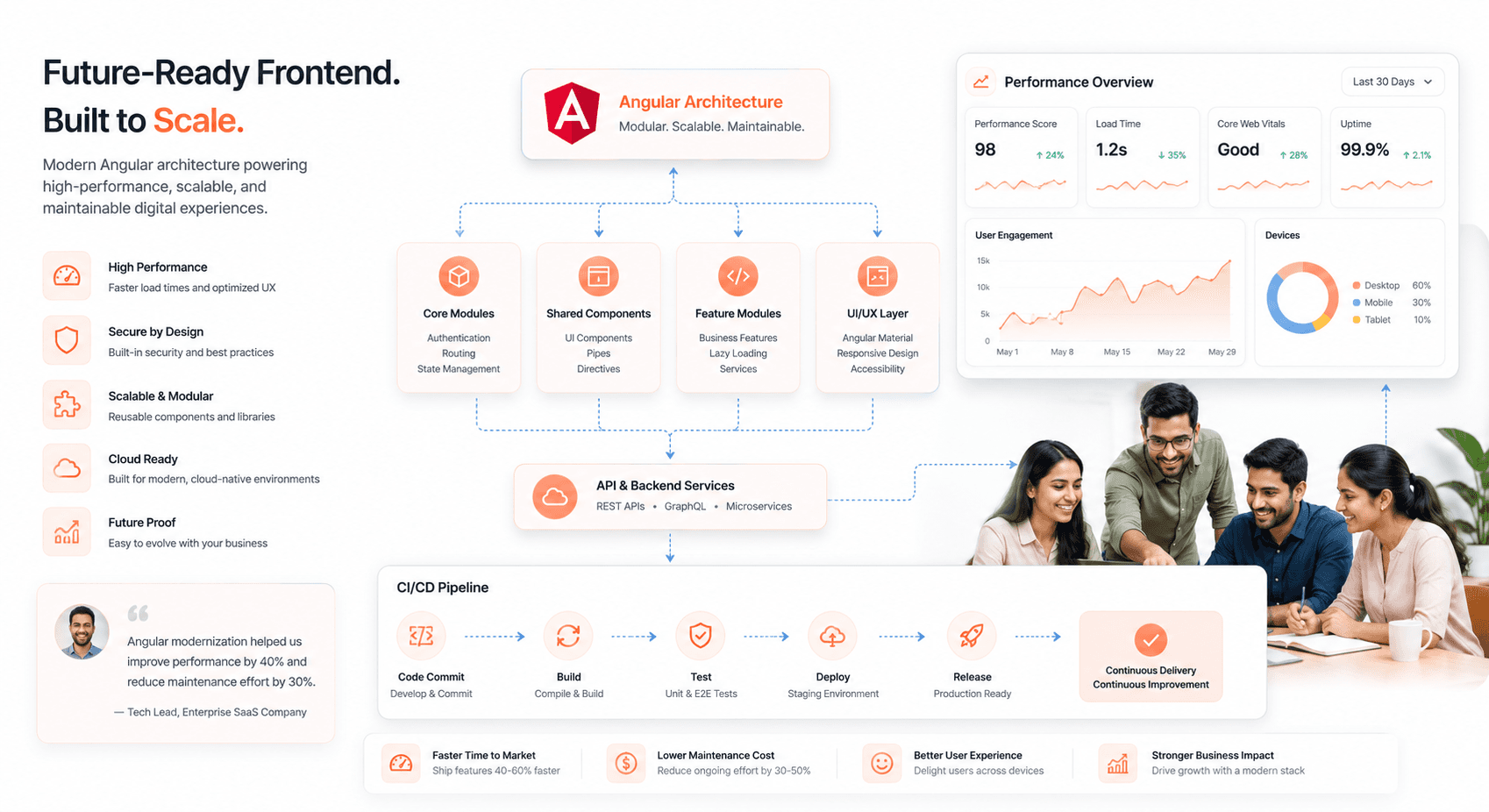
Conclusion
Legacy-to-Angular frontend modernization is not just a technical upgrade, it's a strategic investment in your application's future. The incremental migration approach outlined in this guide allows teams to modernize their applications without the risks and disruptions associated with complete rewrites. By systematically planning your migration, preparing your codebase with modern architecture patterns, and gradually implementing Angular features, you can achieve significant improvements in performance, maintainability, and developer productivity while keeping your application operational throughout the process.
The key to successful modernization lies in taking a measured, methodical approach. Start with thorough assessment and planning, clean up your existing code structure, establish a hybrid environment, and migrate feature by feature. Remember that modernization is an ongoing mindset rather than a one-time project. As you complete your migration to Angular, continue investing in modern development practices, automated testing, and regular updates to ensure your application remains competitive and maintainable for years to come. Your future development team and your business stakeholders will appreciate the foundation you've built for scalable, efficient frontend development.




About the author
I’m the founder of Hashbyt, an AI-first frontend and UI/UX SaaS partner helping 200+ SaaS companies scale faster through intelligent, growth-driven design. My work focuses on building modern frontend systems, design frameworks, and product modernization strategies that boost revenue, improve user adoption, and help SaaS founders turn their UI into a true growth engine.
Is a clunky UI holding back your growth?
Is a clunky UI holding back your growth?
▶︎
Transform slow, frustrating dashboards into intuitive interfaces that ensure effortless user adoption.
▶︎
Transform slow, frustrating dashboards into intuitive interfaces that ensure effortless user adoption.
