

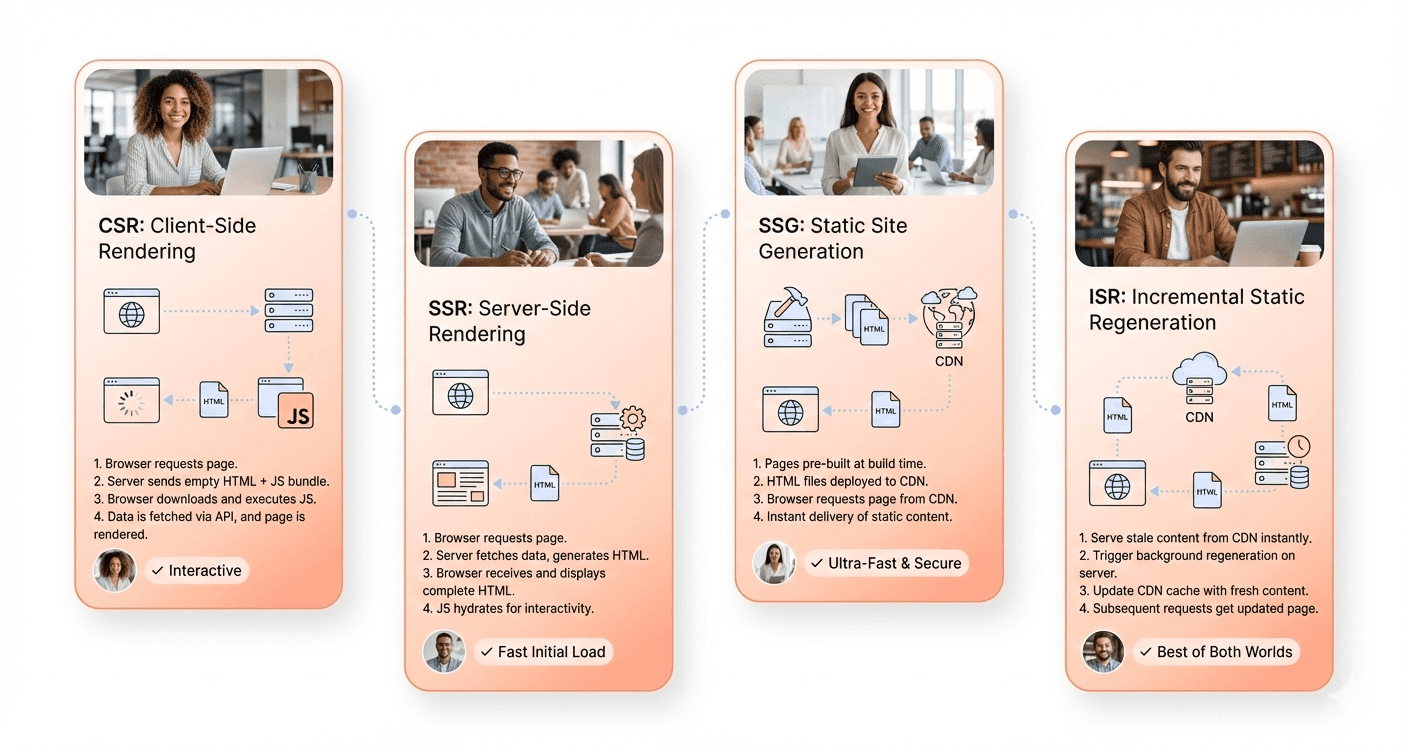
CSR, SSR, SSG and ISR are four answers to one question: where and when is a page's HTML generated? In the browser (CSR), on the server for every request (SSR), once at build time (SSG), or at build time and then refreshed in the background (ISR). The answer shapes your web application's performance and user experience, how well search engines and AI assistants can read your pages, and what you pay for hosting.
Below you will find a quick answer, a decision table, direct answers to the two most searched match-ups (ISR vs SSR and ISR vs CSR), a closer look at each method, and the APIs that implement them in Next.js 16, Nuxt 4, Astro and React Router, checked in September 2026.
CSR vs SSR vs SSG vs ISR: Quick Answer
Quick answer: Use SSG for pages that rarely change, such as blogs, docs and marketing pages. Use ISR when those pages must refresh every few minutes or on publish without a full rebuild. Use SSR when HTML must be fresh or personalised on every request. Use CSR for logged-in dashboards and tools where SEO does not matter.
Most production apps mix all four, choosing per route rather than per project. The table below shows how they compare.
CSR vs SSR vs SSG vs ISR Decision Table
Method | When HTML is generated | Freshness | SEO and AI crawlers | Server cost | Best for | Next.js 16 / Nuxt 4 / Astro |
|---|---|---|---|---|---|---|
CSR (client-side rendering) | In the browser, after JavaScript downloads and runs | Live: data is fetched in the browser | Weakest: the first HTML is an almost empty shell | Lowest: static files plus your APIs | Logged-in dashboards, internal tools, SaaS app screens | Next.js: |
SSR (server-side rendering) | On the server, on every request | Always current | Strong: complete HTML on every response | Highest: compute on every request | Personalised or request-specific pages: accounts, search results, regional pricing | Next.js: dynamic rendering (a route that reads |
SSG (static site generation) | Once, at build time | Only as fresh as the last build | Strongest: complete HTML served from a CDN | Lowest: CDN only | Blogs, documentation, marketing and landing pages | Next.js: static prerendering (default for routes without request-time data) and |
ISR (incremental static regeneration) | At build time or first request, then regenerated in the background after a time window or on demand | Seconds to hours old, or updated on publish with on-demand revalidation | Strong: complete, cached HTML | Low to medium: only stale pages are rebuilt | Large catalogues, news and CMS-driven pages | Next.js: |
Framework APIs checked against the official Next.js, Nuxt and Astro documentation on 30 September 2026 (next 16.3.7, nuxt 4.5.2, astro 7.3.5).
ISR vs SSR: Which Should You Use?
ISR vs SSR: ISR serves a cached, prerendered page and rebuilds it in the background once its revalidation window has passed, or when you call revalidatePath() or revalidateTag(). Most visitors get CDN-speed HTML that may be slightly out of date. SSR renders a new page for every request, so content is always current but every visit costs server time. Choose ISR for content that is the same for everyone and can be a few minutes old; choose SSR for personalised or real-time pages.
ISR vs CSR: Which Should You Use?
ISR vs CSR: ISR sends complete HTML that search engines and AI crawlers can read immediately, and refreshes it on a schedule or on publish. CSR sends an almost empty HTML shell and builds the page in the browser with JavaScript, so what a crawler sees depends on whether it runs JavaScript. Choose ISR for public pages you want found; choose CSR for interactive screens behind a login. Many apps use both, for example ISR for a product page and CSR for the basket.
Server-Side Rendering (SSR): Fresh HTML on Every Request
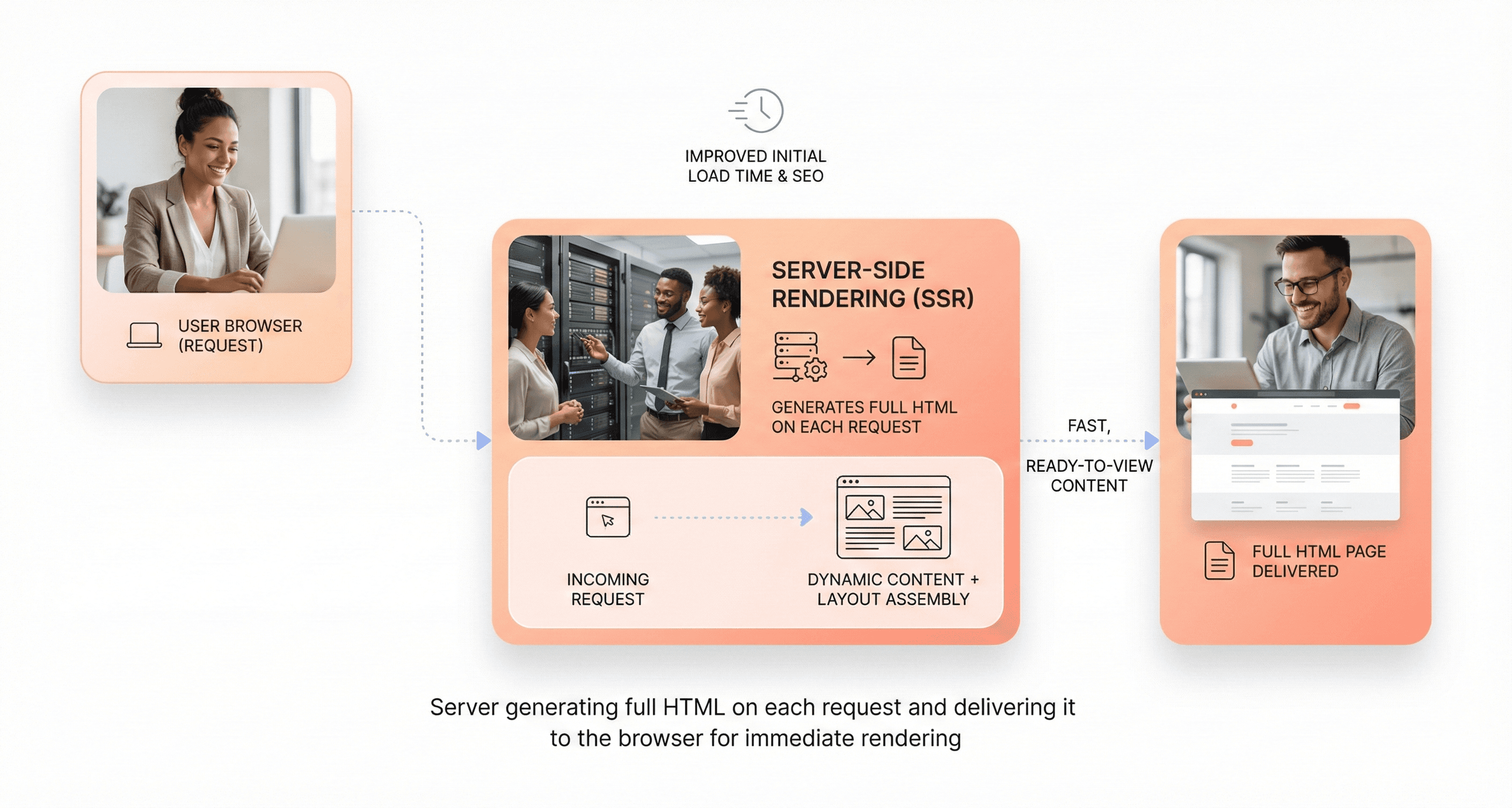
How SSR Generates HTML on the Server for Every Request
With SSR, the server builds the complete HTML for a page each time it is requested, the opposite of the traditional client-side approach where the browser assembles the page. When a request arrives, the server runs your components, fetches the data they need and returns finished HTML. In the Next.js App Router, pages and layouts are Server Components by default, and a route is rendered this way whenever it reads request-time data such as cookies, headers or search parameters.
The browser can paint that HTML straight away. JavaScript then loads and hydrates the page, attaching event handlers so it becomes interactive. React Server Components, stable since React 19 (December 2024), reduce that cost: their code is not sent to the browser, so only the interactive Client Components need hydrating.
SEO Benefits and Faster First Paint Advantages
The SEO advantage is simple: crawlers receive complete HTML without having to run JavaScript. Google can render JavaScript, but its own guidance says server-side or pre-rendering is still a good idea because it is faster for users and crawlers and not all bots can run JavaScript. That includes most AI crawlers: a Vercel and MERJ study (December 2024) found that none of the major AI crawlers it tested, including GPTBot and ClaudeBot, rendered JavaScript. If you want to be cited by AI assistants, your key content needs to be in the HTML.
Users also see meaningful content sooner, because the first response already contains it rather than an empty container waiting for JavaScript. The gain is largest on slower phones and networks.
If you build with Next.js, our guide to what is new in Next.js 16 covers Turbopack as the default bundler, Cache Components and the updated caching APIs.
Additionally, SSR enables better social media sharing experiences through proper meta tag population and Open Graph data availability, which social platforms can readily access during link previews and content sharing processes.
Server Load Challenges and Slower Time-to-Interactive Issues
The trade-off is cost. Each page request requires server processing power to execute rendering logic, fetch data, and generate HTML markup, creating higher computational demands compared to serving static files or minimal client-side applications.
Server load scaling becomes particularly challenging during traffic spikes, as every user interaction potentially triggers server-side processing. This increased load can lead to higher hosting costs and requires more sophisticated server infrastructure management, including load balancing and horizontal scaling strategies.
Time-to-interactive represents another critical consideration in SSR implementations. While users see content quickly through faster first paint, the page remains non-interactive until JavaScript bundles download, parse, and hydrate the server-rendered HTML. This hydration process can create a frustrating user experience where visible elements appear clickable but remain unresponsive until client-side JavaScript takes control.
Best Use Cases for News Sites and E-Commerce Platforms
Server-side rendering excels in scenarios where SEO performance and immediate content visibility take precedence over complex client-side interactions. News sites benefit because crawlers get the full article immediately and readers see it without waiting for JavaScript. If a page is the same for every visitor and only changes every few minutes, ISR usually gives the same SEO benefit at lower cost.
E-commerce platforms represent another ideal SSR use case, particularly for product listing pages, category browsing, and individual product detail views. These pages require strong search engine visibility for product discovery while benefiting from immediate content rendering for improved conversion rates. The ability to serve fully-formed product information, pricing, and availability details without client-side processing delays directly impacts user experience and sales performance.
SSR is the right default when the HTML depends on who is asking: account pages, search results, prices by location, A/B-tested pages and anything personalised. Documentation and marketing sites are usually better served by SSG or ISR.
Client-Side Rendering (CSR): The Browser Builds the Page
How CSR Shifts Rendering to the Browser
In client-side rendering, the server sends a minimal HTML file to the browser: a bare template containing little more than a root element and script tags. The heavy lifting of rendering content happens entirely in the user's browser, where JavaScript takes control of the document and dynamically populates it with content.
Instead of a separate HTML page for each URL, a client-side rendered app creates every route in the browser. JavaScript fetches the data, builds the interface and updates it as the user navigates.
On the first visit the browser downloads the HTML shell plus the JavaScript and CSS the app needs (often split into chunks that load on demand). From that point forward, the single-page application handles all user interactions without requiring full page refreshes from the server.

Benefits: Rich Interactions and Low Server Load
Client-side rendering excels at creating smooth, app-like user experiences. Single-page applications (SPAs) update only the part of the screen that changes, so there are no full-page reloads between views.
This approach delivers several key advantages:
Development Speed: Working entirely on the client side eliminates concerns about server compatibility. Developers can freely use browser-only APIs like the window object without worrying about server-side constraints.
Hosting Costs: Single-page applications can be hosted on any static server capable of serving HTML, CSS, and JavaScript files. This eliminates the need for expensive server infrastructure that supports JavaScript runtime environments, allowing deployment on cost-effective platforms like Amazon S3 or Netlify.
Fast In-App Navigation: After the first load, moving between views fetches only data, not whole pages, so navigation inside the app can feel faster than full page loads.
Drawbacks: SEO Limits and a Slower First Load
Despite its interactive advantages, client-side rendering faces significant challenges that can impact both search visibility and user experience. The most critical limitation revolves around search engine optimization, as some crawlers struggle to execute the client-side JavaScript necessary to render content properly.
The first HTML response is an almost empty HTML shell. Google queues pages for rendering and can index content added by JavaScript, but that is an extra step, and most AI crawlers read only the raw HTML, so they may never see your content.
Slower First Load: Nothing meaningful appears until the browser has downloaded, parsed and executed the JavaScript, so the first load is usually slower than SSR or SSG, especially on mid-range phones and slow networks.
Device Dependency: Performance relies heavily on the user's device capabilities and computing power. While powerful devices handle JavaScript processing efficiently, users with older phones or slower internet connections may experience significantly degraded performance.
Core Web Vitals: Heavy JavaScript work during load can hurt Largest Contentful Paint (LCP) and Interaction to Next Paint (INP), which Google uses as page experience signals. This is a ranking signal, not a penalty.
Best Fit: Dashboards and SaaS Apps
Client-side rendering proves most effective for applications where SEO isn't a primary concern but rich user interactions are essential. Internal business applications, user dashboards, and SaaS platforms represent the sweet spot for CSR implementation.
These applications typically operate behind authentication walls where search engine indexing isn't necessary, allowing developers to focus entirely on creating sophisticated user interfaces without SEO constraints. The approach works exceptionally well for:
Interactive dashboards requiring real-time data updates and complex user interactions
SaaS platforms where users need seamless navigation between different application sections
Internal business tools that prioritize functionality over search visibility
Applications requiring native app-like experiences with smooth transitions and minimal loading interruptions
For these use cases, the benefits of reduced server load, lower hosting costs, and enhanced user experience far outweigh the SEO limitations, making client-side rendering the optimal choice for delivering complex, interactive web applications.
Static Site Generation (SSG): HTML Built Once, Served From a CDN
Pre-Building HTML Pages at Build Time
Static site generation takes a fundamentally different approach by pre-rendering HTML pages during the build process rather than on demand. This process involves generating complete HTML files for every page of your website before deployment, creating static files that can be served instantly when users request them.
The build-time generation means that when a visitor requests a webpage, the response is a pre-generated HTML file that doesn't require the webpage's HTML to "rebuild" on the visitor's browser or be dynamically created by your server. This elimination of runtime processing creates a significant performance advantage, as there's no computational overhead during user visits.
In the Next.js App Router, a route without request-time data is prerendered at build time by default, and generateStaticParams prerenders dynamic routes such as /blog/[slug]. Astro prerenders every page by default, Nuxt does it with nuxt generate or a prerender: true route rule, and React Router framework mode uses its prerender option.

Speed and SEO Benefits
Because pages are ready-made files, a CDN can serve them from a location near the visitor with no server work at request time. That usually gives the fastest time to first byte of the four methods.
The SEO advantages are equally impressive. Pre-rendered content is immediately crawlable by search engines, ensuring optimal visibility and indexing. Search engine and AI crawlers receive complete HTML without running JavaScript, and fast delivery helps Core Web Vitals.
Some frameworks also cut the JavaScript that follows the HTML. Astro renders components to HTML and CSS and strips client-side JavaScript by default, hydrating only the interactive "islands" you mark with a client:* directive.
Limitations: Real-Time Data and Build Times
While static site generation excels in many scenarios, it faces significant challenges with real-time data requirements. Since content is generated at build time, websites requiring frequently updated information like live scores, real-time dashboards, or personalized content face limitations. Any content changes necessitate a complete rebuild and redeployment process.
Build time complexity becomes particularly evident with large sites containing numerous pages. The static generation process must render every page during build time, which can result in significantly longer build durations for sites with thousands of pages or complex data fetching requirements.
Dynamic content integration presents another challenge. Features like user authentication, personalized recommendations, or user-specific content require additional architectural considerations and often hybrid approaches combining static generation with client-side or server-side rendering techniques.
Best Fit: Blogs, Docs and Marketing Sites
Static site generation shines brightest for content-focused websites where information remains relatively stable. Blogs represent an ideal use case, as blog posts rarely change once published, and all visitors should see identical content. The same principle applies to documentation sites, where technical content benefits from fast loading times and excellent SEO without frequent updates.
For SSG-driven blogs where speed is everything, debunking these 7 myths about front-end performance will help you build even faster, more optimized static experiences.
Marketing websites leverage static site generation effectively because they typically feature promotional content, company information, and product descriptions that don't require real-time updates. Fast, crawlable pages suit lead generation, and there is no server to scale during a campaign spike.
E-commerce applications can benefit from static site generation for product catalog pages, especially when product information updates occur through scheduled build processes rather than real-time inventory changes. This approach works particularly well for businesses with stable product lines and predictable content update cycles.
Incremental Static Regeneration (ISR): Static Pages That Refresh Themselves
How ISR Combines Static Pages With Background Updates
Incremental Static Regeneration (ISR) combines the speed of static pages with content that updates without a full rebuild. Pages are served from the cache and regenerated in the background.
When a user requests a page, ISR first serves the cached static version instantly, then triggers a background regeneration process if the content has exceeded its designated revalidation time.
When implementing ISR for balanced speed and freshness, reviewing the top frontend frameworks for web app development in 2026 can guide you toward the most compatible ecosystem.
The ISR workflow operates through a precise sequence: during the initial build, all known pages are generated and cached. Subsequent requests receive these cached pages instantaneously. After the specified revalidation period expires, the next request still returns the cached page while simultaneously initiating background regeneration. Once the new version generates successfully, it replaces the cached content for all future requests.

Fast Loads With Periodic Freshness
ISR delivers consistently fast performance by leveraging global CDN caching while maintaining content freshness through strategic revalidation intervals. Pages stay cached until their revalidation window expires. Next.js recommends a long window, such as an hour rather than a second, and on-demand revalidation when you need precision; if you need real-time data, use dynamic rendering instead.
On-demand revalidation lets you refresh pages the moment content changes, for example from a CMS webhook. In Next.js 16 you call revalidatePath('/blog') or revalidateTag('posts', 'max') from a Server Action or Route Handler. revalidateTag now takes a cache profile as its second argument, and the new updateTag() gives read-your-writes updates inside Server Actions.
Configuration Complexity and Stale Data
Implementing ISR requires careful consideration of revalidation timing and error handling mechanisms. Developers must balance update frequency with performance, as overly frequent revalidation can increase server load while infrequent updates may serve stale content. In the App Router you set export const revalidate = 3600 on a route, list known paths with generateStaticParams, and use dynamicParams to decide whether unknown paths are generated on demand or return a 404. (getStaticProps with revalidate is the older Pages Router equivalent.)
Error handling presents another complexity layer, as failed regeneration attempts continue serving the last successfully generated page. That keeps the site up but can leave stale data in place during backend issues. Next.js ISR also has platform limits: it runs only on the Node.js runtime (the default), does not work with a static export, and elsewhere depends on your hosting adapter. Self-hosted apps running several instances need a shared cache.
Best Fit: E-Commerce Catalogues and Large Content Sites
ISR excels in scenarios requiring both performance and content freshness, making it ideal for e-commerce platforms and large-scale content websites. E-commerce sites get fast product pages while prices and descriptions refresh on a schedule or on publish; show live stock levels with a small client-side or streamed component. The ability to handle thousands of content pages without extended build times makes ISR particularly suitable for large catalogs or content libraries.
Content-heavy applications like blogs, news sites, and documentation platforms leverage ISR's capacity to serve vast amounts of pages efficiently while keeping information current. The reduced backend load through intelligent caching strategies helps manage high-traffic scenarios while maintaining optimal user experience across global audiences.
Choosing the Right Rendering Strategy for Your Project
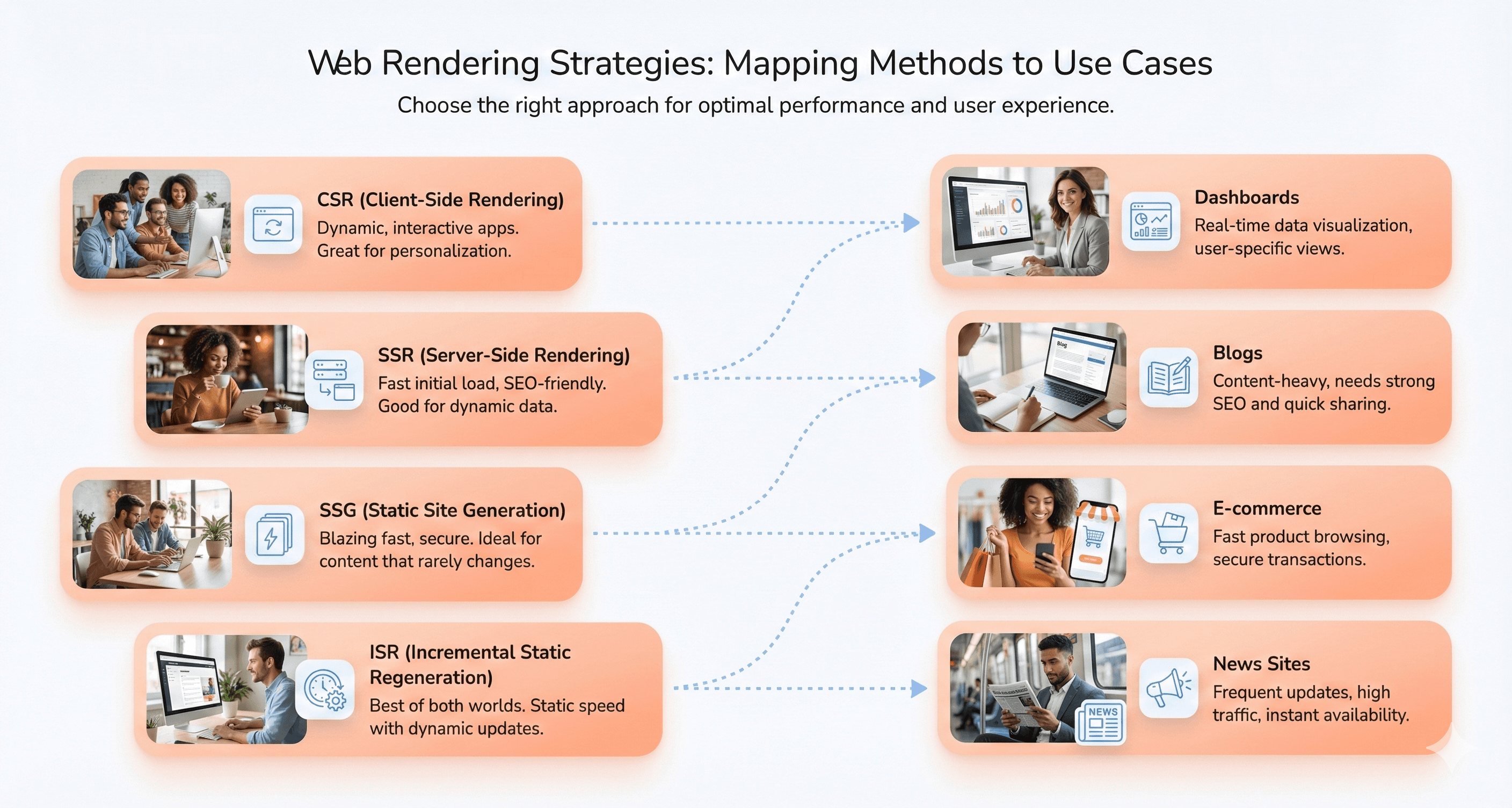
Matching Rendering Methods to Content Update Frequency
The first question is how often your content changes. Static Site Generation (SSG) works best for content that rarely changes: blogs, documentation sites, portfolios and company landing pages load fastest as pre-rendered pages. However, SSG becomes impractical when content requires frequent updates, as each change necessitates a full site rebuild.
For dynamic content that changes regularly, Server-Side Rendering (SSR) excels by generating fresh HTML for every request. This makes it ideal for news websites with real-time updates, e-commerce product pages requiring fresh data, and content-driven platforms where information must stay current.
Incremental Static Regeneration (ISR) offers a compelling middle ground, allowing static pages to regenerate after set intervals or on publish. It suits e-commerce platforms with frequent product updates or news sites requiring timely article publishing without the overhead of constant rebuilds.
Client-side rendering (CSR) suits applications where content updates happen through user interactions rather than content management systems, making it ideal for dashboards with dynamic data and SaaS platforms requiring real-time interactions.
Balancing SEO Requirements with Performance Needs
SEO considerations significantly impact rendering method selection. Both SSG and SSR provide excellent SEO performance since search engines can easily crawl fully-formed HTML documents. SSG delivers superior initial load speeds while maintaining SEO benefits, making it perfect for marketing pages and blogs where search visibility matters.
SSR offers dynamic content handling with SEO advantages but comes with a slower Time-to-First-Byte (TTFB) due to server-side processing. ISR combines fast, SEO-friendly static pages with updates within minutes, or immediately on publish with on-demand revalidation, which suits large sites that need both speed and search visibility.
CSR presents SEO challenges as crawlers struggle with JavaScript-heavy content, seeing primarily blank pages initially. However, for applications where SEO is not needed, such as internal dashboards or pages behind a login, CSR's rich interactive capabilities outweigh these limitations.
Considering Server Resources and Infrastructure Costs
Infrastructure requirements vary dramatically across rendering strategies. SSG offers the most cost-effective solution since hosting static files requires minimal server resources and scales easily. The build-time rendering eliminates server-side processing during requests, reducing operational costs significantly.
When optimizing rendering strategies, frontend architecture also plays a crucial role. Migrating from legacy CSS frameworks to utility-first systems through Tailwind CSS migration can reduce the CSS each page ships, whichever rendering method you use.
SSR demands higher server loads and resources, especially under heavy traffic, as each request requires server-side rendering. This translates to increased hosting costs and the need for robust server infrastructure with efficient caching strategies to maintain performance.
CSR shifts rendering responsibilities to the client, reducing server load but potentially requiring more powerful client devices. ISR requires an understanding of caching and revalidation strategies but offers optimized resource usage for large sites by updating content incrementally rather than rebuilding everything.
Framework Support in 2026: Next.js 16, Nuxt 4, Astro and React Router
Every major meta-framework now supports several methods and lets you choose per route. Versions below are the latest on npm as of 30 September 2026.
Next.js 16 (16.3.7): pages are Server Components by default. Without Cache Components, routes are prerendered at build time unless they use request-time data, and ISR uses
revalidate,revalidatePath()andrevalidateTag(). Cache Components (opt-in withcacheComponents: true, added in 16.0) makes data dynamic by default, caches with'use cache'andcacheLife, and uses Partial Prerendering: a static shell served from the CDN with dynamic parts streamed in through<Suspense>. The oldexperimental.pprflag has been removed.Nuxt 4 (4.5.2): universal rendering (SSR plus hydration) by default, with per-route
routeRules:prerender: truefor SSG,swrorisrfor cached regeneration (isradds CDN caching on Netlify and Vercel), andssr: falsefor CSR.Astro (7.3.5): every page is prerendered by default. Add an adapter and
export const prerender = falsefor on-demand rendering, or use server islands (server:defer) to render a personalised component after the static page loads.React Router framework mode (8.4.0): the successor to Remix since React Router v7 (November 2024). Server rendering is on by default,
ssr: falsegives SPA mode, andprerendergenerates static pages at build time.
SSG is the simplest to run. SSR needs server capacity and a caching plan. ISR needs the most thought about revalidation windows, tags and where the cache lives. CSR complexity sits in client-side state management and routing rather than infrastructure.
If you are moving an older React or Pages Router app to the App Router to use these options, our Next.js migration services cover the move route by route.

Conclusion: Which Rendering Method Should You Use?
There is no single winner, but there is a clear rule. Default to SSG for anything public that rarely changes. Move to ISR when that content needs refreshing without a rebuild. Use SSR only where HTML must differ per request. Keep CSR for interactive screens behind a login, where SEO does not matter.
Rather than viewing these rendering strategies as competing approaches, consider them complementary tools in your development toolkit. Modern frameworks like Next.js allow you to mix and match these methods within a single application, using SSG for marketing pages, SSR for product listings, and CSR for user dashboards. The key to success lies in understanding your content's nature, your audience's expectations, and your infrastructure constraints to make the best choice for each part of your application.
Need help choosing or implementing a rendering strategy? Our frontend development services team builds with Next.js, Nuxt and Astro, and our frontend frameworks guide compares the wider ecosystem.





About the author
I’m the founder of Hashbyt, an AI-first frontend and UI/UX SaaS partner helping 200+ SaaS companies scale faster through intelligent, growth-driven design. My work focuses on building modern frontend systems, design frameworks, and product modernization strategies that boost revenue, improve user adoption, and help SaaS founders turn their UI into a true growth engine.



Is a clunky UI holding back your growth?
Is a clunky UI holding back your growth?
▶︎
Transform slow, frustrating dashboards into intuitive interfaces that ensure effortless user adoption.
▶︎
Transform slow, frustrating dashboards into intuitive interfaces that ensure effortless user adoption.
