Share

Share

How to Modernize a Legacy Frontend Without Breaking Existing Workflows

How to Modernize a Legacy Frontend Without Breaking Existing Workflows

Posted on

Frontend Development

Frontend Development

Posted at

Dec 26, 2025

Dec 26, 2025

Min read

10

I hope you found this post valuable. If you’re looking for proven frontend and design expertise to elevate your product, feel free to reach out.

I hope you found this post valuable. If you’re looking for proven frontend and design expertise to elevate your product, feel free to reach out.

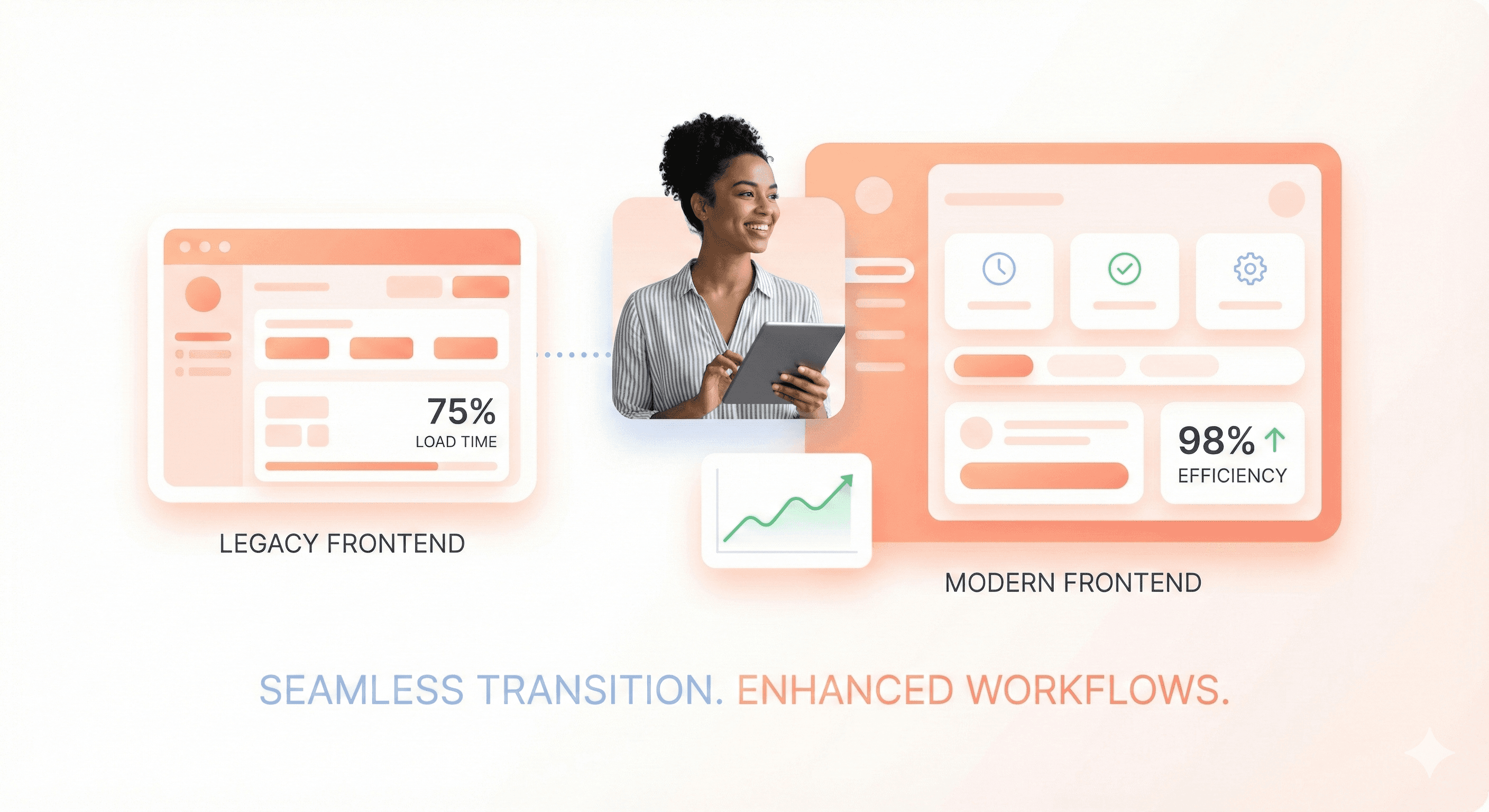
Comparison of legacy frontend interface and modern frontend UI showing improved performance and user experience without workflow disruption

Outdated legacy frontends drain productivity and frustrate users, but complete rewrites can break critical business workflows. This guide shows frontend developers and engineering teams how to modernize legacy applications through strategic, incremental upgrades that preserve existing functionality while delivering modern user experiences.

The key is treating modernization as a systematic renovation, not a demolition project. You'll discover proven strategies for gradually upgrading component libraries, implementing modern frameworks alongside legacy code, and introducing performance optimizations without disrupting user workflows.

We'll cover strategic planning techniques that help you assess your current frontend and prioritize high-impact improvements, plus gradual migration approaches that let you modernize one feature at a time while keeping your application running smoothly for users and business teams.

Also Read: Legacy modernization guide for SaaS

Why Legacy Frontend Modernization Is Critical for Business Success
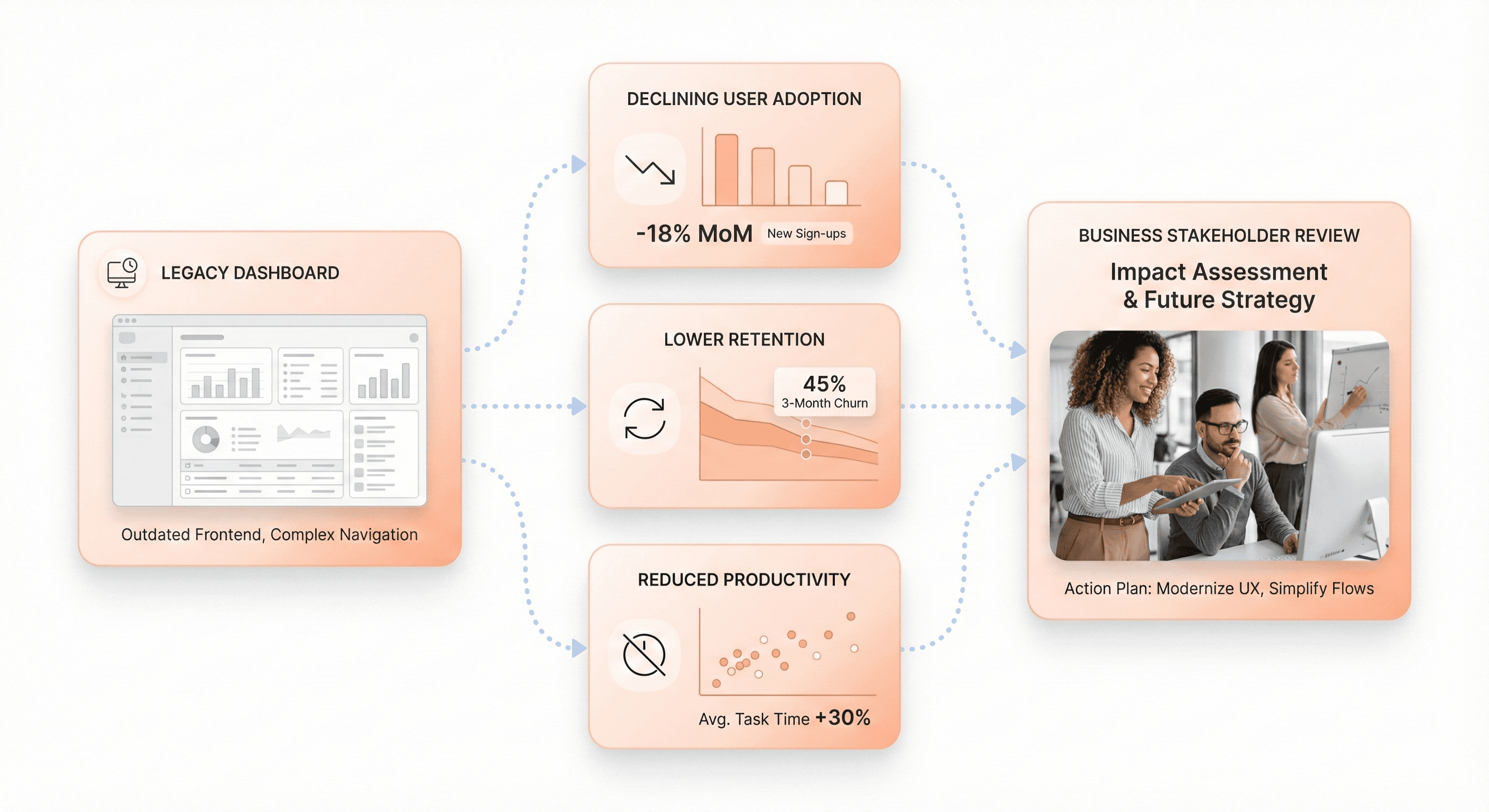
Legacy frontend dashboards causing reduced user adoption, lower retention, and slower business growth

Impact on User Adoption and Retention Rates

Legacy frontend systems create significant barriers to user adoption and retention, directly threatening business growth and competitiveness. Outdated interfaces with slow performance, confusing navigation, and inconsistent functionality frustrate both employees and customers, leading to decreased engagement and higher abandonment rates.

Modern users expect intuitive, responsive experiences that work seamlessly across devices. When businesses maintain legacy frontends with outdated frameworks and limited mobile compatibility, they lose potential customers to competitors offering superior digital experiences. Research shows that 65% of salespeople at firms with mobile CRM achieve their sales quotas, compared to just 22% at companies without modern mobile interfaces, demonstrating the direct correlation between frontend modernization and business performance.

Legacy systems also limit personalization capabilities and fail to support the streamlined workflows that modern users demand. This results in poor user experience that drives customers away and makes it difficult to attract new ones. Organizations relying on outdated frontends struggle to deliver the exceptional user experiences necessary for customer retention in today's competitive market.

Effect on Development Velocity and Team Productivity
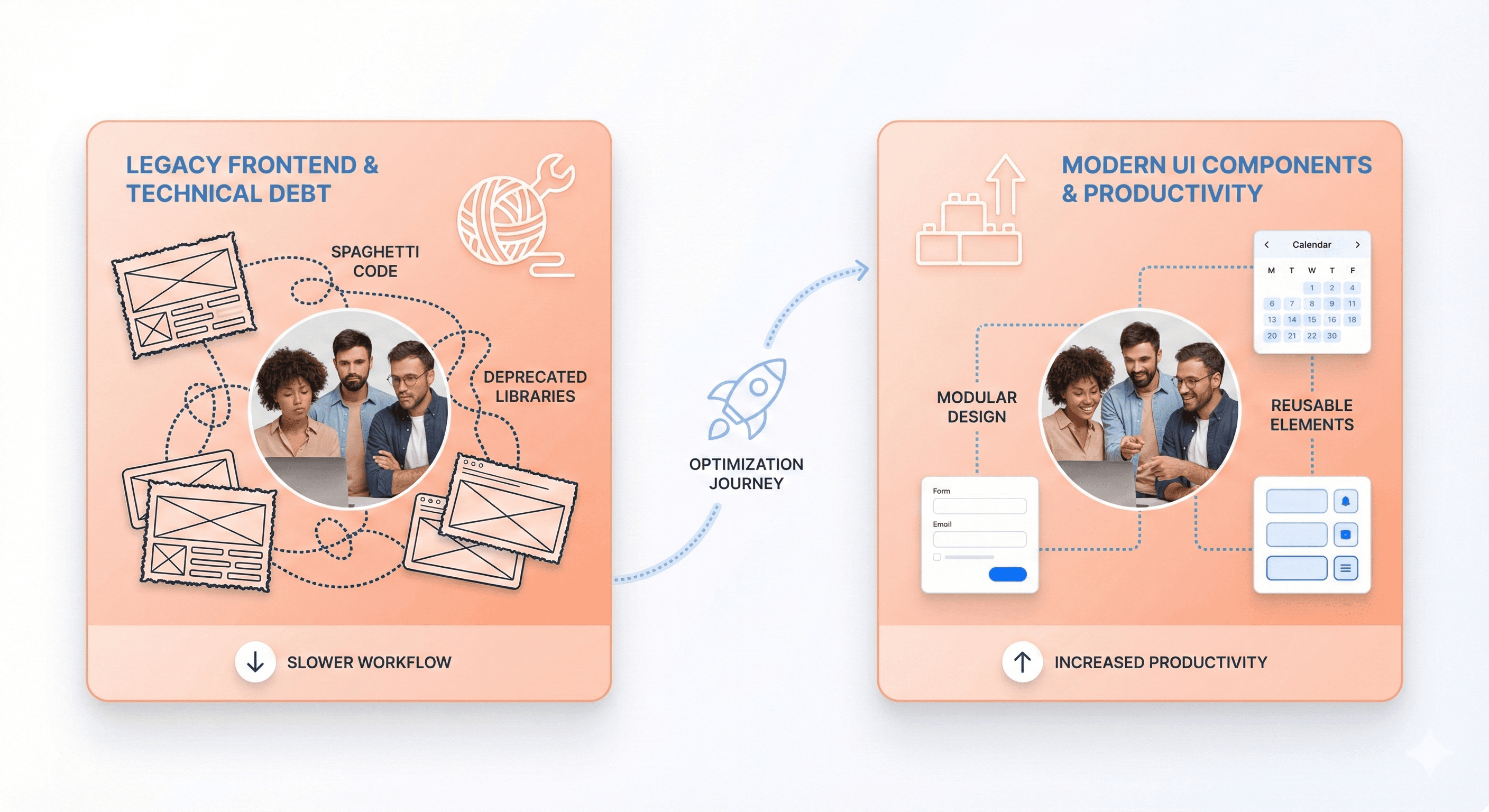
Developers struggling with technical debt in legacy frontend systems compared to streamlined modern frontend components

Legacy frontend systems significantly impact development velocity and team productivity through multiple operational challenges. Development teams spend excessive time maintaining outdated codebases, dealing with technical debt, and implementing manual processes that modern frameworks automate.

Technical debt accumulation in legacy systems creates a productivity drain where developers allocate 10-20% of their technology budgets just to resolve issues caused by outdated code structures. This leaves limited resources for innovation and new feature development. Teams working with legacy frontends experience frequent application incidents that are difficult to diagnose and resolve, often requiring disruptive fixes that affect the entire application.

Modern open-source code and cloud-based architectures enable teams to collaborate more effectively, leading to improved team utilization and the elimination of manual processes. When organizations modernize their frontend systems, developers gain access to contemporary toolchains, collaborative environments, and DevOps practices that accelerate product development cycles and improve system reliability. This transformation allows teams to redirect focus toward innovation and customer-centric initiatives rather than constant maintenance of outdated systems.

Operational Cost Reduction and Support Ticket Management

Legacy frontend modernization delivers substantial operational cost reductions by addressing the expensive maintenance burden that outdated systems impose on organizations. Legacy systems consume up to 75% of IT budgets for ongoing maintenance, with organizations spending an average of $40,000 annually just to keep these systems operational. This massive resource allocation leaves minimal budget for strategic initiatives and innovation.

Modernized frontend systems significantly reduce maintenance and support costs through improved stability, automated updates, and easier troubleshooting capabilities. Modern architectures eliminate the need for costly patches, manual updates, and complex repairs that characterize legacy system maintenance. Support teams experience fewer incidents and can resolve issues more quickly without disrupting core business operations.

The cost benefits extend beyond direct maintenance savings. Organizations reduce their dependency on rare technical skills required to maintain legacy systems, as modern frameworks utilize widely available expertise. This eliminates the premium costs associated with specialized enterprise frontend modernization knowledge and reduces the risk of operational disruptions due to limited personnel availability.

Additionally, modernized systems enable better integration with automated monitoring and support tools, reducing the volume of support tickets and enabling proactive issue resolution. This operational efficiency allows IT departments to allocate resources more strategically, transforming technology spending from a maintenance burden into a driver of business value and competitive advantage.

The Four Pillars of Frontend-First Legacy Modernization

UI Modernization Through Component-Based Design Systems
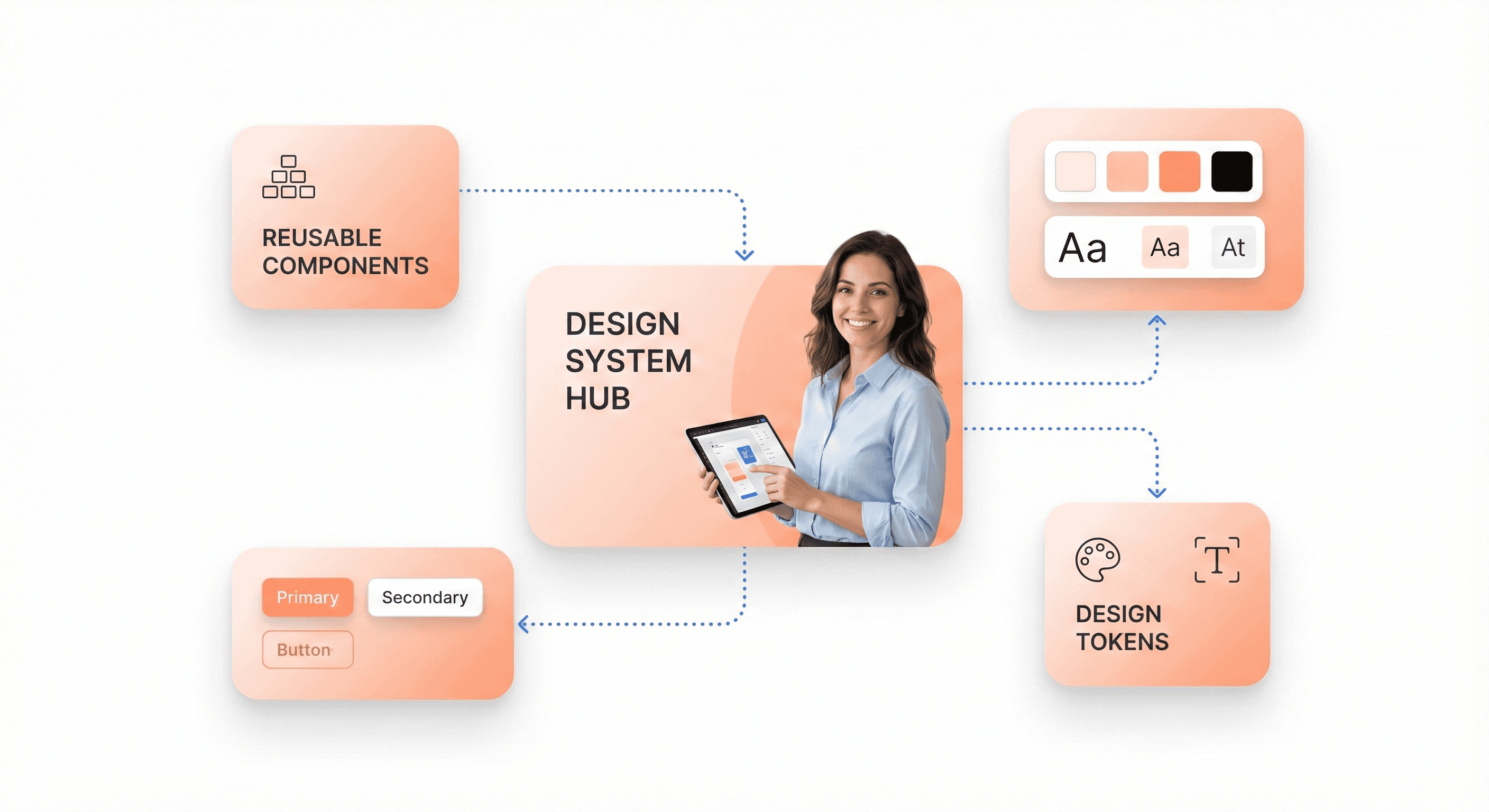
Reusable UI components and design tokens forming a scalable component-based design system for modern frontends

Building a scalable frontend architecture starts with adopting component-based design systems that form the foundation of modern applications. Component-based architectures enable teams to create modular, reusable elements that can be shared across multiple projects, reducing redundancy and ensuring design consistency throughout the application ecosystem.

The key to successful UI modernization lies in establishing a centralized component library that serves as a single source of truth for all interface elements. This approach allows teams to maintain up-to-date features efficiently while avoiding redundant work. Modern design systems leverage open-source UI libraries like MUI, Antd, or ShadCN as their foundation, providing robust building blocks for rapid development.

Design tokens play a crucial role in maintaining consistency across the organization. These standardized colors, fonts, spacing guidelines, and other visual elements create a common language between design and development teams. When properly implemented, design tokens ensure that buttons, charts, and layouts remain cohesive rather than drifting apart over time, which was a common challenge in legacy systems.

The integration of design-to-code workflows significantly accelerates the modernization process. Tools that convert design files directly into production-ready code bridge the gap between design and development teams, speeding up development cycles and ensuring design consistency across frontend components. This automated approach reduces manual errors and maintains visual fidelity from concept to implementation.

UX Enhancement with Modern User Experience Patterns
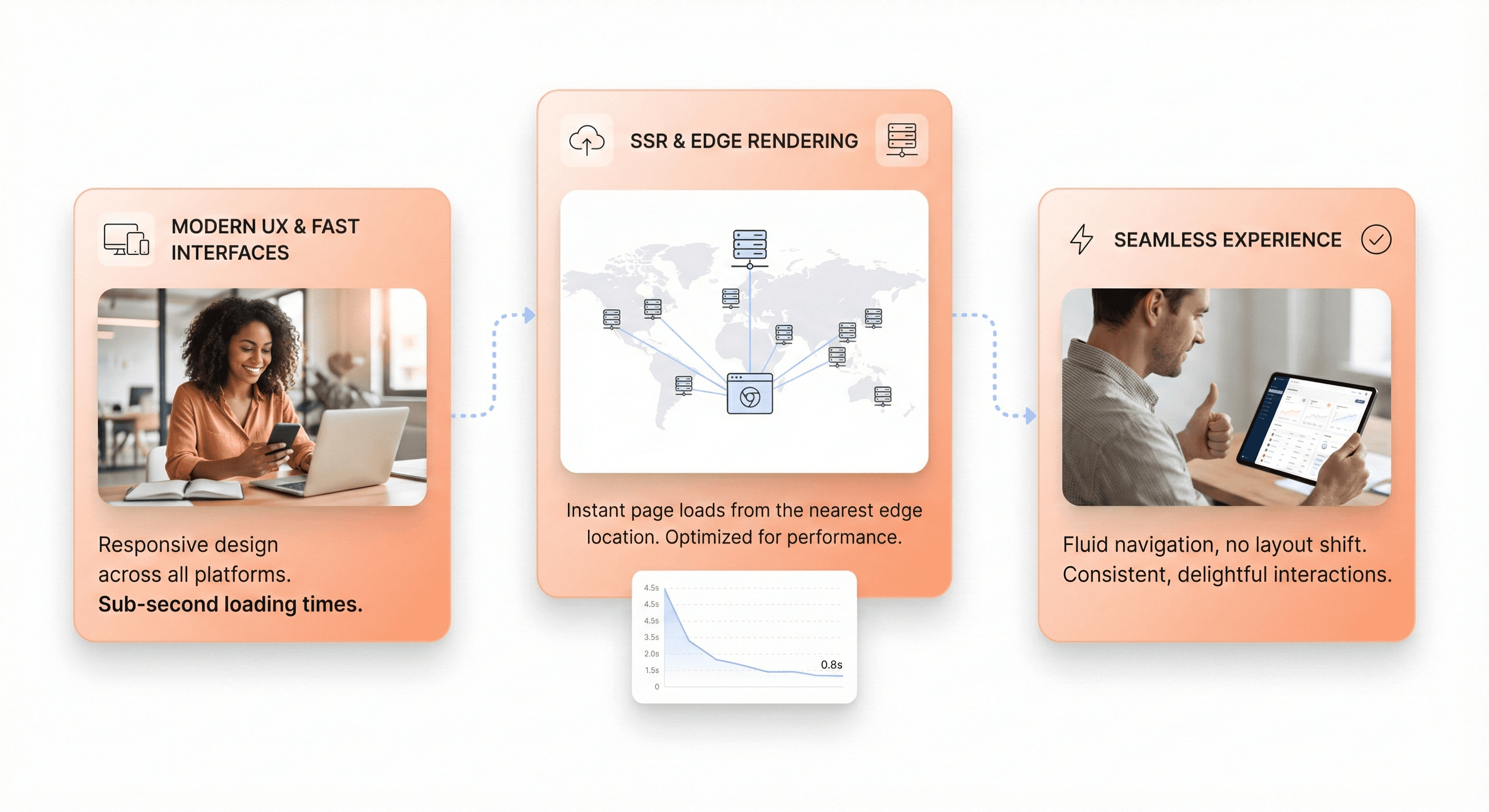
Modern frontend UX patterns delivering faster load times with responsive design and server-side rendering

Now that we have covered the foundational aspects of component-based design, the focus shifts to enhancing user experience through modern interaction patterns that meet contemporary user expectations for speed and functionality. Modern UX patterns prioritize responsiveness and intuitive navigation, addressing the performance bottlenecks that plagued legacy systems.

The shift toward modern UX patterns involves implementing faster load times and improved responsiveness that users expect from contemporary applications. Legacy systems often suffered from inconsistent user experiences due to scattered design elements and lack of centralized theming. Modern approaches consolidate these elements into unified design patterns that create seamless, consistent interactions across the entire application.

Edge rendering and server-side rendering (SSR) have become essential components of modern UX enhancement strategies. By bringing content closer to users through solutions like Vercel's Edge Functions or Cloudflare Workers, applications can deliver significantly improved load times and user experience on a global scale. React with Next.js has emerged as the industry standard for combining server and client-side components, leveraging SSR to optimize performance while maintaining interactive functionality.

The implementation of modern user experience patterns also addresses the fragmentation issues that commonly affect legacy systems. When customers encounter friction due to inconsistent interfaces, it directly impacts business outcomes. Modern UX patterns eliminate these pain points by establishing standardized interaction models that users can intuitively understand and navigate.

Performance Optimization for Faster Load Times
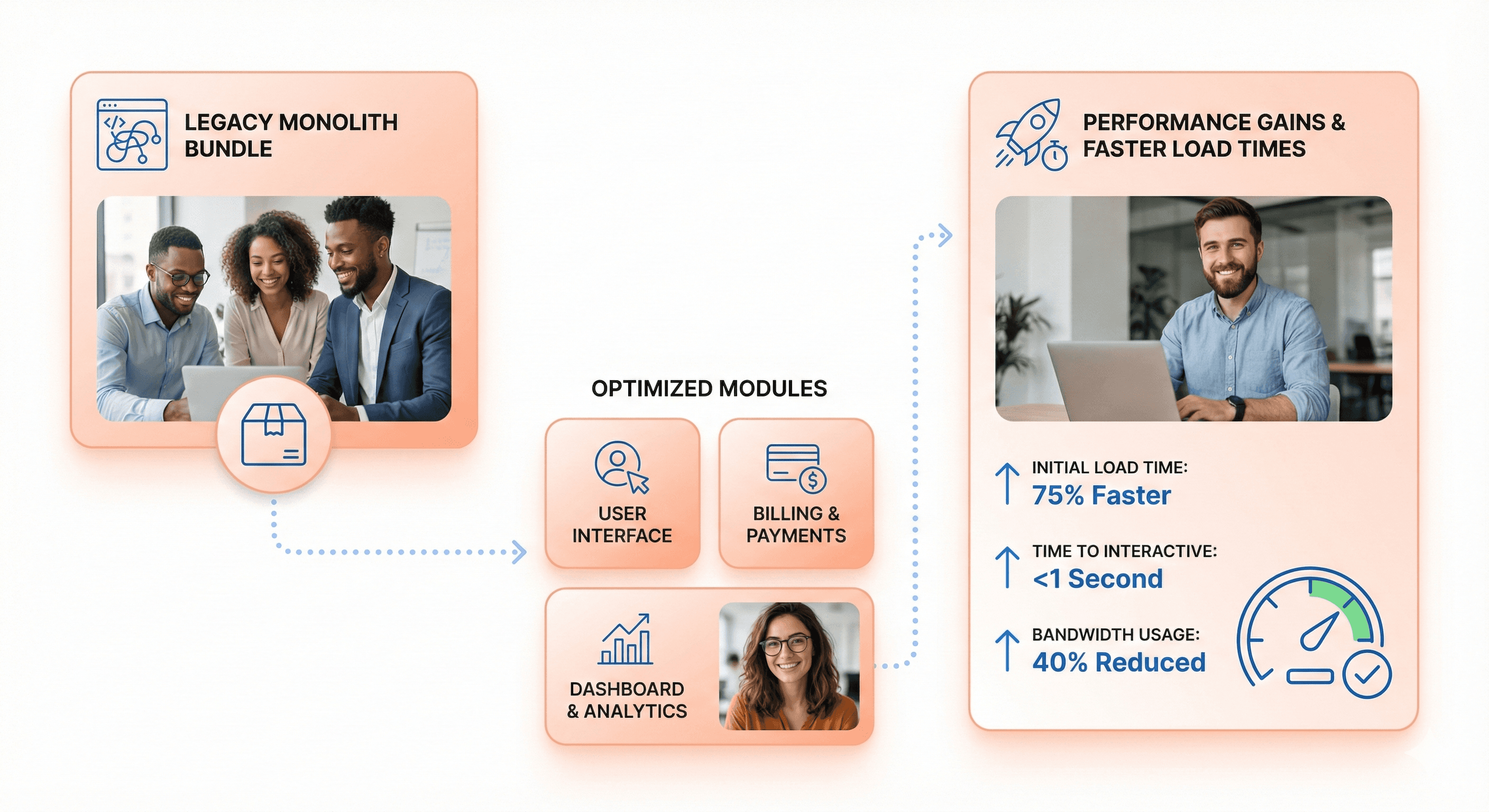
Optimized frontend bundles showing reduced load time using code splitting and performance optimization techniques

With modern UX patterns established, performance optimization becomes the critical factor that determines user satisfaction and business success. Legacy frontend systems often struggle with substantial bundle sizes that create significant performance bottlenecks, particularly affecting users on slower networks.

Aggressive bundle optimization represents one of the most impactful performance improvements available to legacy systems. Modern approaches can achieve dramatic reductions in core bundle sizes—in some cases reducing them by approximately 80%—through strategic restructuring and dead code removal. These optimizations require implementing automated CI checks to ensure performance regressions don't reappear during future development cycles.

Performance engineering must become a built-in guarantee rather than an afterthought. This involves implementing optimized bundles, strategic prefetching, comprehensive caching strategies, and preview environments that allow teams to test performance impacts before production deployment. CI-enforced guardrails ensure that performance standards are maintained throughout the development process.

The challenge of bundle sizes crossing 1.2 MB in legacy systems demonstrates the critical need for performance-first thinking. Modern performance optimization techniques focus on code splitting, lazy loading, and intelligent caching mechanisms that dramatically reduce initial load times while maintaining full functionality for users who need advanced features.

Scalability Architecture for Long-Term Growth

Previously, we've examined the immediate performance benefits of modernization, but scalability architecture ensures that these improvements can accommodate long-term growth and evolving business requirements. Scalability architecture addresses the rigid, tightly coupled systems that make even small changes risky and time-consuming.

Microfrontends represent a transformative approach to scalability, allowing teams to break down monolithic frontends into smaller, independently deployable components. This architecture enables parallel development where multiple teams can ship features without stepping on each other's toes, addressing one of the most significant collaboration challenges in legacy systems.

The plugin-based design philosophy supports safe extensibility and independent team operations. Teams can develop and deploy components in isolation using standard interfaces between different code segments, which simplifies application scalability for large frontend applications. This modular approach transforms the development process from a coordination nightmare into a streamlined, collaborative effort.

Maintainability and scalability work hand-in-hand through simplified state management, consolidated APIs, and improved testability. Legacy systems often suffer from scattered API calls and Redux stores that mix server and UI state, creating layers of complexity that discourage cross-team contributions. Modern scalability architecture consolidates these elements into manageable, well-defined boundaries that teams can understand and modify safely.

The architectural transformation also addresses the painful developer experience that plagues legacy systems, where slow build times and long local boot-ups can drain productivity. Modern scalability architecture prioritizes developer experience with faster feedback loops, smoother onboarding processes, and tooling that developers actually enjoy using, creating a foundation for sustained innovation and growth.

Strategic Planning and Assessment for Modernization Projects

Conducting Comprehensive Legacy System Audits

Now that we understand the importance of legacy frontend modernization, the foundation of any successful modernization project begins with a thorough system audit. A comprehensive legacy system audit involves three critical components: complete system documentation, performance evaluation, and security assessment.

System Documentation and Mapping

Begin by creating a detailed inventory of all legacy systems, documenting key attributes including system name, version, installation date, programming languages, frameworks, and databases used. Document maintenance status with update frequency and last patch date, along with support status indicating vendor support availability and internal expertise levels. Include usage metrics tracking active users, transaction volume, and peak loads.

Equally important is mapping system connections to understand dependencies. Document data flows recording how information moves between systems, including format and frequency of data exchanges. Note integration points such as APIs, file transfers, and database connections that enable system communication. Identify service dependencies to understand which systems rely on others for proper operation and potential failure impacts.

Performance and Technical Assessment

Evaluate system performance through critical metrics that directly affect operations. Measure response times for transaction processing, system uptime percentages, error rates, and resource usage monitoring CPU, memory, and storage consumption. Conduct peak load testing to reveal maximum concurrent user capacity and identify scalability limits.

Common performance issues include increased processing times where tasks take minutes instead of seconds, memory leaks requiring frequent restarts, database bottlenecks causing slower queries, integration failures requiring manual intervention, and outdated dependencies creating compatibility issues.

Identifying High-Impact Quick Wins and Prioritization

With comprehensive audit data in hand, the next step involves strategic prioritization based on business impact and technical urgency. Effective prioritization ensures maximum return on modernization investment while minimizing operational disruption.

Risk-Based Prioritization Framework

Establish a priority matrix categorizing systems into four levels. Critical priority systems require immediate attention within 0-3 months due to security risks, compliance gaps, or severe performance problems. High priority systems supporting essential business functions with major inefficiencies or high maintenance costs should be addressed within 3-6 months. Medium priority systems with manageable workarounds can be scheduled for 6-12 months, while low priority stable systems with minor concerns can be updated after 12+ months.

Quick Win Identification

Focus on identifying opportunities that deliver immediate value with minimal effort. These include addressing outdated authentication systems with weak password policies, resolving unpatched software vulnerabilities, updating legacy protocols that don't meet modern encryption standards, and improving audit trail capabilities with better logging systems.

Cost-Benefit Analysis

Evaluate both direct and indirect costs associated with each system. Direct costs include maintenance, support, and infrastructure expenses. Hidden costs encompass personnel training requirements, integration complexity, and productivity impacts. Consider how legacy systems affect customer response times, increase error rates through manual workarounds, create information silos, and limit remote work capabilities.

User Research and Pain Point Analysis

Understanding how legacy systems impact actual users provides crucial insights for prioritization and modernization planning. User research reveals operational inefficiencies that may not be apparent through technical audits alone.

Workflow Impact Assessment

Document how legacy systems disrupt daily workflows and reduce operational efficiency. Common issues include delayed customer responses due to slower processing speeds, increased error rates from manual workarounds, information isolation caused by poor integration preventing departmental collaboration, and productivity interruptions from frequent system downtime creating task backlogs.

User Experience Evaluation

Assess the human impact of legacy systems on employee productivity and satisfaction. Extended training requirements for complex interfaces increase onboarding time for new employees. Limited mobile access capabilities restrict flexible work arrangements. Outdated user interface designs frustrate employees and slow work processes, potentially affecting morale and increasing workplace dissatisfaction.

Business Process Alignment

Connect each system to its corresponding business process to understand impact levels. Finance departments typically depend on payment processing and general ledger systems with critical impact. Operations rely on inventory management and order systems with high impact. HR departments use personnel records and payroll systems with medium impact, while marketing utilizes CRM and email platforms with variable impact levels.

This comprehensive assessment approach ensures modernization efforts address both technical debt and user needs, creating a solid foundation for successful frontend modernization that preserves existing workflows while delivering meaningful improvements.

Gradual Migration Strategies That Preserve Existing Workflows

Building New Components Outside Legacy Codebase

The first principle of preserving existing workflows during modernization is to establish a parallel development environment. Rather than modifying the legacy system directly, create a completely separate application alongside your existing codebase. This approach allows teams to bootstrap new frameworks like Next.js while keeping the original Nuxt application fully operational and serving users.

When implementing this strategy, extract shared components into reusable packages. Create small npm packages containing UI components, session handling logic, and design system configurations that both applications can import. This ensures UX consistency during the transition while preventing code duplication across systems.

The key to success lies in maintaining data consistency between systems. Both the legacy and new applications should share the same APIs, databases, and authentication mechanisms. This shared foundation enables seamless coexistence without disrupting existing user sessions or data integrity.

Implementing Incremental Page-by-Page Migration
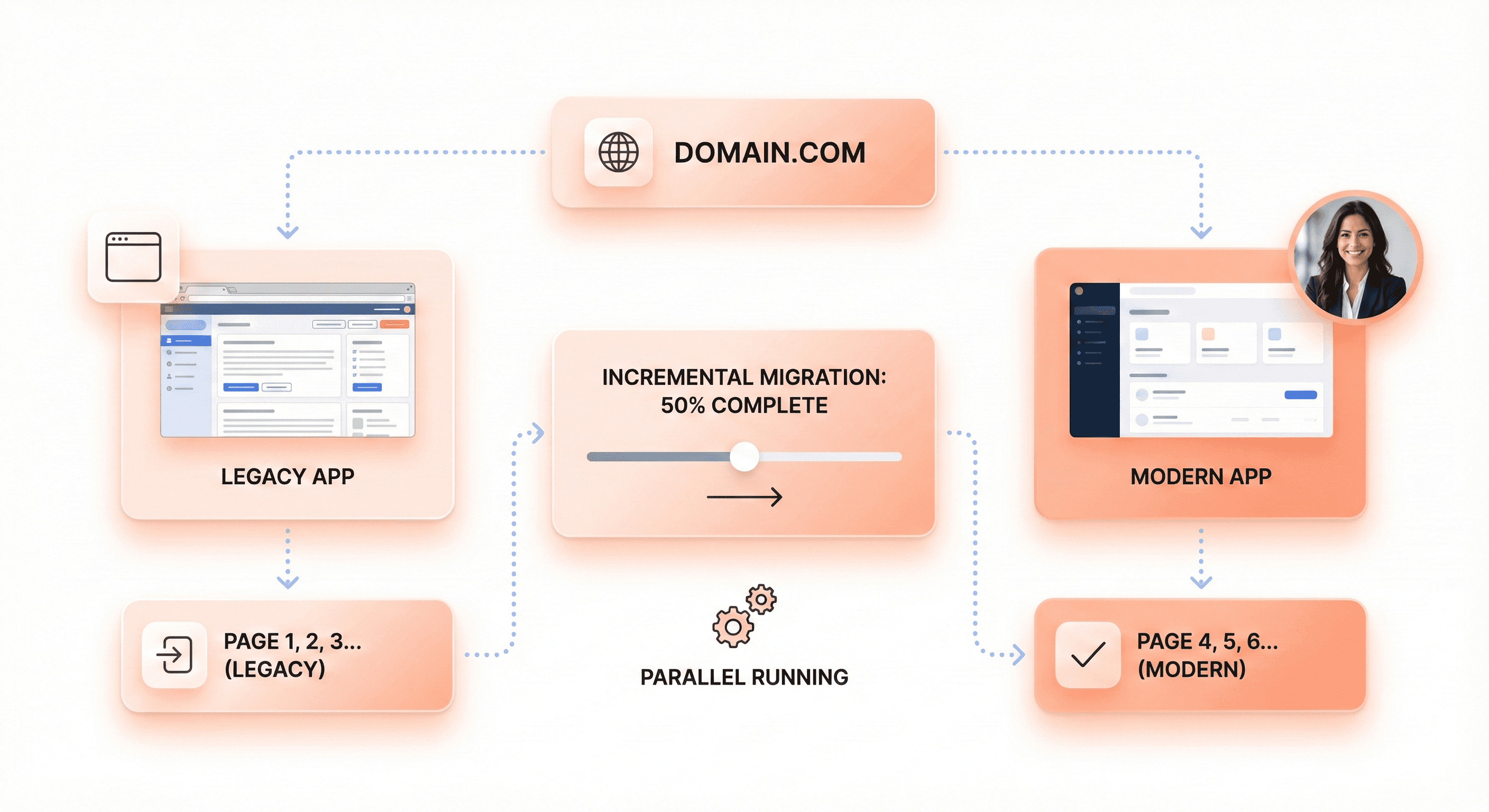
Page-by-page frontend migration where legacy and modern applications run in parallel under the same domain

Page-by-page migration represents a vertical incremental strategy where specific functionality is gradually moved to the new system. Start by identifying migration boundaries within your application - common segments include /dashboard, /settings, /admin, and /auth sections. Select the first section based on minimal dependencies and isolated logic to reduce complexity.

Implement proxy routing using reverse proxy configuration to direct traffic intelligently. Configure your web server with rules that route specific paths to the new system while maintaining all other traffic on the legacy application:


This routing strategy allows both applications to serve under the same domain, making the transition completely transparent to users. As each section is successfully migrated and validated, expand the proxy rules to include additional pages until the entire legacy system is replaced.

A/B Testing During Transition Phases

A/B testing during migration provides crucial validation of both technical implementation and business value substantially earlier in the process. Implement dark launches where traffic is sent to both old and new systems simultaneously, allowing direct comparison of responses to validate identical behavior.

Configure your infrastructure to serve a percentage of traffic through the new system while maintaining the legacy system as the primary handler. Start with a small percentage - perhaps 5-10% of traffic - and gradually increase as confidence builds in the new system's stability and performance.

Monitor key metrics during these phases including response times, error rates, and user experience indicators. The new system should demonstrate bug-for-bug compatibility with the legacy system while achieving the intended improvements in performance or functionality. Only proceed to full migration once the A/B testing phase proves the new system meets all requirements and user expectations remain unchanged.

This incremental validation approach minimizes risk by providing natural rollback points and ensures business continuity throughout the modernization process.

Choosing the Right Technology Stack and Framework

Evaluating Long-Term Framework Viability and Support

When selecting a technology stack for legacy modernization, long-term viability becomes critical. The reference content emphasizes that today's new approach is tomorrow's legacy, making it essential to evaluate framework sustainability before committing to migration.

Framework migrations are among the most complex types of frontend modernization projects. They often arise through acquisitions where different tech stacks need integration, when legacy applications require modernization for new features, or when scaling issues emerge with existing codebases. Understanding the framework's roadmap, community support, and vendor backing helps avoid future migration cycles.

Consider the community ecosystem surrounding your chosen framework. Technologies with wider community support make it easier to hire developers, find solutions to common issues, and receive ongoing updates. The reference content highlights examples like migrating from Flow to TypeScript - while TypeScript may not necessarily solve problems better, its wider community adoption provides long-term advantages for team growth and knowledge sharing.

Evaluate vendor sunset risks carefully. Some legacy systems face forced migrations when technologies are phased out entirely, creating pressure and tight timelines. Choose frameworks with strong backing from established companies or robust open-source communities that can sustain development over time.

Prioritizing Reusability and Component Sharing

The reference content reveals a critical challenge in large projects: old patterns keep replicating. New team members often look around for examples and replicate existing approaches, which can extend transition periods and multiply deprecated patterns across the codebase.

To combat this issue, prioritize frameworks that support component reusability and sharing. Modern frameworks should enable teams to create standardized component libraries that can be shared across different parts of the application during migration phases.

When migrating between frameworks, the ability to create reusable components becomes essential for maintaining consistency. The reference content discusses how different tools and approaches can accumulate for the same problem, leading to performance degradation as users download code that solves identical problems multiple times unnecessarily.

Consider frameworks that support:

  • Component libraries with clear documentation

  • Design system integration

  • Cross-team sharing mechanisms

  • Version control for components

This approach prevents the multiplication of overlapping solutions and reduces the complexity that comes from managing multiple tools solving the same problems.

Leveraging Existing Components to Avoid Reinventing Solutions

Rather than rebuilding everything from scratch, successful modernization strategies focus on leveraging existing components and gradually replacing legacy pieces. The reference content outlines two proven progressive migration strategies that preserve existing functionality while introducing modern frameworks.

"Outside in" migration represents a top-down approach where you migrate the application shell first, then replace legacy pages one by one at the route level. This strategy allows you to gain benefits from the new stack early while creating clear boundaries between legacy and modern code. You can release newly migrated pages progressively using feature flags for controlled rollouts.

"Inside out" migration takes a bottom-up approach, replacing legacy pieces piecemeal while keeping the existing shell and entry point. This method works well for exploration phases where teams want to test new frameworks without committing to full migration upfront.

Both strategies emphasize preserving existing workflows while introducing new technology. The reference content warns against making UX updates simultaneously with framework migrations, as scope creep contributes to prolonged timelines and increased complexity.

Focus on frameworks that support gradual integration patterns. Look for technologies that can coexist with legacy systems during transition periods, allowing for incremental replacement rather than disruptive big-bang migrations. This approach maintains business continuity while modernizing the underlying technology stack.

Consider automation opportunities when selecting frameworks. The reference content suggests investing in static code analysis and automated change tools like code mods. Choose frameworks that support consistent patterns, avoid import aliasing, and minimize dynamic behavior that makes code harder to analyze and migrate automatically.

Implementing Microfrontends for Scalable Architecture
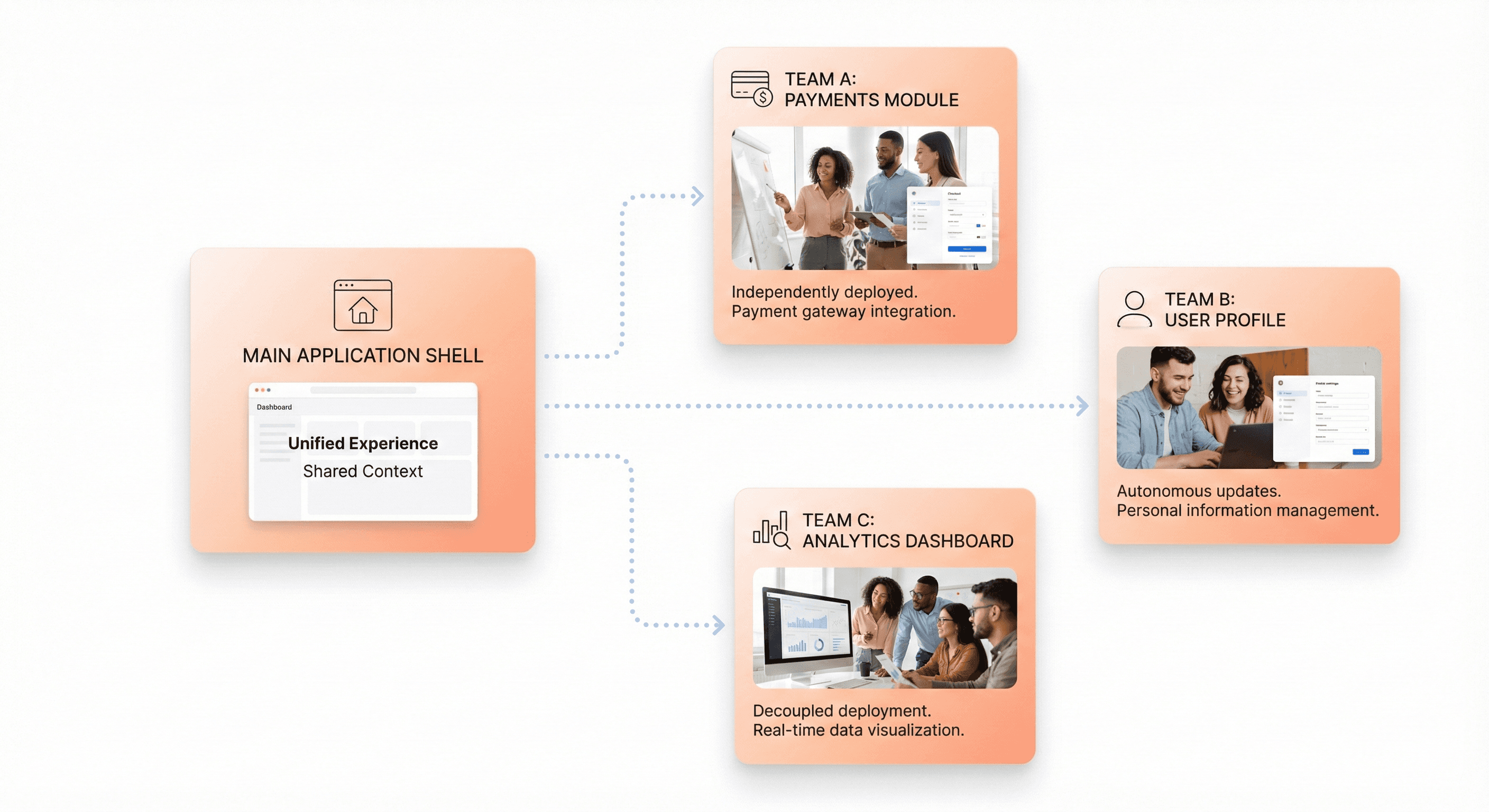
Microfrontend architecture enabling independent teams to deploy scalable frontend components safely

Breaking Monolithic Applications into Feature-Based Components

Now that we have covered strategic planning and assessment, the next critical step involves decomposing your monolithic frontend into manageable, feature-based components. This process requires identifying technical boundaries within the existing application, commonly referred to as "seams," which act as delineation points of modularity.

The decomposition strategy operates on two dimensional levels:

Vertical Segmentation: This approach involves segregating components and services based on their functionalities. Each vertical slice represents a self-contained, highly cohesive, and independently deployable unit that encompasses all layers and serves a specific business capability. This makes vertical separation more advantageous in the context of modernization as it provides a finer level of decomposition, allowing you to deliver end-to-end functionality with each increment while selectively replacing only the necessary parts of each layer.

Horizontal Segmentation: Applications can be segmented and systematically replaced by layers (presentation layer, service layer, data access layer). While this approach offers structured decomposition, it typically requires an intermediary facade positioned between affected layers to represent each functional entry point.

Micro Frontend architecture (MFE) provides the clean mechanism needed to achieve full feature parity from the onset. By allowing components to originate from independent deployments and permitting competing technologies (such as React or Angular) to coexist within a single interface, MFE enables you to incrementally replace the frontend in thin, vertical slices without impacting the rest of the application.

The key principle is to align micro-frontends with business domains, not technical layers. Instead of organizing code by framework or feature type, design independent product capabilities that map to real user needs - catalogue, checkout, profile, analytics. This domain-driven alignment enables micro-frontends to scale effectively.

Independent Team Ownership and Development Workflows

With this modular foundation in place, micro-frontends unlock true team autonomy by design. Each team can own slices of the product end-to-end - domain, design, delivery - without waiting for centralized approval or coordination through a single release train.

This ownership model addresses the core organizational challenges that slow down delivery. When teams are forced to coordinate through shared codebases, decision-making slows and creativity fades. Micro-frontends reverse this dynamic by allowing teams to:

  • Choose their technology stack independently: Teams can select frameworks, libraries, and tools that best serve their domain without compatibility constraints

  • Maintain separate development workflows: Each team can establish their own coding standards, testing practices, and development processes

  • Release on independent schedules: Teams can ship features based on business priorities rather than waiting for organization-wide release windows

The autonomy doesn't come without structure. Shared guidelines around routing, design tokens, and observability create coherence without reintroducing central control. The goal is creating a federation of teams rather than anarchy of frameworks.

This model particularly benefits large-scale applications where multiple teams work on different functional areas. Organizations like Spotify, Netflix, and American Express have adopted MFE specifically to give teams the independence needed to develop, deploy, and scale their respective parts of the application without the complexities of shared codebases.

Managing CI/CD Pipelines for Distributed Frontend Components

Previously, we've established team autonomy and component boundaries. Now, the technical infrastructure must support independent deployment workflows while maintaining system coherence.

Each micro-frontend requires its own CI/CD pipeline that can deploy independently without affecting other components. This distributed deployment model eliminates the bottlenecks of coordinated releases while enabling faster feedback cycles.

Pipeline Architecture Considerations:

  • Independent Build Processes: Each micro-frontend maintains its own build configuration, dependency management, and testing pipeline

  • Deployment Isolation: Components can be deployed to production independently, reducing risk and enabling faster iterations

  • Rollback Capabilities: Individual micro-frontends can be rolled back without affecting the entire application

Integration Strategies:

The most effective approach involves centralizing routing logic at the edge layer (CDN or edge functions) rather than embedding conditional logic inside application code. This pattern enables:

  • Instant Traffic Control: Route-level decisions determine which micro-frontend serves specific requests

  • Progressive Rollouts: Canary deployments and feature flags can be managed at the routing layer

  • Zero-Downtime Rollbacks: Traffic can be redirected to stable versions immediately without code redeployment

Cross-Component Coordination:

While maintaining independence, certain shared concerns require coordination:

  • Shared Dependencies: Design systems and utility libraries should have their own release cycles, typically slower and more stable than individual micro-frontends

  • Integration Testing: End-to-end testing across micro-frontends requires orchestration, though this should be minimal to preserve autonomy

  • Monitoring and Observability: Centralized monitoring provides system-wide visibility while allowing teams to own their component-specific metrics

This infrastructure enables the continuous modernization practice where teams can evolve their technology stacks incrementally, preventing systems from returning to outdated states while maintaining delivery velocity.

Performance Modernization Techniques

Code Splitting and Lazy Loading Implementation

Now that we've covered strategic migration approaches, implementing proper code splitting and lazy loading becomes essential for modernizing performance without disrupting existing workflows. The fundamental principle behind these techniques is loading only the code that users actually need, when they need it.

Dynamic Import Strategy

The most effective approach for legacy modernization involves implementing dynamic imports for component-level code splitting. This allows you to load JavaScript components on demand rather than bundling everything upfront:

This technique is particularly valuable when modernizing legacy frontends because it enables you to upgrade individual components without affecting the entire application bundle.

Webpack Configuration for Optimal Splitting

To maximize the benefits of code splitting in your modernization project, configure Webpack with strategic cache groups that separate vendor libraries from your application code:

optimization: {
  runtimeChunk: { name: 'manifest' },
  splitChunks: {
    cacheGroups: {
      vendor: {
        name: 'chunk-vendors',
        test: /[\\/]node_modules[\\/]

This configuration ensures that frequently used libraries are cached separately, reducing redundant downloads when updating application code.

Cache-Busting for Modernized Assets

Implement content hash-based filenames to ensure proper cache invalidation when modernizing legacy components. Use [contenthash] in your output configuration to generate unique filenames based on content changes, ensuring users always receive the latest versions of updated components while preserving cache efficiency for unchanged assets.

Image Optimization and Responsive Design Strategies

With code splitting established, optimizing images and implementing responsive design becomes the next critical performance modernization technique. Legacy applications often suffer from inefficient image handling that significantly impacts load times and user experience.

Lazy Loading Implementation

Implement lazy loading for images to reduce initial page load times, especially important when modernizing content-heavy legacy applications:

<img data-src="image.jpg" />

Responsive Image Strategies

Modernize legacy image handling by implementing responsive images using the <picture> element with srcset and media queries:

<picture>
  <source srcset="banner_w1000.jpg" media="(min-width: 801px)">
  <source srcset="banner_w800.jpg" media="(max-width: 800px)">
  <img src="banner_w800.jpg" alt="">
</picture>

Advanced Lazy Loading Patterns

For enhanced user experience in modernized applications, implement hover-based lazy loading for non-critical large images:

<div class="image-container">
  <img class="thumbnail" src="thumb.jpg">
  <img class="full-size" data-src="large.jpg" />
</div>

Modern Image Formats

Implement WebP format support to reduce image sizes by up to 30% while maintaining quality. Use progressive enhancement with fallbacks:

<picture>
  <source srcset="image.webp" type="image/webp" />
  <source srcset="image.jpg" type="image/jpeg" />
  <img src="image.jpg" alt="desc" />
</picture>

Server-Side Rendering for Enhanced User Experience

Previously, we've addressed client-side optimizations, but server-side rendering (SSR) represents a fundamental shift in how modernized applications deliver content to users. SSR is particularly beneficial when modernizing legacy frontends because it provides immediate performance improvements while maintaining compatibility with existing workflows.

SSR vs Client-Side Rendering

The key advantage of server-side rendering lies in delivering fully rendered HTML to the client, resulting in faster initial display and improved perceived performance. Unlike client-side rendering where users see a blank screen until JavaScript loads and executes, SSR provides immediate visual feedback.

SSR Implementation Process

The SSR process involves several coordinated steps that work seamlessly with existing backend systems:

  1. Server renders HTML with pre-fetched data from existing APIs

  2. Client receives fully rendered HTML and begins displaying content immediately

  3. JavaScript loads asynchronously in the background for hydration

  4. Interactive features become available without disrupting the displayed content

This approach is particularly valuable for legacy modernization because it allows you to implement modern rendering techniques while preserving existing data sources and API endpoints.

Integration Benefits

SSR provides enhanced SEO capabilities and faster time-to-first-contentful-paint, crucial metrics for business-critical legacy applications. The technique also ensures that essential content remains accessible even if JavaScript fails to load, providing a robust fallback that maintains functionality for users with older browsers or slow connections.

By implementing these server-side rendering techniques alongside code splitting and image optimization, your modernized frontend achieves significant performance improvements while maintaining operational compatibility with existing workflows and systems.

Security and Access Management in Modern Frontends

Implementing Secure Component-Level Access Controls

Previously, as we've covered the strategic aspects of frontend modernization, implementing proper security measures becomes critical when transitioning legacy systems. Component-level access controls form the foundation of secure frontend architecture, requiring careful implementation of authentication and authorization mechanisms.

The fundamental principle in frontend security is that the client is inherently insecure. Any browser API used for storage, including localStorage and sessionStorage, is visible to users and can be modified. This means storing sensitive authentication tokens like JWTs in localStorage creates significant vulnerabilities, as XSS attacks can access these tokens and compromise backend security.

For robust component-level security, implement HttpOnly cookies instead of client-side token storage. These cookies cannot be accessed by JavaScript, preventing malicious scripts from extracting authentication data. The server loads the cookie content, extracts the JWT, and handles verification server-side, maintaining a secure authorization process.

Component access should be controlled through role-based authorization systems. When users authenticate, they receive tokens with specific roles (like "Pro User" or "Standard User"). Each frontend component checks these roles before rendering sensitive content or enabling specific functionality. This approach ensures that users only access components they're authorized to use.

Implement Content Security Policy (CSP) headers to protect against XSS attacks at the component level. A minimal CSP configuration should include:


Managing Team Permissions and Collaboration Spaces

Now that we have covered component-level security, team permission management becomes essential for maintaining secure collaboration workflows during modernization projects. Different team members require varying access levels to different parts of the modernized application.

Establish hierarchical permission structures that align with your organization's roles. Backend developers might need access to API endpoints and database configurations, while frontend developers require access to UI components and styling frameworks. Product managers might need read-only access to analytics dashboards, while QA teams require comprehensive testing permissions across all environments.

Implement environment-specific access controls to prevent accidental deployment issues. Development, staging, and production environments should have distinct permission levels. Junior developers might have full access to development environments but restricted access to production deployments. This segmentation prevents unauthorized changes from affecting live user experiences.

For API access management, use different token types for different use cases. Frontend application tokens should have limited scope for UI functionality, while API-specific tokens for paid services require separate authorization levels. This separation ensures that users cannot extract frontend tokens to access premium API features without proper payment authorization.

Token rotation strategies should balance security with user experience. While rotating tokens per request provides maximum security, it can break multi-tab functionality. Instead, implement session-based rotation with reasonable timeframes that maintain security without compromising usability.

Protecting Sensitive Frontend Components

With team permissions established, protecting sensitive components requires implementing multiple layers of defense against various attack vectors. Frontend components containing sensitive business logic, user data, or premium features need comprehensive protection strategies.

CSRF protection is essential for sensitive components handling form submissions or financial transactions. Implement CSRF tokens that are generated per session and included in form payloads. Components processing sensitive actions should validate these tokens before executing requests. This prevents malicious sites from triggering unauthorized actions on behalf of authenticated users.

Clickjacking protection prevents malicious sites from embedding your components in invisible iframes. Set the X-Frame-Options header to DENY or use CSP's frame-ancestors 'none' directive. This ensures sensitive components cannot be embedded in malicious sites that trick users into unintended actions.

For components handling financial or sensitive data, implement additional verification layers. Rate limiting prevents excessive requests that could indicate automated attacks. Two-factor authentication for high-risk actions adds extra security for critical operations like money transfers or account modifications.

Supply chain security protects components from compromised dependencies. Avoid CDNs for critical components and use package-lock.json files to prevent dependency manipulation. Pin specific dependency versions and regularly audit third-party packages for known vulnerabilities.

Race condition protection prevents double-submission issues in sensitive components. Disable submission buttons immediately after user interaction and implement server-side duplicate detection for financial transactions. This prevents users from accidentally triggering multiple premium purchases or sensitive operations.

Client-side validation should complement, not replace, server-side security. While frontend validation improves user experience, remember that any frontend constraint can be bypassed. Use client-side checks for immediate feedback while ensuring all security validation occurs on the backend where it cannot be manipulated.

DevOps Integration for Continuous Modernization

Automated Testing and Regression Prevention

With modernization efforts underway, establishing comprehensive automated testing becomes critical for maintaining application quality while preventing regression issues. Legacy applications often suffer from regression problems during modernization programs, making automated testing frameworks essential for identifying defects early and reducing downtime while ensuring maximum reliability.

Automated testing serves as the foundation for safe modernization by creating safety nets around existing functionality before any changes are made. The implementation involves using tools like Selenium, TestNG, and JUnit for functional testing, regression testing, and performance validation throughout the modernization lifecycle. These frameworks enable teams to build test coverage around existing functionality first, allowing safe modernization without breaking critical features.

The key principle is shifting testing left in the development process - catching defects as early as possible rather than discovering them late in the cycle. For legacy systems without existing tests, pipelines should begin by adding smoke tests and gradually evolve into comprehensive unit, integration, and regression coverage. This progressive approach ensures that modernization efforts don't introduce new bugs while maintaining the reliability of business-critical operations.

Independent Build and Test Pipelines

Now that we've covered the importance of automated testing, implementing independent build and test pipelines becomes the next crucial step for scalable modernization. These pipelines form the backbone of continuous integration and continuous deployment (CI/CD), which smoothens the integration of code changes with testing and deployment processes without interruption.

Independent pipelines are particularly valuable when dealing with legacy applications that have complex codebases and numerous dependencies. By creating separate, isolated build environments, teams can migrate or modernize different components without affecting the entire system. Tools like Jenkins, GitLab CI/CD, and Azure DevOps provide powerful automation capabilities for build, test, and deployment processes.

The implementation involves designing pipelines that can handle different modernization scenarios. For lift-and-shift migrations, pipelines focus on deployment automation and monitoring. During replatforming efforts, pipelines automate builds and deployments while introducing automated testing to validate changes against new platform services. For comprehensive refactoring projects, each new service receives its own CI/CD pipeline with progressive delivery, rollback mechanisms, and automated testing.

Version control integration becomes essential, with all code, configuration, and database scripts moved into Git repositories to enable GitOps workflows. This approach ensures that every change is tracked, validated, and can be rolled back if necessary, providing the safety and reliability required for mission-critical legacy system modernization.

Deployment Automation to Static Hosts

Previously, we've established the foundation with testing and build pipelines. With this in mind, deployment automation to static hosts represents the final piece of the DevOps integration puzzle for continuous modernization. This approach addresses the common challenge of manual release cycles that plague legacy applications, where deployments are still performed using shell scripts, email checklists, or line-by-line administrative commands.

Deployment automation transforms these error-prone manual processes into consistent, repeatable workflows. Using Infrastructure as Code (IaC) tools like Terraform and AWS CloudFormation, infrastructure can be provisioned consistently across development, staging, and production environments. This eliminates the "works on my machine" problem where applications pass testing but fail in production due to environmental inconsistencies.

For static host deployments, automation tools like Ansible playbooks provide powerful capabilities for managing server configurations and application deployments. These tools ensure that every deployment follows the same validated process, reducing the risk of human error and enabling faster delivery cycles. Container technologies like Docker can further enhance deployment consistency by packaging applications with their dependencies, making them portable across different environments.

The automation strategy should always include robust rollback mechanisms, especially for legacy environments that tend to be fragile. Pipeline designs incorporate blue-green deployment strategies, canary releases, or snapshot-based rollbacks to ensure that any issues can be quickly resolved without extended downtime. This safety-first approach builds confidence in the modernization process while maintaining business continuity.

Conclusion
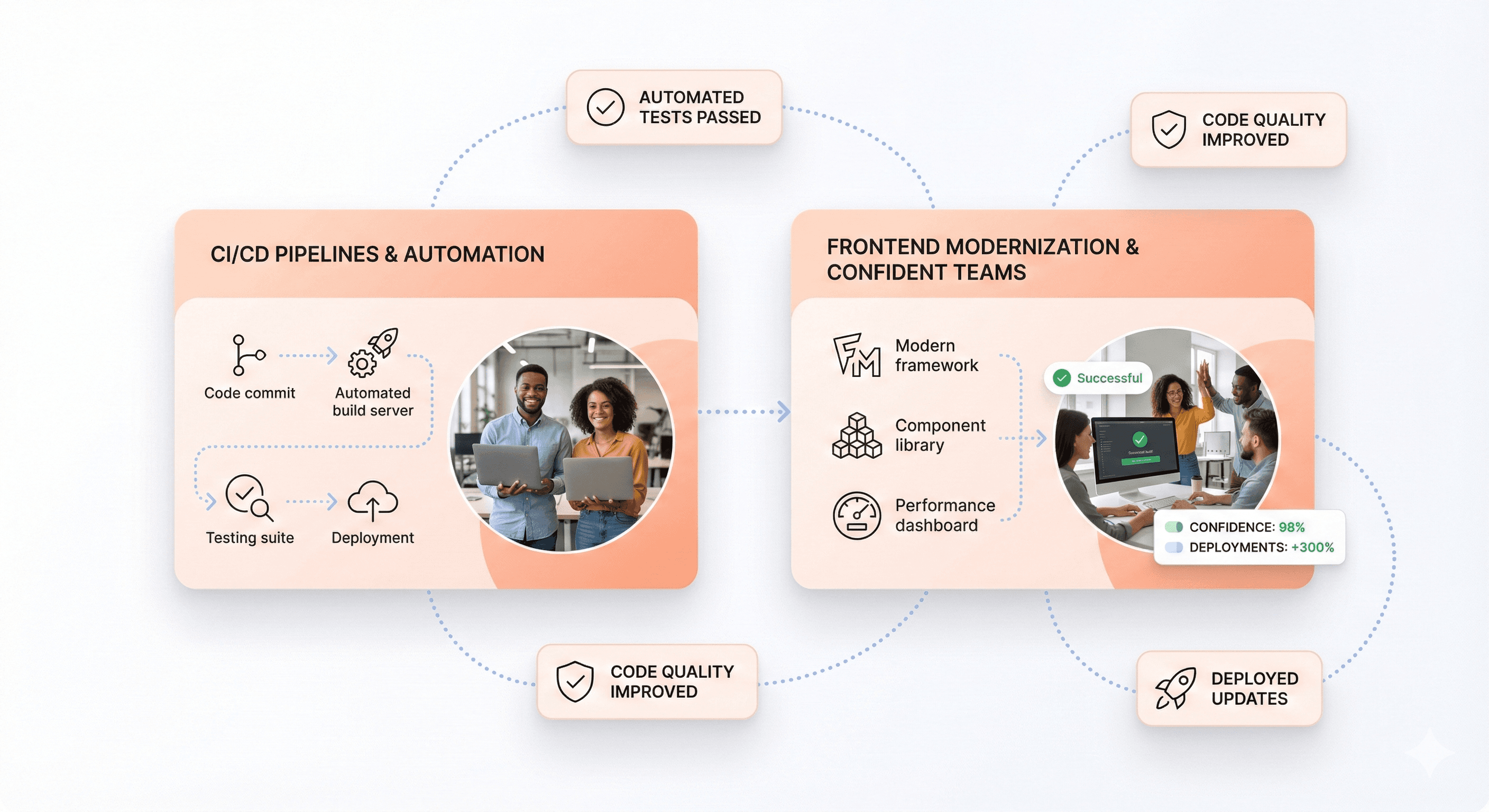
Automated CI/CD pipelines enabling continuous frontend modernization and faster, safer deployments

Modernizing a legacy frontend without breaking existing workflows requires a strategic, incremental approach that prioritizes both technical excellence and business continuity. By following the principles outlined—from strategic assessment and gradual migration strategies to implementing microfrontends and modern performance techniques—organizations can transform their user experience while maintaining operational stability. The key lies in treating modernization as a systematic process rather than a complete overhaul, focusing on measurable improvements in UI, UX, performance, and scalability.

The path forward demands patience, clear communication with stakeholders, and a commitment to building for the future. Start small with high-impact components, establish robust DevOps practices, and give teams ownership over their domains. Remember that successful frontend modernization isn't just about adopting the latest technologies—it's about creating sustainable systems that serve users better while empowering development teams to iterate faster and more confidently. The investment in time and resources will pay dividends through improved user satisfaction, reduced maintenance costs, and enhanced development velocity for years to come.


Outdated legacy frontends drain productivity and frustrate users, but complete rewrites can break critical business workflows. This guide shows frontend developers and engineering teams how to modernize legacy applications through strategic, incremental upgrades that preserve existing functionality while delivering modern user experiences.

The key is treating modernization as a systematic renovation, not a demolition project. You'll discover proven strategies for gradually upgrading component libraries, implementing modern frameworks alongside legacy code, and introducing performance optimizations without disrupting user workflows.

We'll cover strategic planning techniques that help you assess your current frontend and prioritize high-impact improvements, plus gradual migration approaches that let you modernize one feature at a time while keeping your application running smoothly for users and business teams.

Also Read: Legacy modernization guide for SaaS

Why Legacy Frontend Modernization Is Critical for Business Success

Legacy frontend dashboards causing reduced user adoption, lower retention, and slower business growth

Impact on User Adoption and Retention Rates

Legacy frontend systems create significant barriers to user adoption and retention, directly threatening business growth and competitiveness. Outdated interfaces with slow performance, confusing navigation, and inconsistent functionality frustrate both employees and customers, leading to decreased engagement and higher abandonment rates.

Modern users expect intuitive, responsive experiences that work seamlessly across devices. When businesses maintain legacy frontends with outdated frameworks and limited mobile compatibility, they lose potential customers to competitors offering superior digital experiences. Research shows that 65% of salespeople at firms with mobile CRM achieve their sales quotas, compared to just 22% at companies without modern mobile interfaces, demonstrating the direct correlation between frontend modernization and business performance.

Legacy systems also limit personalization capabilities and fail to support the streamlined workflows that modern users demand. This results in poor user experience that drives customers away and makes it difficult to attract new ones. Organizations relying on outdated frontends struggle to deliver the exceptional user experiences necessary for customer retention in today's competitive market.

Effect on Development Velocity and Team Productivity

Developers struggling with technical debt in legacy frontend systems compared to streamlined modern frontend components

Legacy frontend systems significantly impact development velocity and team productivity through multiple operational challenges. Development teams spend excessive time maintaining outdated codebases, dealing with technical debt, and implementing manual processes that modern frameworks automate.

Technical debt accumulation in legacy systems creates a productivity drain where developers allocate 10-20% of their technology budgets just to resolve issues caused by outdated code structures. This leaves limited resources for innovation and new feature development. Teams working with legacy frontends experience frequent application incidents that are difficult to diagnose and resolve, often requiring disruptive fixes that affect the entire application.

Modern open-source code and cloud-based architectures enable teams to collaborate more effectively, leading to improved team utilization and the elimination of manual processes. When organizations modernize their frontend systems, developers gain access to contemporary toolchains, collaborative environments, and DevOps practices that accelerate product development cycles and improve system reliability. This transformation allows teams to redirect focus toward innovation and customer-centric initiatives rather than constant maintenance of outdated systems.

Operational Cost Reduction and Support Ticket Management

Legacy frontend modernization delivers substantial operational cost reductions by addressing the expensive maintenance burden that outdated systems impose on organizations. Legacy systems consume up to 75% of IT budgets for ongoing maintenance, with organizations spending an average of $40,000 annually just to keep these systems operational. This massive resource allocation leaves minimal budget for strategic initiatives and innovation.

Modernized frontend systems significantly reduce maintenance and support costs through improved stability, automated updates, and easier troubleshooting capabilities. Modern architectures eliminate the need for costly patches, manual updates, and complex repairs that characterize legacy system maintenance. Support teams experience fewer incidents and can resolve issues more quickly without disrupting core business operations.

The cost benefits extend beyond direct maintenance savings. Organizations reduce their dependency on rare technical skills required to maintain legacy systems, as modern frameworks utilize widely available expertise. This eliminates the premium costs associated with specialized enterprise frontend modernization knowledge and reduces the risk of operational disruptions due to limited personnel availability.

Additionally, modernized systems enable better integration with automated monitoring and support tools, reducing the volume of support tickets and enabling proactive issue resolution. This operational efficiency allows IT departments to allocate resources more strategically, transforming technology spending from a maintenance burden into a driver of business value and competitive advantage.

The Four Pillars of Frontend-First Legacy Modernization

UI Modernization Through Component-Based Design Systems

Reusable UI components and design tokens forming a scalable component-based design system for modern frontends

Building a scalable frontend architecture starts with adopting component-based design systems that form the foundation of modern applications. Component-based architectures enable teams to create modular, reusable elements that can be shared across multiple projects, reducing redundancy and ensuring design consistency throughout the application ecosystem.

The key to successful UI modernization lies in establishing a centralized component library that serves as a single source of truth for all interface elements. This approach allows teams to maintain up-to-date features efficiently while avoiding redundant work. Modern design systems leverage open-source UI libraries like MUI, Antd, or ShadCN as their foundation, providing robust building blocks for rapid development.

Design tokens play a crucial role in maintaining consistency across the organization. These standardized colors, fonts, spacing guidelines, and other visual elements create a common language between design and development teams. When properly implemented, design tokens ensure that buttons, charts, and layouts remain cohesive rather than drifting apart over time, which was a common challenge in legacy systems.

The integration of design-to-code workflows significantly accelerates the modernization process. Tools that convert design files directly into production-ready code bridge the gap between design and development teams, speeding up development cycles and ensuring design consistency across frontend components. This automated approach reduces manual errors and maintains visual fidelity from concept to implementation.

UX Enhancement with Modern User Experience Patterns

Modern frontend UX patterns delivering faster load times with responsive design and server-side rendering

Now that we have covered the foundational aspects of component-based design, the focus shifts to enhancing user experience through modern interaction patterns that meet contemporary user expectations for speed and functionality. Modern UX patterns prioritize responsiveness and intuitive navigation, addressing the performance bottlenecks that plagued legacy systems.

The shift toward modern UX patterns involves implementing faster load times and improved responsiveness that users expect from contemporary applications. Legacy systems often suffered from inconsistent user experiences due to scattered design elements and lack of centralized theming. Modern approaches consolidate these elements into unified design patterns that create seamless, consistent interactions across the entire application.

Edge rendering and server-side rendering (SSR) have become essential components of modern UX enhancement strategies. By bringing content closer to users through solutions like Vercel's Edge Functions or Cloudflare Workers, applications can deliver significantly improved load times and user experience on a global scale. React with Next.js has emerged as the industry standard for combining server and client-side components, leveraging SSR to optimize performance while maintaining interactive functionality.

The implementation of modern user experience patterns also addresses the fragmentation issues that commonly affect legacy systems. When customers encounter friction due to inconsistent interfaces, it directly impacts business outcomes. Modern UX patterns eliminate these pain points by establishing standardized interaction models that users can intuitively understand and navigate.

Performance Optimization for Faster Load Times

Optimized frontend bundles showing reduced load time using code splitting and performance optimization techniques

With modern UX patterns established, performance optimization becomes the critical factor that determines user satisfaction and business success. Legacy frontend systems often struggle with substantial bundle sizes that create significant performance bottlenecks, particularly affecting users on slower networks.

Aggressive bundle optimization represents one of the most impactful performance improvements available to legacy systems. Modern approaches can achieve dramatic reductions in core bundle sizes—in some cases reducing them by approximately 80%—through strategic restructuring and dead code removal. These optimizations require implementing automated CI checks to ensure performance regressions don't reappear during future development cycles.

Performance engineering must become a built-in guarantee rather than an afterthought. This involves implementing optimized bundles, strategic prefetching, comprehensive caching strategies, and preview environments that allow teams to test performance impacts before production deployment. CI-enforced guardrails ensure that performance standards are maintained throughout the development process.

The challenge of bundle sizes crossing 1.2 MB in legacy systems demonstrates the critical need for performance-first thinking. Modern performance optimization techniques focus on code splitting, lazy loading, and intelligent caching mechanisms that dramatically reduce initial load times while maintaining full functionality for users who need advanced features.

Scalability Architecture for Long-Term Growth

Previously, we've examined the immediate performance benefits of modernization, but scalability architecture ensures that these improvements can accommodate long-term growth and evolving business requirements. Scalability architecture addresses the rigid, tightly coupled systems that make even small changes risky and time-consuming.

Microfrontends represent a transformative approach to scalability, allowing teams to break down monolithic frontends into smaller, independently deployable components. This architecture enables parallel development where multiple teams can ship features without stepping on each other's toes, addressing one of the most significant collaboration challenges in legacy systems.

The plugin-based design philosophy supports safe extensibility and independent team operations. Teams can develop and deploy components in isolation using standard interfaces between different code segments, which simplifies application scalability for large frontend applications. This modular approach transforms the development process from a coordination nightmare into a streamlined, collaborative effort.

Maintainability and scalability work hand-in-hand through simplified state management, consolidated APIs, and improved testability. Legacy systems often suffer from scattered API calls and Redux stores that mix server and UI state, creating layers of complexity that discourage cross-team contributions. Modern scalability architecture consolidates these elements into manageable, well-defined boundaries that teams can understand and modify safely.

The architectural transformation also addresses the painful developer experience that plagues legacy systems, where slow build times and long local boot-ups can drain productivity. Modern scalability architecture prioritizes developer experience with faster feedback loops, smoother onboarding processes, and tooling that developers actually enjoy using, creating a foundation for sustained innovation and growth.

Strategic Planning and Assessment for Modernization Projects

Conducting Comprehensive Legacy System Audits

Now that we understand the importance of legacy frontend modernization, the foundation of any successful modernization project begins with a thorough system audit. A comprehensive legacy system audit involves three critical components: complete system documentation, performance evaluation, and security assessment.

System Documentation and Mapping

Begin by creating a detailed inventory of all legacy systems, documenting key attributes including system name, version, installation date, programming languages, frameworks, and databases used. Document maintenance status with update frequency and last patch date, along with support status indicating vendor support availability and internal expertise levels. Include usage metrics tracking active users, transaction volume, and peak loads.

Equally important is mapping system connections to understand dependencies. Document data flows recording how information moves between systems, including format and frequency of data exchanges. Note integration points such as APIs, file transfers, and database connections that enable system communication. Identify service dependencies to understand which systems rely on others for proper operation and potential failure impacts.

Performance and Technical Assessment

Evaluate system performance through critical metrics that directly affect operations. Measure response times for transaction processing, system uptime percentages, error rates, and resource usage monitoring CPU, memory, and storage consumption. Conduct peak load testing to reveal maximum concurrent user capacity and identify scalability limits.

Common performance issues include increased processing times where tasks take minutes instead of seconds, memory leaks requiring frequent restarts, database bottlenecks causing slower queries, integration failures requiring manual intervention, and outdated dependencies creating compatibility issues.

Identifying High-Impact Quick Wins and Prioritization

With comprehensive audit data in hand, the next step involves strategic prioritization based on business impact and technical urgency. Effective prioritization ensures maximum return on modernization investment while minimizing operational disruption.

Risk-Based Prioritization Framework

Establish a priority matrix categorizing systems into four levels. Critical priority systems require immediate attention within 0-3 months due to security risks, compliance gaps, or severe performance problems. High priority systems supporting essential business functions with major inefficiencies or high maintenance costs should be addressed within 3-6 months. Medium priority systems with manageable workarounds can be scheduled for 6-12 months, while low priority stable systems with minor concerns can be updated after 12+ months.

Quick Win Identification

Focus on identifying opportunities that deliver immediate value with minimal effort. These include addressing outdated authentication systems with weak password policies, resolving unpatched software vulnerabilities, updating legacy protocols that don't meet modern encryption standards, and improving audit trail capabilities with better logging systems.

Cost-Benefit Analysis

Evaluate both direct and indirect costs associated with each system. Direct costs include maintenance, support, and infrastructure expenses. Hidden costs encompass personnel training requirements, integration complexity, and productivity impacts. Consider how legacy systems affect customer response times, increase error rates through manual workarounds, create information silos, and limit remote work capabilities.

User Research and Pain Point Analysis

Understanding how legacy systems impact actual users provides crucial insights for prioritization and modernization planning. User research reveals operational inefficiencies that may not be apparent through technical audits alone.

Workflow Impact Assessment

Document how legacy systems disrupt daily workflows and reduce operational efficiency. Common issues include delayed customer responses due to slower processing speeds, increased error rates from manual workarounds, information isolation caused by poor integration preventing departmental collaboration, and productivity interruptions from frequent system downtime creating task backlogs.

User Experience Evaluation

Assess the human impact of legacy systems on employee productivity and satisfaction. Extended training requirements for complex interfaces increase onboarding time for new employees. Limited mobile access capabilities restrict flexible work arrangements. Outdated user interface designs frustrate employees and slow work processes, potentially affecting morale and increasing workplace dissatisfaction.

Business Process Alignment

Connect each system to its corresponding business process to understand impact levels. Finance departments typically depend on payment processing and general ledger systems with critical impact. Operations rely on inventory management and order systems with high impact. HR departments use personnel records and payroll systems with medium impact, while marketing utilizes CRM and email platforms with variable impact levels.

This comprehensive assessment approach ensures modernization efforts address both technical debt and user needs, creating a solid foundation for successful frontend modernization that preserves existing workflows while delivering meaningful improvements.

Gradual Migration Strategies That Preserve Existing Workflows

Building New Components Outside Legacy Codebase

The first principle of preserving existing workflows during modernization is to establish a parallel development environment. Rather than modifying the legacy system directly, create a completely separate application alongside your existing codebase. This approach allows teams to bootstrap new frameworks like Next.js while keeping the original Nuxt application fully operational and serving users.

When implementing this strategy, extract shared components into reusable packages. Create small npm packages containing UI components, session handling logic, and design system configurations that both applications can import. This ensures UX consistency during the transition while preventing code duplication across systems.

The key to success lies in maintaining data consistency between systems. Both the legacy and new applications should share the same APIs, databases, and authentication mechanisms. This shared foundation enables seamless coexistence without disrupting existing user sessions or data integrity.

Implementing Incremental Page-by-Page Migration

Page-by-page frontend migration where legacy and modern applications run in parallel under the same domain

Page-by-page migration represents a vertical incremental strategy where specific functionality is gradually moved to the new system. Start by identifying migration boundaries within your application - common segments include /dashboard, /settings, /admin, and /auth sections. Select the first section based on minimal dependencies and isolated logic to reduce complexity.

Implement proxy routing using reverse proxy configuration to direct traffic intelligently. Configure your web server with rules that route specific paths to the new system while maintaining all other traffic on the legacy application:


This routing strategy allows both applications to serve under the same domain, making the transition completely transparent to users. As each section is successfully migrated and validated, expand the proxy rules to include additional pages until the entire legacy system is replaced.

A/B Testing During Transition Phases

A/B testing during migration provides crucial validation of both technical implementation and business value substantially earlier in the process. Implement dark launches where traffic is sent to both old and new systems simultaneously, allowing direct comparison of responses to validate identical behavior.

Configure your infrastructure to serve a percentage of traffic through the new system while maintaining the legacy system as the primary handler. Start with a small percentage - perhaps 5-10% of traffic - and gradually increase as confidence builds in the new system's stability and performance.

Monitor key metrics during these phases including response times, error rates, and user experience indicators. The new system should demonstrate bug-for-bug compatibility with the legacy system while achieving the intended improvements in performance or functionality. Only proceed to full migration once the A/B testing phase proves the new system meets all requirements and user expectations remain unchanged.

This incremental validation approach minimizes risk by providing natural rollback points and ensures business continuity throughout the modernization process.

Choosing the Right Technology Stack and Framework

Evaluating Long-Term Framework Viability and Support

When selecting a technology stack for legacy modernization, long-term viability becomes critical. The reference content emphasizes that today's new approach is tomorrow's legacy, making it essential to evaluate framework sustainability before committing to migration.

Framework migrations are among the most complex types of frontend modernization projects. They often arise through acquisitions where different tech stacks need integration, when legacy applications require modernization for new features, or when scaling issues emerge with existing codebases. Understanding the framework's roadmap, community support, and vendor backing helps avoid future migration cycles.

Consider the community ecosystem surrounding your chosen framework. Technologies with wider community support make it easier to hire developers, find solutions to common issues, and receive ongoing updates. The reference content highlights examples like migrating from Flow to TypeScript - while TypeScript may not necessarily solve problems better, its wider community adoption provides long-term advantages for team growth and knowledge sharing.

Evaluate vendor sunset risks carefully. Some legacy systems face forced migrations when technologies are phased out entirely, creating pressure and tight timelines. Choose frameworks with strong backing from established companies or robust open-source communities that can sustain development over time.

Prioritizing Reusability and Component Sharing

The reference content reveals a critical challenge in large projects: old patterns keep replicating. New team members often look around for examples and replicate existing approaches, which can extend transition periods and multiply deprecated patterns across the codebase.

To combat this issue, prioritize frameworks that support component reusability and sharing. Modern frameworks should enable teams to create standardized component libraries that can be shared across different parts of the application during migration phases.

When migrating between frameworks, the ability to create reusable components becomes essential for maintaining consistency. The reference content discusses how different tools and approaches can accumulate for the same problem, leading to performance degradation as users download code that solves identical problems multiple times unnecessarily.

Consider frameworks that support:

  • Component libraries with clear documentation

  • Design system integration

  • Cross-team sharing mechanisms

  • Version control for components

This approach prevents the multiplication of overlapping solutions and reduces the complexity that comes from managing multiple tools solving the same problems.

Leveraging Existing Components to Avoid Reinventing Solutions

Rather than rebuilding everything from scratch, successful modernization strategies focus on leveraging existing components and gradually replacing legacy pieces. The reference content outlines two proven progressive migration strategies that preserve existing functionality while introducing modern frameworks.

"Outside in" migration represents a top-down approach where you migrate the application shell first, then replace legacy pages one by one at the route level. This strategy allows you to gain benefits from the new stack early while creating clear boundaries between legacy and modern code. You can release newly migrated pages progressively using feature flags for controlled rollouts.

"Inside out" migration takes a bottom-up approach, replacing legacy pieces piecemeal while keeping the existing shell and entry point. This method works well for exploration phases where teams want to test new frameworks without committing to full migration upfront.

Both strategies emphasize preserving existing workflows while introducing new technology. The reference content warns against making UX updates simultaneously with framework migrations, as scope creep contributes to prolonged timelines and increased complexity.

Focus on frameworks that support gradual integration patterns. Look for technologies that can coexist with legacy systems during transition periods, allowing for incremental replacement rather than disruptive big-bang migrations. This approach maintains business continuity while modernizing the underlying technology stack.

Consider automation opportunities when selecting frameworks. The reference content suggests investing in static code analysis and automated change tools like code mods. Choose frameworks that support consistent patterns, avoid import aliasing, and minimize dynamic behavior that makes code harder to analyze and migrate automatically.

Implementing Microfrontends for Scalable Architecture

Microfrontend architecture enabling independent teams to deploy scalable frontend components safely

Breaking Monolithic Applications into Feature-Based Components

Now that we have covered strategic planning and assessment, the next critical step involves decomposing your monolithic frontend into manageable, feature-based components. This process requires identifying technical boundaries within the existing application, commonly referred to as "seams," which act as delineation points of modularity.

The decomposition strategy operates on two dimensional levels:

Vertical Segmentation: This approach involves segregating components and services based on their functionalities. Each vertical slice represents a self-contained, highly cohesive, and independently deployable unit that encompasses all layers and serves a specific business capability. This makes vertical separation more advantageous in the context of modernization as it provides a finer level of decomposition, allowing you to deliver end-to-end functionality with each increment while selectively replacing only the necessary parts of each layer.

Horizontal Segmentation: Applications can be segmented and systematically replaced by layers (presentation layer, service layer, data access layer). While this approach offers structured decomposition, it typically requires an intermediary facade positioned between affected layers to represent each functional entry point.

Micro Frontend architecture (MFE) provides the clean mechanism needed to achieve full feature parity from the onset. By allowing components to originate from independent deployments and permitting competing technologies (such as React or Angular) to coexist within a single interface, MFE enables you to incrementally replace the frontend in thin, vertical slices without impacting the rest of the application.

The key principle is to align micro-frontends with business domains, not technical layers. Instead of organizing code by framework or feature type, design independent product capabilities that map to real user needs - catalogue, checkout, profile, analytics. This domain-driven alignment enables micro-frontends to scale effectively.

Independent Team Ownership and Development Workflows

With this modular foundation in place, micro-frontends unlock true team autonomy by design. Each team can own slices of the product end-to-end - domain, design, delivery - without waiting for centralized approval or coordination through a single release train.

This ownership model addresses the core organizational challenges that slow down delivery. When teams are forced to coordinate through shared codebases, decision-making slows and creativity fades. Micro-frontends reverse this dynamic by allowing teams to:

  • Choose their technology stack independently: Teams can select frameworks, libraries, and tools that best serve their domain without compatibility constraints

  • Maintain separate development workflows: Each team can establish their own coding standards, testing practices, and development processes

  • Release on independent schedules: Teams can ship features based on business priorities rather than waiting for organization-wide release windows

The autonomy doesn't come without structure. Shared guidelines around routing, design tokens, and observability create coherence without reintroducing central control. The goal is creating a federation of teams rather than anarchy of frameworks.

This model particularly benefits large-scale applications where multiple teams work on different functional areas. Organizations like Spotify, Netflix, and American Express have adopted MFE specifically to give teams the independence needed to develop, deploy, and scale their respective parts of the application without the complexities of shared codebases.

Managing CI/CD Pipelines for Distributed Frontend Components

Previously, we've established team autonomy and component boundaries. Now, the technical infrastructure must support independent deployment workflows while maintaining system coherence.

Each micro-frontend requires its own CI/CD pipeline that can deploy independently without affecting other components. This distributed deployment model eliminates the bottlenecks of coordinated releases while enabling faster feedback cycles.

Pipeline Architecture Considerations:

  • Independent Build Processes: Each micro-frontend maintains its own build configuration, dependency management, and testing pipeline

  • Deployment Isolation: Components can be deployed to production independently, reducing risk and enabling faster iterations

  • Rollback Capabilities: Individual micro-frontends can be rolled back without affecting the entire application

Integration Strategies:

The most effective approach involves centralizing routing logic at the edge layer (CDN or edge functions) rather than embedding conditional logic inside application code. This pattern enables:

  • Instant Traffic Control: Route-level decisions determine which micro-frontend serves specific requests

  • Progressive Rollouts: Canary deployments and feature flags can be managed at the routing layer

  • Zero-Downtime Rollbacks: Traffic can be redirected to stable versions immediately without code redeployment

Cross-Component Coordination:

While maintaining independence, certain shared concerns require coordination:

  • Shared Dependencies: Design systems and utility libraries should have their own release cycles, typically slower and more stable than individual micro-frontends

  • Integration Testing: End-to-end testing across micro-frontends requires orchestration, though this should be minimal to preserve autonomy

  • Monitoring and Observability: Centralized monitoring provides system-wide visibility while allowing teams to own their component-specific metrics

This infrastructure enables the continuous modernization practice where teams can evolve their technology stacks incrementally, preventing systems from returning to outdated states while maintaining delivery velocity.

Performance Modernization Techniques

Code Splitting and Lazy Loading Implementation

Now that we've covered strategic migration approaches, implementing proper code splitting and lazy loading becomes essential for modernizing performance without disrupting existing workflows. The fundamental principle behind these techniques is loading only the code that users actually need, when they need it.

Dynamic Import Strategy

The most effective approach for legacy modernization involves implementing dynamic imports for component-level code splitting. This allows you to load JavaScript components on demand rather than bundling everything upfront:

This technique is particularly valuable when modernizing legacy frontends because it enables you to upgrade individual components without affecting the entire application bundle.

Webpack Configuration for Optimal Splitting

To maximize the benefits of code splitting in your modernization project, configure Webpack with strategic cache groups that separate vendor libraries from your application code:

optimization: {
  runtimeChunk: { name: 'manifest' },
  splitChunks: {
    cacheGroups: {
      vendor: {
        name: 'chunk-vendors',
        test: /[\\/]node_modules[\\/]

This configuration ensures that frequently used libraries are cached separately, reducing redundant downloads when updating application code.

Cache-Busting for Modernized Assets

Implement content hash-based filenames to ensure proper cache invalidation when modernizing legacy components. Use [contenthash] in your output configuration to generate unique filenames based on content changes, ensuring users always receive the latest versions of updated components while preserving cache efficiency for unchanged assets.

Image Optimization and Responsive Design Strategies

With code splitting established, optimizing images and implementing responsive design becomes the next critical performance modernization technique. Legacy applications often suffer from inefficient image handling that significantly impacts load times and user experience.

Lazy Loading Implementation

Implement lazy loading for images to reduce initial page load times, especially important when modernizing content-heavy legacy applications:

<img data-src="image.jpg" />

Responsive Image Strategies

Modernize legacy image handling by implementing responsive images using the <picture> element with srcset and media queries:

<picture>
  <source srcset="banner_w1000.jpg" media="(min-width: 801px)">
  <source srcset="banner_w800.jpg" media="(max-width: 800px)">
  <img src="banner_w800.jpg" alt="">
</picture>

Advanced Lazy Loading Patterns

For enhanced user experience in modernized applications, implement hover-based lazy loading for non-critical large images:

<div class="image-container">
  <img class="thumbnail" src="thumb.jpg">
  <img class="full-size" data-src="large.jpg" />
</div>

Modern Image Formats

Implement WebP format support to reduce image sizes by up to 30% while maintaining quality. Use progressive enhancement with fallbacks:

<picture>
  <source srcset="image.webp" type="image/webp" />
  <source srcset="image.jpg" type="image/jpeg" />
  <img src="image.jpg" alt="desc" />
</picture>

Server-Side Rendering for Enhanced User Experience

Previously, we've addressed client-side optimizations, but server-side rendering (SSR) represents a fundamental shift in how modernized applications deliver content to users. SSR is particularly beneficial when modernizing legacy frontends because it provides immediate performance improvements while maintaining compatibility with existing workflows.

SSR vs Client-Side Rendering

The key advantage of server-side rendering lies in delivering fully rendered HTML to the client, resulting in faster initial display and improved perceived performance. Unlike client-side rendering where users see a blank screen until JavaScript loads and executes, SSR provides immediate visual feedback.

SSR Implementation Process

The SSR process involves several coordinated steps that work seamlessly with existing backend systems:

  1. Server renders HTML with pre-fetched data from existing APIs

  2. Client receives fully rendered HTML and begins displaying content immediately

  3. JavaScript loads asynchronously in the background for hydration

  4. Interactive features become available without disrupting the displayed content

This approach is particularly valuable for legacy modernization because it allows you to implement modern rendering techniques while preserving existing data sources and API endpoints.

Integration Benefits

SSR provides enhanced SEO capabilities and faster time-to-first-contentful-paint, crucial metrics for business-critical legacy applications. The technique also ensures that essential content remains accessible even if JavaScript fails to load, providing a robust fallback that maintains functionality for users with older browsers or slow connections.

By implementing these server-side rendering techniques alongside code splitting and image optimization, your modernized frontend achieves significant performance improvements while maintaining operational compatibility with existing workflows and systems.

Security and Access Management in Modern Frontends

Implementing Secure Component-Level Access Controls

Previously, as we've covered the strategic aspects of frontend modernization, implementing proper security measures becomes critical when transitioning legacy systems. Component-level access controls form the foundation of secure frontend architecture, requiring careful implementation of authentication and authorization mechanisms.

The fundamental principle in frontend security is that the client is inherently insecure. Any browser API used for storage, including localStorage and sessionStorage, is visible to users and can be modified. This means storing sensitive authentication tokens like JWTs in localStorage creates significant vulnerabilities, as XSS attacks can access these tokens and compromise backend security.

For robust component-level security, implement HttpOnly cookies instead of client-side token storage. These cookies cannot be accessed by JavaScript, preventing malicious scripts from extracting authentication data. The server loads the cookie content, extracts the JWT, and handles verification server-side, maintaining a secure authorization process.

Component access should be controlled through role-based authorization systems. When users authenticate, they receive tokens with specific roles (like "Pro User" or "Standard User"). Each frontend component checks these roles before rendering sensitive content or enabling specific functionality. This approach ensures that users only access components they're authorized to use.

Implement Content Security Policy (CSP) headers to protect against XSS attacks at the component level. A minimal CSP configuration should include:


Managing Team Permissions and Collaboration Spaces

Now that we have covered component-level security, team permission management becomes essential for maintaining secure collaboration workflows during modernization projects. Different team members require varying access levels to different parts of the modernized application.

Establish hierarchical permission structures that align with your organization's roles. Backend developers might need access to API endpoints and database configurations, while frontend developers require access to UI components and styling frameworks. Product managers might need read-only access to analytics dashboards, while QA teams require comprehensive testing permissions across all environments.

Implement environment-specific access controls to prevent accidental deployment issues. Development, staging, and production environments should have distinct permission levels. Junior developers might have full access to development environments but restricted access to production deployments. This segmentation prevents unauthorized changes from affecting live user experiences.

For API access management, use different token types for different use cases. Frontend application tokens should have limited scope for UI functionality, while API-specific tokens for paid services require separate authorization levels. This separation ensures that users cannot extract frontend tokens to access premium API features without proper payment authorization.

Token rotation strategies should balance security with user experience. While rotating tokens per request provides maximum security, it can break multi-tab functionality. Instead, implement session-based rotation with reasonable timeframes that maintain security without compromising usability.

Protecting Sensitive Frontend Components

With team permissions established, protecting sensitive components requires implementing multiple layers of defense against various attack vectors. Frontend components containing sensitive business logic, user data, or premium features need comprehensive protection strategies.

CSRF protection is essential for sensitive components handling form submissions or financial transactions. Implement CSRF tokens that are generated per session and included in form payloads. Components processing sensitive actions should validate these tokens before executing requests. This prevents malicious sites from triggering unauthorized actions on behalf of authenticated users.

Clickjacking protection prevents malicious sites from embedding your components in invisible iframes. Set the X-Frame-Options header to DENY or use CSP's frame-ancestors 'none' directive. This ensures sensitive components cannot be embedded in malicious sites that trick users into unintended actions.

For components handling financial or sensitive data, implement additional verification layers. Rate limiting prevents excessive requests that could indicate automated attacks. Two-factor authentication for high-risk actions adds extra security for critical operations like money transfers or account modifications.

Supply chain security protects components from compromised dependencies. Avoid CDNs for critical components and use package-lock.json files to prevent dependency manipulation. Pin specific dependency versions and regularly audit third-party packages for known vulnerabilities.

Race condition protection prevents double-submission issues in sensitive components. Disable submission buttons immediately after user interaction and implement server-side duplicate detection for financial transactions. This prevents users from accidentally triggering multiple premium purchases or sensitive operations.

Client-side validation should complement, not replace, server-side security. While frontend validation improves user experience, remember that any frontend constraint can be bypassed. Use client-side checks for immediate feedback while ensuring all security validation occurs on the backend where it cannot be manipulated.

DevOps Integration for Continuous Modernization

Automated Testing and Regression Prevention

With modernization efforts underway, establishing comprehensive automated testing becomes critical for maintaining application quality while preventing regression issues. Legacy applications often suffer from regression problems during modernization programs, making automated testing frameworks essential for identifying defects early and reducing downtime while ensuring maximum reliability.

Automated testing serves as the foundation for safe modernization by creating safety nets around existing functionality before any changes are made. The implementation involves using tools like Selenium, TestNG, and JUnit for functional testing, regression testing, and performance validation throughout the modernization lifecycle. These frameworks enable teams to build test coverage around existing functionality first, allowing safe modernization without breaking critical features.

The key principle is shifting testing left in the development process - catching defects as early as possible rather than discovering them late in the cycle. For legacy systems without existing tests, pipelines should begin by adding smoke tests and gradually evolve into comprehensive unit, integration, and regression coverage. This progressive approach ensures that modernization efforts don't introduce new bugs while maintaining the reliability of business-critical operations.

Independent Build and Test Pipelines

Now that we've covered the importance of automated testing, implementing independent build and test pipelines becomes the next crucial step for scalable modernization. These pipelines form the backbone of continuous integration and continuous deployment (CI/CD), which smoothens the integration of code changes with testing and deployment processes without interruption.

Independent pipelines are particularly valuable when dealing with legacy applications that have complex codebases and numerous dependencies. By creating separate, isolated build environments, teams can migrate or modernize different components without affecting the entire system. Tools like Jenkins, GitLab CI/CD, and Azure DevOps provide powerful automation capabilities for build, test, and deployment processes.

The implementation involves designing pipelines that can handle different modernization scenarios. For lift-and-shift migrations, pipelines focus on deployment automation and monitoring. During replatforming efforts, pipelines automate builds and deployments while introducing automated testing to validate changes against new platform services. For comprehensive refactoring projects, each new service receives its own CI/CD pipeline with progressive delivery, rollback mechanisms, and automated testing.

Version control integration becomes essential, with all code, configuration, and database scripts moved into Git repositories to enable GitOps workflows. This approach ensures that every change is tracked, validated, and can be rolled back if necessary, providing the safety and reliability required for mission-critical legacy system modernization.

Deployment Automation to Static Hosts

Previously, we've established the foundation with testing and build pipelines. With this in mind, deployment automation to static hosts represents the final piece of the DevOps integration puzzle for continuous modernization. This approach addresses the common challenge of manual release cycles that plague legacy applications, where deployments are still performed using shell scripts, email checklists, or line-by-line administrative commands.

Deployment automation transforms these error-prone manual processes into consistent, repeatable workflows. Using Infrastructure as Code (IaC) tools like Terraform and AWS CloudFormation, infrastructure can be provisioned consistently across development, staging, and production environments. This eliminates the "works on my machine" problem where applications pass testing but fail in production due to environmental inconsistencies.

For static host deployments, automation tools like Ansible playbooks provide powerful capabilities for managing server configurations and application deployments. These tools ensure that every deployment follows the same validated process, reducing the risk of human error and enabling faster delivery cycles. Container technologies like Docker can further enhance deployment consistency by packaging applications with their dependencies, making them portable across different environments.

The automation strategy should always include robust rollback mechanisms, especially for legacy environments that tend to be fragile. Pipeline designs incorporate blue-green deployment strategies, canary releases, or snapshot-based rollbacks to ensure that any issues can be quickly resolved without extended downtime. This safety-first approach builds confidence in the modernization process while maintaining business continuity.

Conclusion

Automated CI/CD pipelines enabling continuous frontend modernization and faster, safer deployments

Modernizing a legacy frontend without breaking existing workflows requires a strategic, incremental approach that prioritizes both technical excellence and business continuity. By following the principles outlined—from strategic assessment and gradual migration strategies to implementing microfrontends and modern performance techniques—organizations can transform their user experience while maintaining operational stability. The key lies in treating modernization as a systematic process rather than a complete overhaul, focusing on measurable improvements in UI, UX, performance, and scalability.

The path forward demands patience, clear communication with stakeholders, and a commitment to building for the future. Start small with high-impact components, establish robust DevOps practices, and give teams ownership over their domains. Remember that successful frontend modernization isn't just about adopting the latest technologies—it's about creating sustainable systems that serve users better while empowering development teams to iterate faster and more confidently. The investment in time and resources will pay dividends through improved user satisfaction, reduced maintenance costs, and enhanced development velocity for years to come.
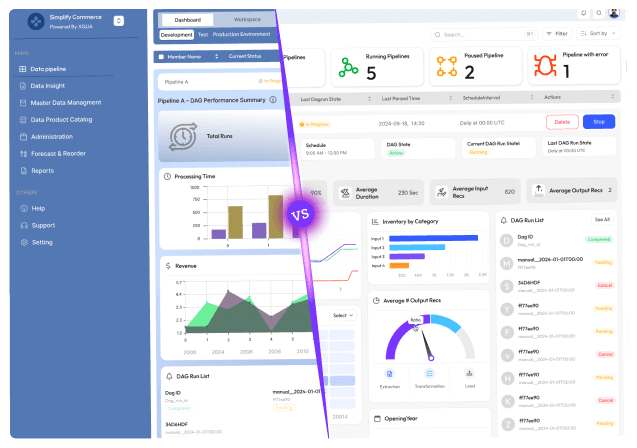
Stuck with slow releases and high IT costs?

▶︎

Launch 2.5x faster with our AI-driven frontend workflows, specialized for SaaS.

▶︎

Cut IT costs by up to 50% and boost user adoption by 2x with our proprietary frameworks.

Stuck with slow releases and high IT costs?

▶︎

Launch 2.5x faster with our AI-driven frontend workflows, specialized for SaaS.

▶︎

Cut IT costs by up to 50% and boost user adoption by 2x with our proprietary frameworks.

Stuck with slow releases and high IT costs?

▶︎

Launch 2.5x faster with our AI-driven frontend workflows, specialized for SaaS.

▶︎

Cut IT costs by up to 50% and boost user adoption by 2x with our proprietary frameworks.

Frequently Asked Questions

We're ready to answer your questions

Slow releases, clunky dashboards, and frustrated users? You've got questions about how to fix them. We have the Frontend-First answers that unlock growth. Let's talk solutions.

Micro-frontend architecture breaks a large frontend application into smaller, independently deployable UI modules. This allows teams to modernize a legacy frontend incrementally, replacing parts of the interface one at a time instead of doing a risky full rewrite. By migrating feature by feature, organizations can preserve existing workflows while gradually introducing modern frameworks and patterns.

Answer

What is micro-frontend architecture and how does it help modernize a legacy frontend?

Question

Micro-frontends enable teams to work independently on specific domains of the application. Each team can develop, test, and deploy its own frontend module without coordinating large, synchronized releases. This reduces deployment bottlenecks, speeds up delivery, and allows teams to iterate faster without impacting unrelated parts of the system.

Answer

How do micro-frontends improve team autonomy and deployment speed?

Question

Yes. By splitting a monolithic frontend into smaller, isolated modules, micro-frontends improve maintainability and scalability. Each module can be updated, tested, or scaled independently, reducing the complexity of the overall system and making long-term maintenance easier compared to tightly coupled legacy frontends.

Answer

Do micro-frontends make frontend systems more scalable and maintainable?

Question

Micro-frontend architectures can introduce performance challenges such as duplicated dependencies, increased bundle sizes, or more complex loading strategies. These issues require careful performance optimization, including efficient asset loading, shared dependencies, and proper architectural planning to ensure performance does not degrade as the system scales.

Answer

Are there performance challenges when using micro-frontends?

Question

Incremental modernization allows teams to upgrade frontend components gradually while keeping legacy systems operational. This approach reduces the risk of breaking existing workflows, enables early feedback from production, and allows continuous improvement through CI/CD pipelines. Instead of large, high-risk launches, changes are validated step by step.

Answer

How does incremental frontend modernization reduce business and technical risk?

Question

Frequently Asked Questions

We're ready to answer your questions

Slow releases, clunky dashboards, and frustrated users? You've got questions about how to fix them. We have the Frontend-First answers that unlock growth. Let's talk solutions.

Micro-frontend architecture breaks a large frontend application into smaller, independently deployable UI modules. This allows teams to modernize a legacy frontend incrementally, replacing parts of the interface one at a time instead of doing a risky full rewrite. By migrating feature by feature, organizations can preserve existing workflows while gradually introducing modern frameworks and patterns.

Answer

What is micro-frontend architecture and how does it help modernize a legacy frontend?

Question

Micro-frontends enable teams to work independently on specific domains of the application. Each team can develop, test, and deploy its own frontend module without coordinating large, synchronized releases. This reduces deployment bottlenecks, speeds up delivery, and allows teams to iterate faster without impacting unrelated parts of the system.

Answer

How do micro-frontends improve team autonomy and deployment speed?

Question

Yes. By splitting a monolithic frontend into smaller, isolated modules, micro-frontends improve maintainability and scalability. Each module can be updated, tested, or scaled independently, reducing the complexity of the overall system and making long-term maintenance easier compared to tightly coupled legacy frontends.

Answer

Do micro-frontends make frontend systems more scalable and maintainable?

Question

Micro-frontend architectures can introduce performance challenges such as duplicated dependencies, increased bundle sizes, or more complex loading strategies. These issues require careful performance optimization, including efficient asset loading, shared dependencies, and proper architectural planning to ensure performance does not degrade as the system scales.

Answer

Are there performance challenges when using micro-frontends?

Question

Incremental modernization allows teams to upgrade frontend components gradually while keeping legacy systems operational. This approach reduces the risk of breaking existing workflows, enables early feedback from production, and allows continuous improvement through CI/CD pipelines. Instead of large, high-risk launches, changes are validated step by step.

Answer

How does incremental frontend modernization reduce business and technical risk?

Question

Frequently Asked Questions

We're ready to answer your questions

Slow releases, clunky dashboards, and frustrated users? You've got questions about how to fix them. We have the Frontend-First answers that unlock growth. Let's talk solutions.

Micro-frontend architecture breaks a large frontend application into smaller, independently deployable UI modules. This allows teams to modernize a legacy frontend incrementally, replacing parts of the interface one at a time instead of doing a risky full rewrite. By migrating feature by feature, organizations can preserve existing workflows while gradually introducing modern frameworks and patterns.

Answer

What is micro-frontend architecture and how does it help modernize a legacy frontend?

Question

Micro-frontends enable teams to work independently on specific domains of the application. Each team can develop, test, and deploy its own frontend module without coordinating large, synchronized releases. This reduces deployment bottlenecks, speeds up delivery, and allows teams to iterate faster without impacting unrelated parts of the system.

Answer

How do micro-frontends improve team autonomy and deployment speed?

Question

Yes. By splitting a monolithic frontend into smaller, isolated modules, micro-frontends improve maintainability and scalability. Each module can be updated, tested, or scaled independently, reducing the complexity of the overall system and making long-term maintenance easier compared to tightly coupled legacy frontends.

Answer

Do micro-frontends make frontend systems more scalable and maintainable?

Question

Micro-frontend architectures can introduce performance challenges such as duplicated dependencies, increased bundle sizes, or more complex loading strategies. These issues require careful performance optimization, including efficient asset loading, shared dependencies, and proper architectural planning to ensure performance does not degrade as the system scales.

Answer

Are there performance challenges when using micro-frontends?

Question

Incremental modernization allows teams to upgrade frontend components gradually while keeping legacy systems operational. This approach reduces the risk of breaking existing workflows, enables early feedback from production, and allows continuous improvement through CI/CD pipelines. Instead of large, high-risk launches, changes are validated step by step.

Answer

How does incremental frontend modernization reduce business and technical risk?

Question

About the author

Author Name:

Parth G

|


Founder of

Hashbyt

I’m the founder of Hashbyt, an AI-first frontend and UI/UX SaaS partner helping 200+ SaaS companies scale faster through intelligent, growth-driven design. My work focuses on building modern frontend systems, design frameworks, and product modernization strategies that boost revenue, improve user adoption, and help SaaS founders turn their UI into a true growth engine.
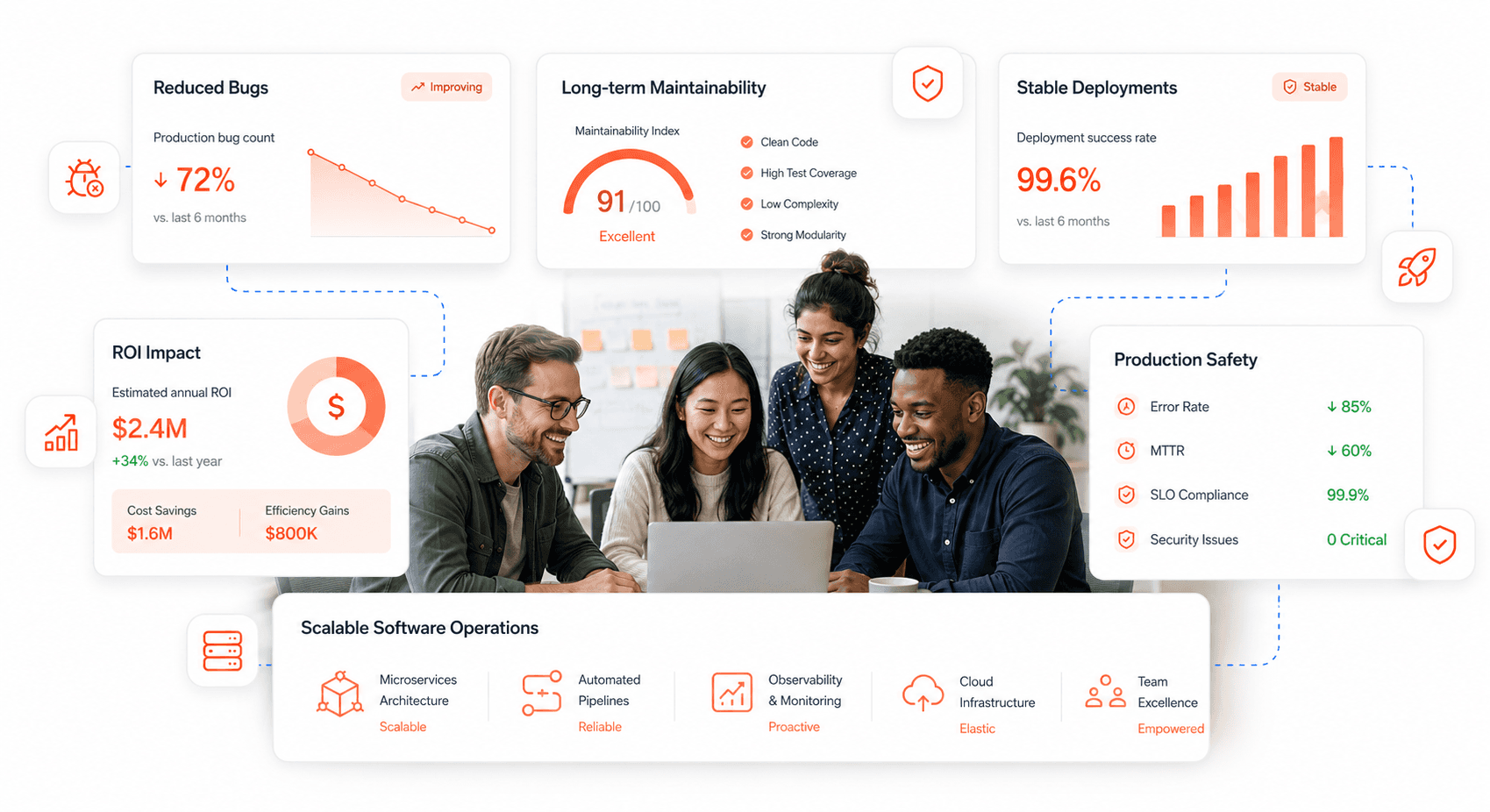
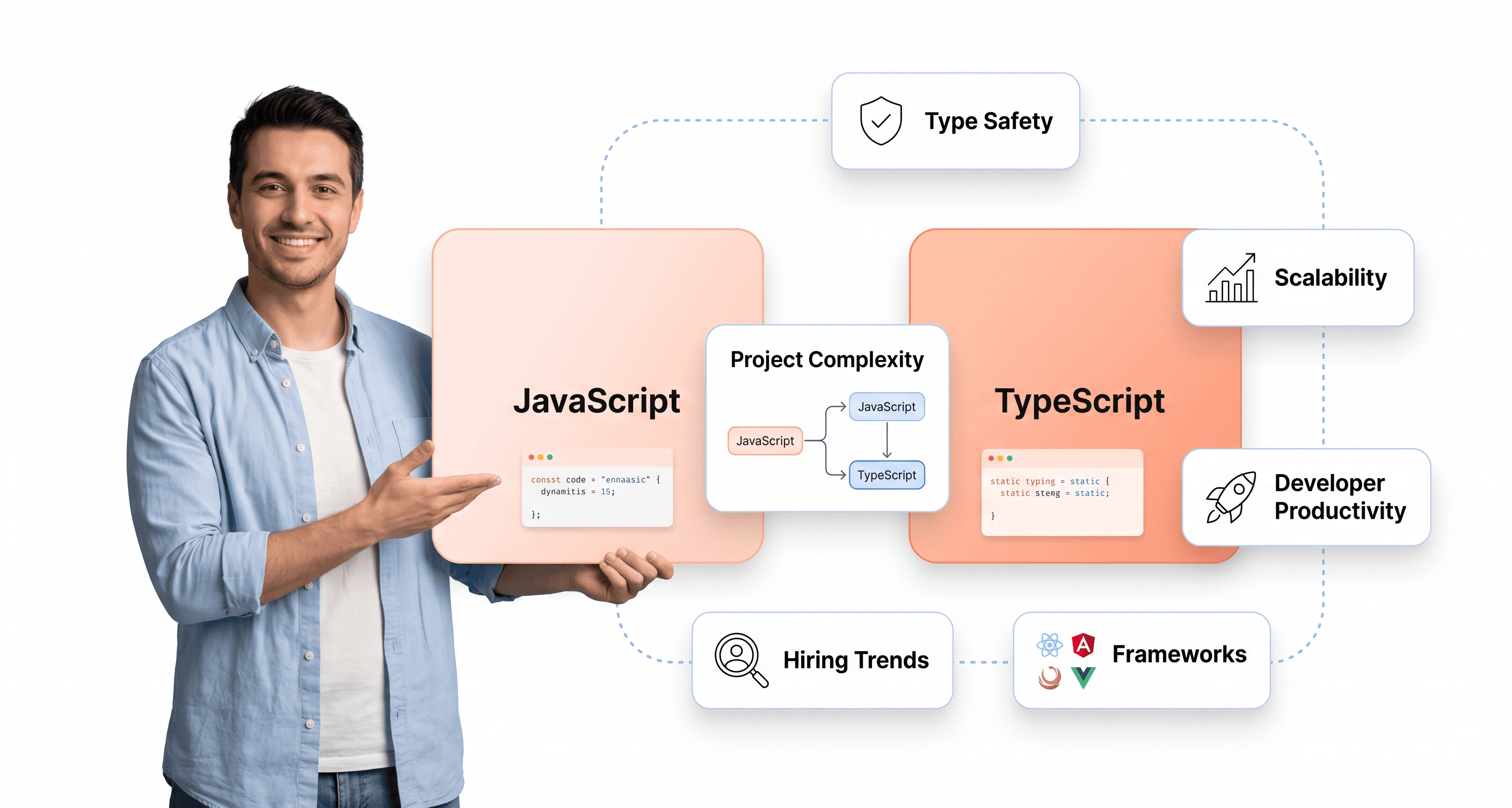
Follow the expert:

Related Blogs

Related Blogs

Is a clunky UI holding back your growth?

Is a clunky UI holding back your growth?

▶︎

Transform slow, frustrating dashboards into intuitive interfaces that ensure effortless user adoption.

▶︎

Transform slow, frustrating dashboards into intuitive interfaces that ensure effortless user adoption.

Is a clunky UI holding back your growth?

Is a clunky UI holding back your growth?

▶︎

Transform slow, frustrating dashboards into intuitive interfaces that ensure effortless user adoption.

▶︎

Transform slow, frustrating dashboards into intuitive interfaces that ensure effortless user adoption.

Is a clunky UI holding back your growth?

Is a clunky UI holding back your growth?

▶︎

Transform slow, frustrating dashboards into intuitive interfaces that ensure effortless user adoption.

▶︎

Transform slow, frustrating dashboards into intuitive interfaces that ensure effortless user adoption.