Blog
Why Legacy Modernization Should Start with UX, Not Backend
Posted on
Legacy Modernization
SAAS Growth
Posted at
Jan 15, 2026
Jan 15, 2026
Min read
10


I hope you found this post valuable. If you’re looking for proven frontend and design expertise to elevate your product, feel free to reach out.


Most MedTech executives know their legacy systems need updating, but they're approaching modernization backwards. Organizations typically pour resources into backend infrastructure while leaving user experience as an afterthought, and it's costing them millions in failed adoption and lost market opportunities.
This guide is for VPs of Product, CTOs, and digital transformation leaders at medical device companies who want to maximize ROI from their modernization investments. You'll discover why starting with user experience creates better business outcomes than traditional backend-first approaches.
We'll explore the critical flaws that make backend-first modernization fail in healthcare settings, examine real-world success stories where UX-led transformations drove measurable market wins, and walk through proven strategies for parallel modernization that reduces risk while accelerating time-to-market. You'll also get a practical audit framework to assess your current systems and build internal capabilities that sustain long-term competitive advantage.
The Critical Flaws of Backend-First Modernization
Why 73% of Healthcare Organizations Waste Money on Legacy Systems
The statistics paint a sobering picture: 79% of organizations report that at least one of their modernization projects has failed, with the average modernization project costing nearly $1.5 million according to vFunction research. This failure rate becomes even more alarming when we consider that more than half of enterprise IT spending will shift from traditional solutions to the cloud by 2025, driven by long-term modernization initiatives.
The root cause of this widespread waste stems from a fundamental misunderstanding of what modernization actually requires. Most organizations treat modernization like any other IT project, focusing exclusively on technical transformation while ignoring the organizational changes required for success. They assume that if the technology works, the project succeeds, a costly misconception that leads to massive budget overruns and failed implementations.
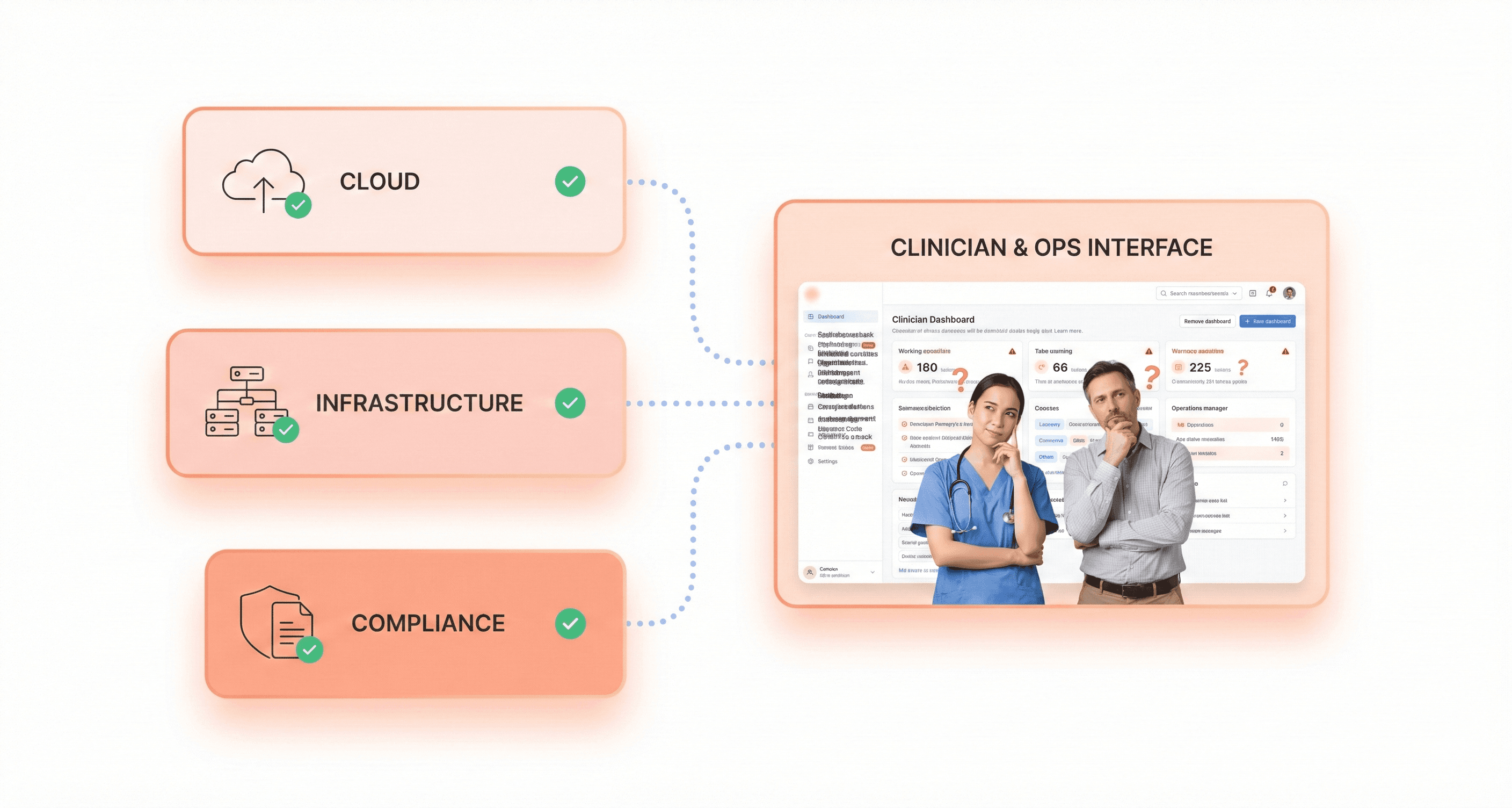
Healthcare organizations are particularly vulnerable to this trap because they often prioritize backend infrastructure improvements without considering how these changes will impact end-user adoption and workflow efficiency. The result is technically sound systems that fail to deliver the promised business value, creating what industry experts call "modernized legacy systems" that perpetuate the same operational constraints as the original applications.
The Paving the Cow Path Problem: New Technology, Same Friction
One of the most insidious antipatterns in legacy modernization is what's known as the "modernized legacy" trap. This occurs when organizations choose lift-and-shift or replatforming approaches that move applications to modern infrastructure without addressing underlying architectural limitations. Microsoft's 2025 survey revealed that 74% of workloads that have already migrated are candidates for modernization, indicating that most initial migrations fail to fully leverage cloud-native capabilities.
These systems create a deceptive appearance of progress, they look modern on paper and run on contemporary infrastructure, but they fail to deliver the scalability, agility, and cost benefits that drove the modernization initiative in the first place. Organizations frequently experience "cloud shock" when they discover their infrastructure costs have increased while deployment bottlenecks, integration challenges, and maintenance burdens remain unchanged.
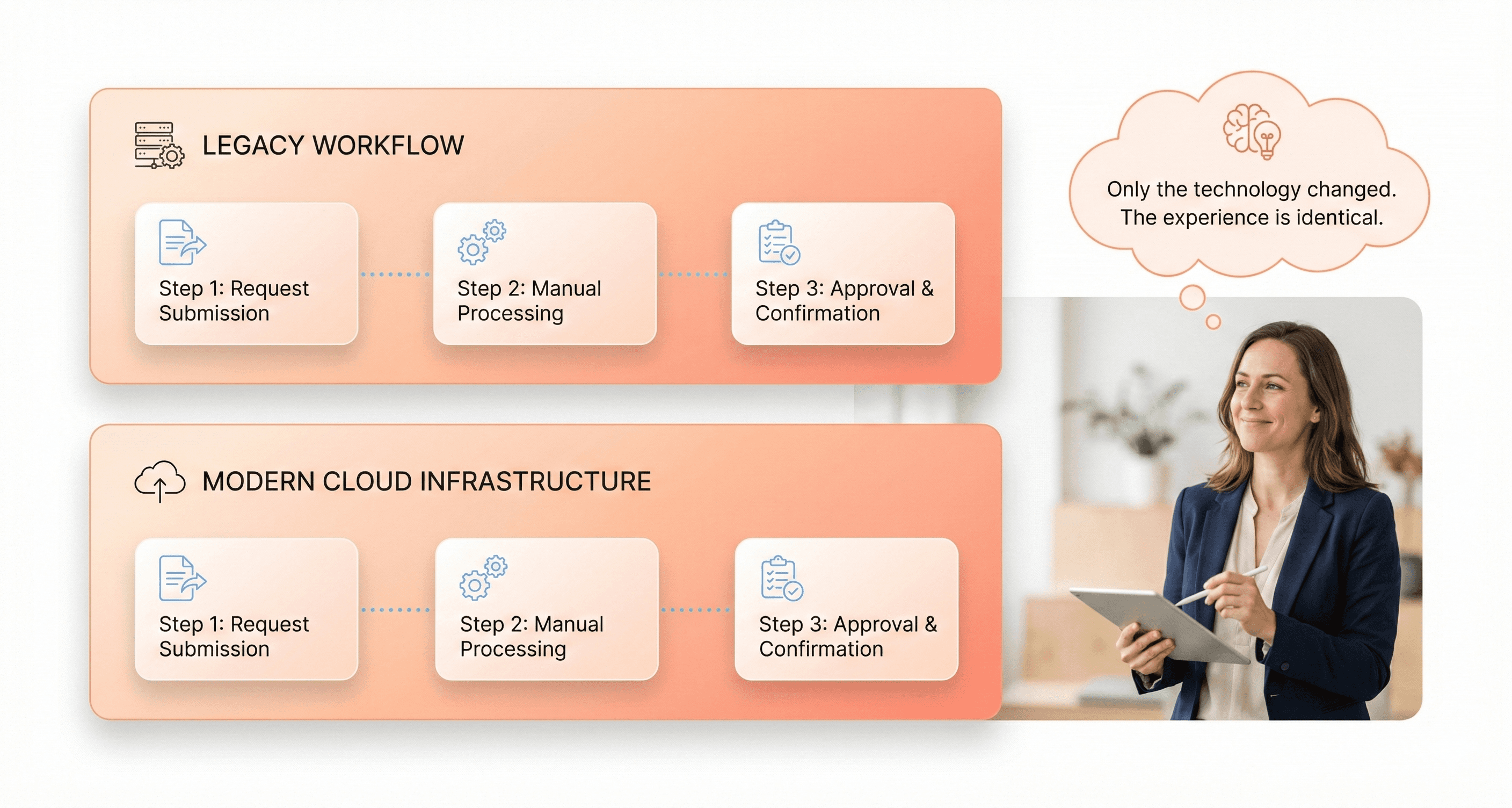
The paving the cow path phenomenon occurs when teams simply recreate existing workflows and user interfaces using newer technologies, without questioning whether those processes were optimal in the first place. This approach preserves all the friction points and inefficiencies of the legacy system while adding the complexity of new technology stacks. Users find themselves navigating the same cumbersome processes, just wrapped in a more modern-looking interface.
How Perfect Engineering Fails Without User Adoption
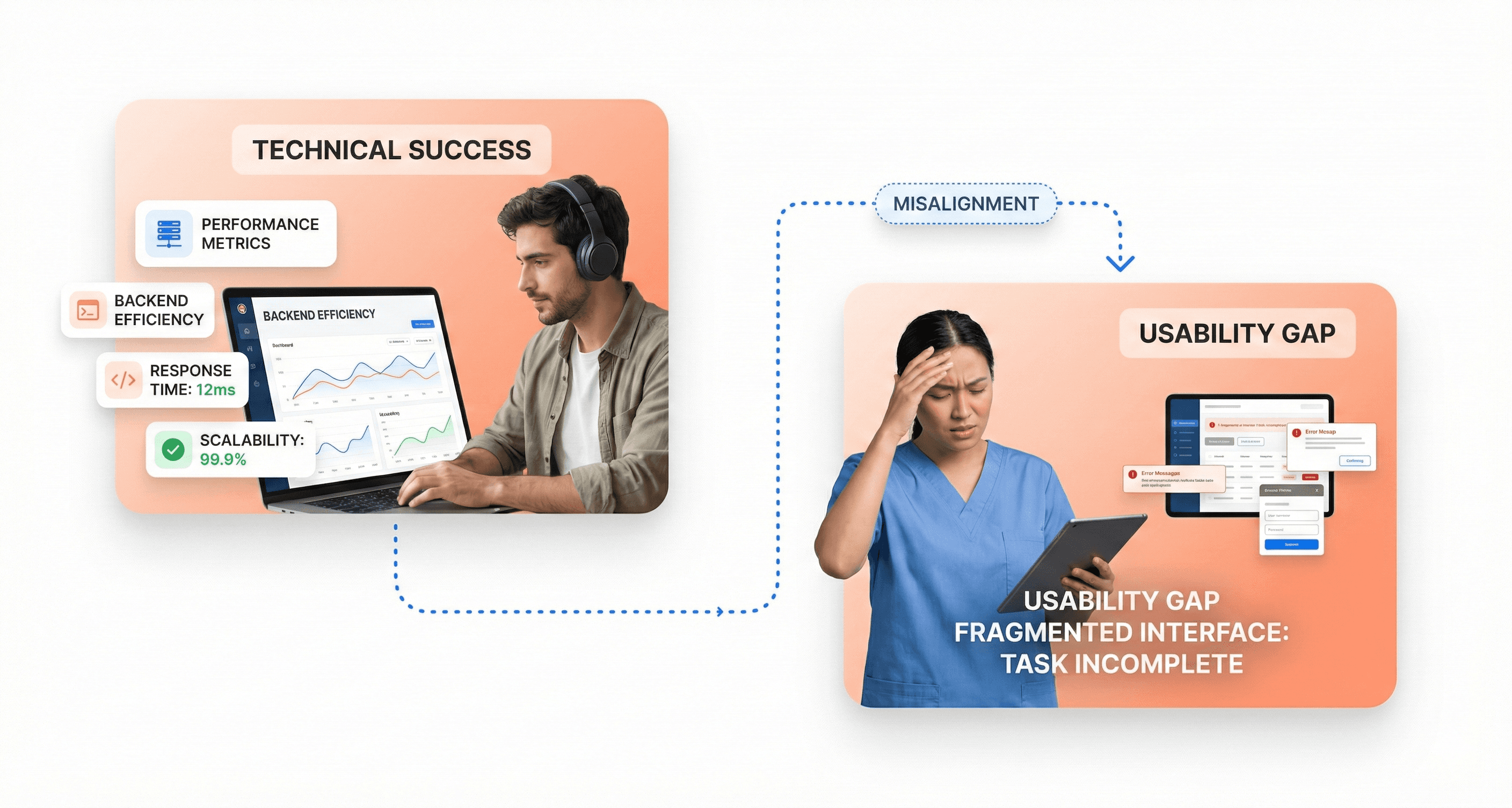
The most technically sophisticated backend modernization efforts can fail catastrophically if they ignore user needs and adoption patterns. A compelling example from Thoughtworks illustrates this perfectly: a client product team envisioned building a faster, more intuitive experience that surfaces all key information in real-time, but the engineering team prioritized backend efficiency, focusing on minimizing unnecessary load by updating data only when explicitly requested.
While both approaches were technically sound, the lack of shared domain understanding led to teams solving different versions of the same problem. Meetings became tense, alignment calls turned into debates, and the core problem, what are we solving for and why? faded into the background. Crucially, metrics such as user adoption, completion time, and basic usability never appeared in the conversation.
After a prolonged period with no delivery, pressure from leadership forced a release that was called a "phased rollout" but added no real user value. The team had to revisit parts of the experience later under deadline pressure, demonstrating how perfect engineering without user-centric thinking leads to waste and rework.
This pattern repeats across organizations because technical teams often assume that superior performance and reliability will automatically translate to user satisfaction and business success. However, users don't experience backend efficiency directly they experience it through interfaces, workflows, and response times. When modernization efforts prioritize technical excellence over user experience, they create a dangerous disconnect between engineering achievement and business impact.
The failure to incorporate user feedback early and often compounds this problem. Big releases delay feedback, while small iterations drive learning. Organizations that aren't shipping fast aren't learning fast, leaving them vulnerable to building sophisticated systems that nobody wants to use.
Real-World Evidence: When UX-First Approaches Drive Market Success
Case Study: $50M Neurological Device Saved by User Research
When a major medical device manufacturer faced the potential failure of their $50 million neurological monitoring system, they discovered that technical specifications weren't the primary concern. Despite having cutting-edge backend capabilities and meeting all regulatory requirements, the device was experiencing widespread rejection in clinical settings. Healthcare professionals found the interface so cognitively demanding that it actually hindered patient care rather than enhancing it.
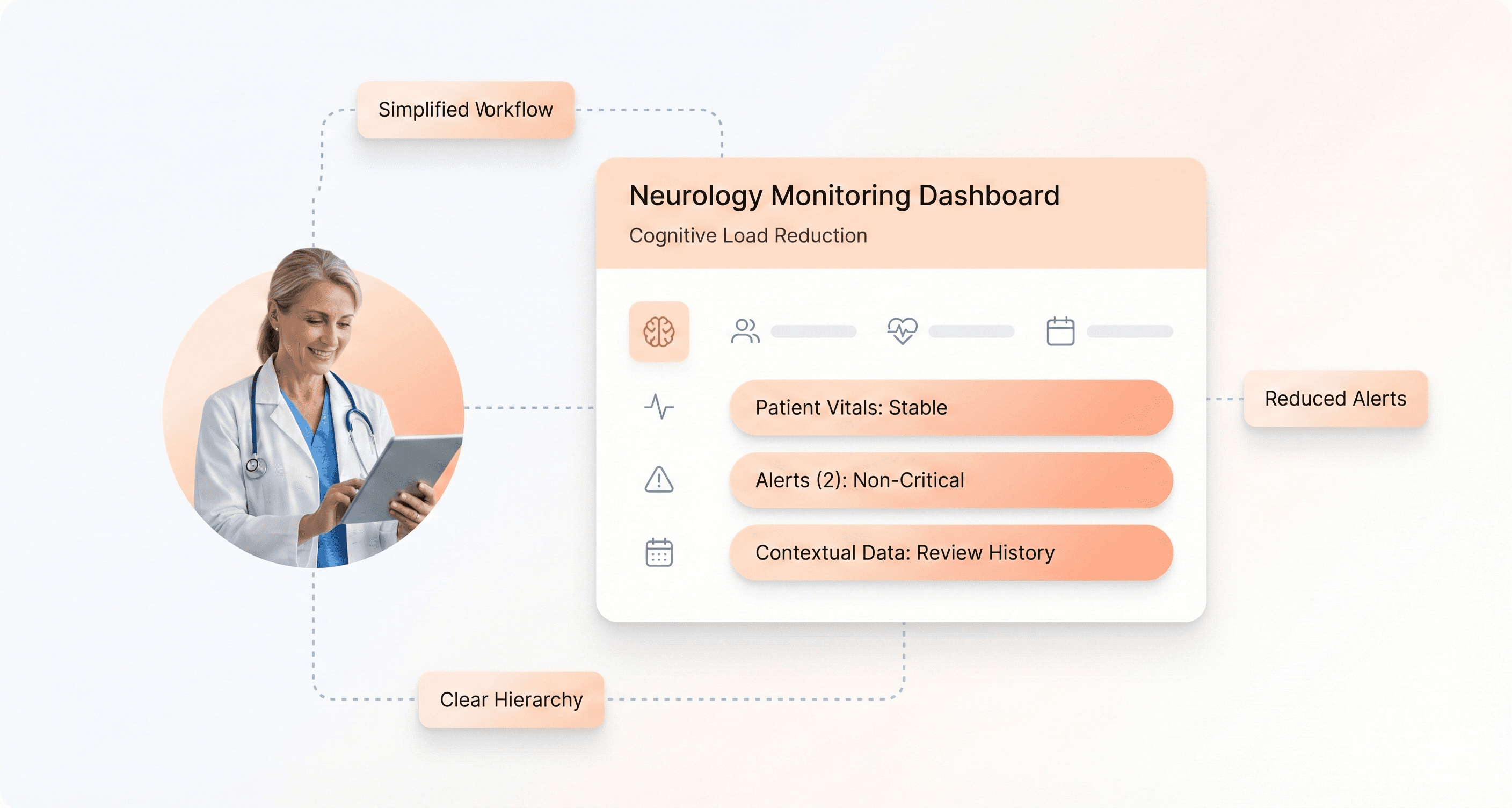
The company's initial modernization approach had focused entirely on backend improvements, upgrading processing power, enhancing data accuracy, and streamlining regulatory compliance. However, comprehensive user research revealed that clinicians were struggling with information overload, unclear visual hierarchies, and workflow disruptions that added precious minutes to critical procedures. In neurological emergencies where every second counts, these usability issues weren't just inconvenient, they were potentially life-threatening.
Through targeted UX research and iterative design improvements, the company transformed the user interface to align with natural clinical workflows. They simplified data visualization, implemented contextual information displays, and redesigned alert systems to reduce cognitive burden. The modernization effort, which prioritized user experience over technical specifications, not only saved the $50 million investment but positioned the device as a market leader.
From Clinical Rejection to Market Leadership Through Design
Euro Car Parts provides a compelling example of how UX-first modernization can transform market position. The Fortune 500 company dominated brick-and-mortar auto parts distribution but struggled online due to legacy eCommerce technology that lacked scalable platforms and failed to optimize conversions. Rather than focusing solely on backend infrastructure improvements, they prioritized comprehensive user experience redesign.
The transformation included software design development that improved both the website's UI and overall functionality, country-specific websites tailored to local user behaviors, and click-and-collect functionality that bridged online and offline experiences. They implemented same-day delivery capabilities, improved website speeds and search functionality, and modern data collection to support Conversion Rate Optimization efforts.
This UX-first approach produced unprecedented results. Euro Car Parts achieved exponential online revenue growth, moving into the IRUK Top 500 within the first phase of modernization. Within two years, they advanced to the prestigious IRUK Top 50 list, demonstrating how prioritizing user experience can accelerate market dominance even in competitive industries.
Similarly, 2XU's international expansion efforts were initially hampered by legacy systems that weren't optimized for mobile browsing and couldn't handle global traffic. Their modernization focused on responsive design, streamlined user workflows, and localized transaction experiences rather than just backend scalability. This user-centric approach enabled successful competition in foreign markets and rapid international scaling.
Why Cognitive Load Matters More Than Technical Specifications
The case studies reveal a critical insight: reducing cognitive load often delivers greater business impact than improving technical performance. IMG's internal licensing system modernization exemplifies this principle. Despite having functional backend systems, their monolithic architecture created workflow inefficiencies that frustrated users and limited productivity.
Instead of focusing purely on technical upgrades, the modernization effort prioritized understanding user journeys and streamlining workflows. The new system provided stronger admin controls, custom workflow capabilities, and exceptional reporting that gave leadership clear visibility into business operations. By reducing the cognitive burden on users, IMG achieved improved productivity and gained a powerful competitive advantage.
American Golf's transformation further illustrates this principle. Their 50-year legacy brand struggled online not because of inadequate server capacity, but due to missing core functionality that modern customers expected. The modernization prioritized secure payment systems, automated fulfillment, personalized user experiences, and intuitive navigation over raw technical performance improvements.
The results validated the cognitive load approach: increased traffic, higher conversion rates, centralized event management for physical stores, and seamless order handling. These outcomes demonstrate that when users can accomplish their goals efficiently and without friction, business metrics improve dramatically—often more than pure technical optimizations would achieve.
Strategic Advantages of Parallel UX-Backend Modernization
Risk Mitigation Through Co-Existence Strategies
With the understanding that backend-first modernization creates critical vulnerabilities, parallel UX-backend modernization offers powerful risk mitigation through co-existence strategies. This approach enables organizations to maintain operational stability while progressively transforming both user experience and underlying infrastructure.
The parallel development model allows teams to prototype and validate solutions simultaneously, significantly reducing technical risk. As demonstrated in complex projects, when design and engineering work concurrently rather than sequentially, teams uncover feasibility constraints, technical challenges, and edge cases early in the process—when adaptation is easier and more cost-effective. This early risk detection prevents costly rework and eliminates the surprise issues that typically emerge during final engineering reviews.
Co-existence strategies enable controlled rollouts using feature flags and progressive deployment techniques. These tools allow organizations to safely test new UX implementations with user subsets while maintaining backend stability, providing instant fallback capabilities to protect existing user experiences. This approach transforms modernization from a high-stakes replacement to a measured, reversible evolution.
User-Centric Development from First Principles
Now that we've established risk mitigation foundations, parallel modernization enables authentic user-centric development by integrating user feedback and performance metrics directly into both UX and backend development cycles. This approach ensures that backend functionality is designed with user interactions at its core, creating smooth data flow, optimal performance, and reliable services that genuinely empower frontend interfaces.
The parallel model facilitates real-time collaboration where user-centric metrics guide backend development priorities. Teams can leverage API response times, error rates, throughput metrics, and feature usage analytics to inform both UX improvements and backend optimizations simultaneously. This creates a feedback loop where backend performance directly correlates with measurable user experience improvements.
By embedding user feedback tools and conducting joint retrospectives focusing on UX-impacting backend issues, teams develop shared empathy and accountability for user success. This cultural shift ensures that technical decisions consistently align with user needs rather than internal convenience.
Competitive Differentiation While Others Focus on Infrastructure
Previously established parallel approaches create significant competitive advantages while competitors remain locked in traditional infrastructure-focused modernization cycles. When organizations modernize UX and backend simultaneously, they can deliver market-differentiating user experiences while building robust technical foundations, a combination that purely backend-focused competitors cannot match quickly.
The parallel development workflow enables faster time-to-market through accelerated iteration cycles. Teams begin testing real user interactions earlier, shortening overall development timelines while maintaining technical quality. This speed advantage compounds over time, creating sustainable competitive moats.
Additionally, parallel modernization produces higher-quality outcomes by testing real interactions rather than theoretical designs. Teams catch usability and performance issues before production deployment, resulting in superior user experiences that drive market differentiation and customer retention.
Regulatory Compliance Through Incremental Validation
With competitive positioning established, parallel UX-backend modernization provides critical advantages for regulatory compliance through incremental validation capabilities. This approach is especially valuable in regulated industries where compliance requirements intersect with both user experience and technical infrastructure.
The parallel model enables continuous documentation and validation of both UX improvements and backend changes, creating comprehensive audit trails required for regulatory review. Teams can implement robust monitoring and incident response systems targeted at compliance-relevant user experience impacts, ensuring that modernization efforts enhance rather than compromise regulatory standing.
Through coordinated backend and frontend development, organizations can maintain regulatory compliance while progressively improving user experiences. The ability to implement controlled rollouts and instant fallback mechanisms provides the safety nets necessary for compliance-critical applications, enabling innovation within regulatory constraints rather than despite them.
Modern Legacy UX Modernization Strategies for 2026
Encapsulation and Strangler Fig Patterns for De-Risking
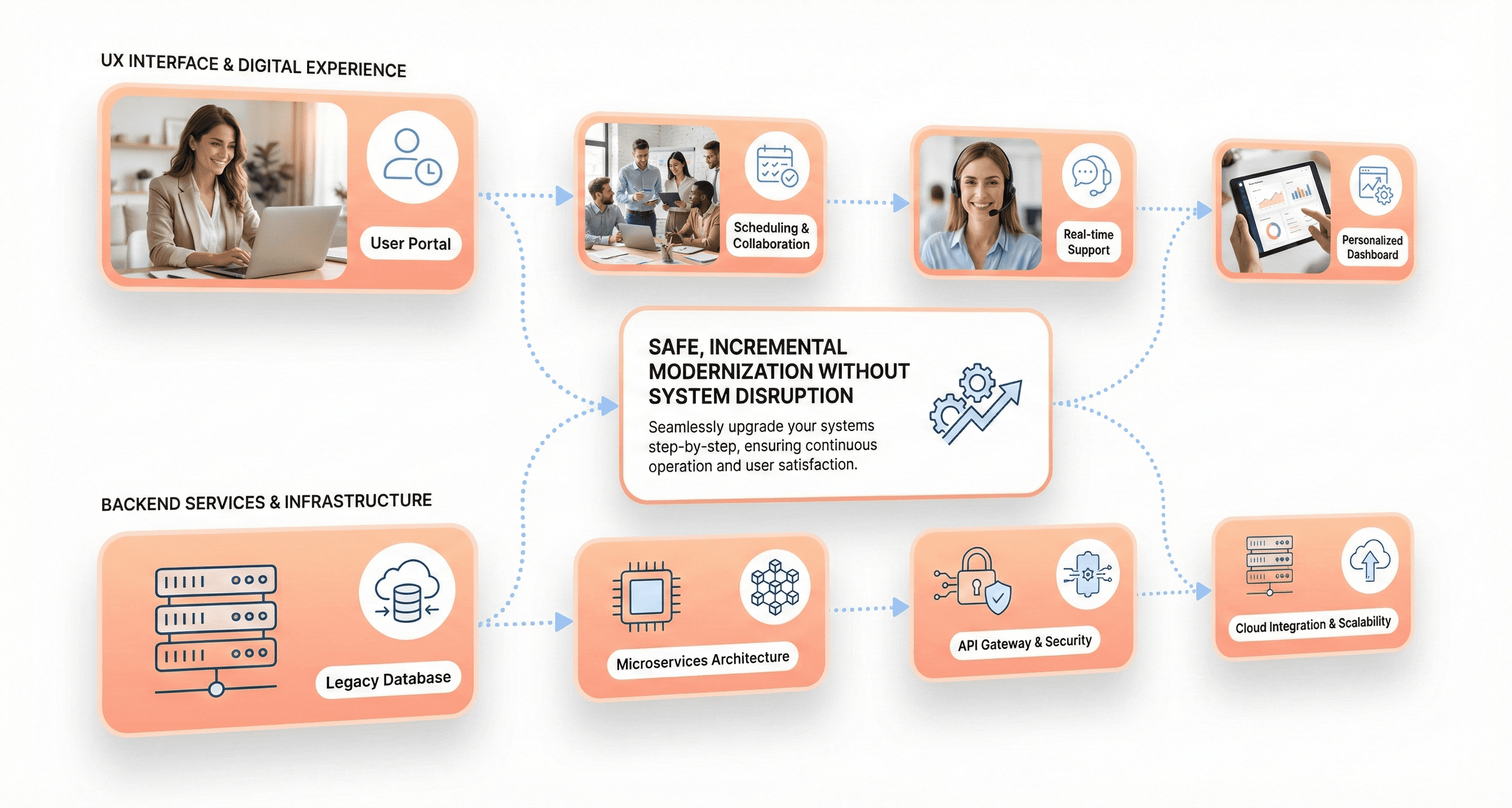
Now that we have established the critical importance of UX-first modernization, organizations need proven architectural patterns to minimize risk during the transformation process. The encapsulation and strangler fig patterns represent two of the most effective strategies for legacy UX modernization, allowing teams to gradually replace outdated interfaces while maintaining operational continuity.
The encapsulation pattern involves wrapping legacy functionality within modern API layers, enabling new user interfaces to interact with existing backend systems without requiring complete system rewrites. This approach allows organizations to focus on creating contemporary UX designs while preserving the underlying business logic that has been refined over years of operation.
The strangler fig pattern, borrowed from nature where one plant gradually replaces another, provides a systematic approach to modernization. Organizations can implement new UX components alongside legacy interfaces, gradually redirecting user traffic to the modernized sections. This method has proven particularly valuable in healthcare and financial services, where system downtime must be minimized.
A practical example involves side-by-side development, where financial services providers have successfully modernized customer front-ends, resulting in a remarkable 50% reduction in time to market and a 30% increase in sales within the first year. This demonstrates how strategic modernization patterns can deliver measurable business outcomes while reducing technical risks.
Role-Based Interfaces That Eliminate Information Overload
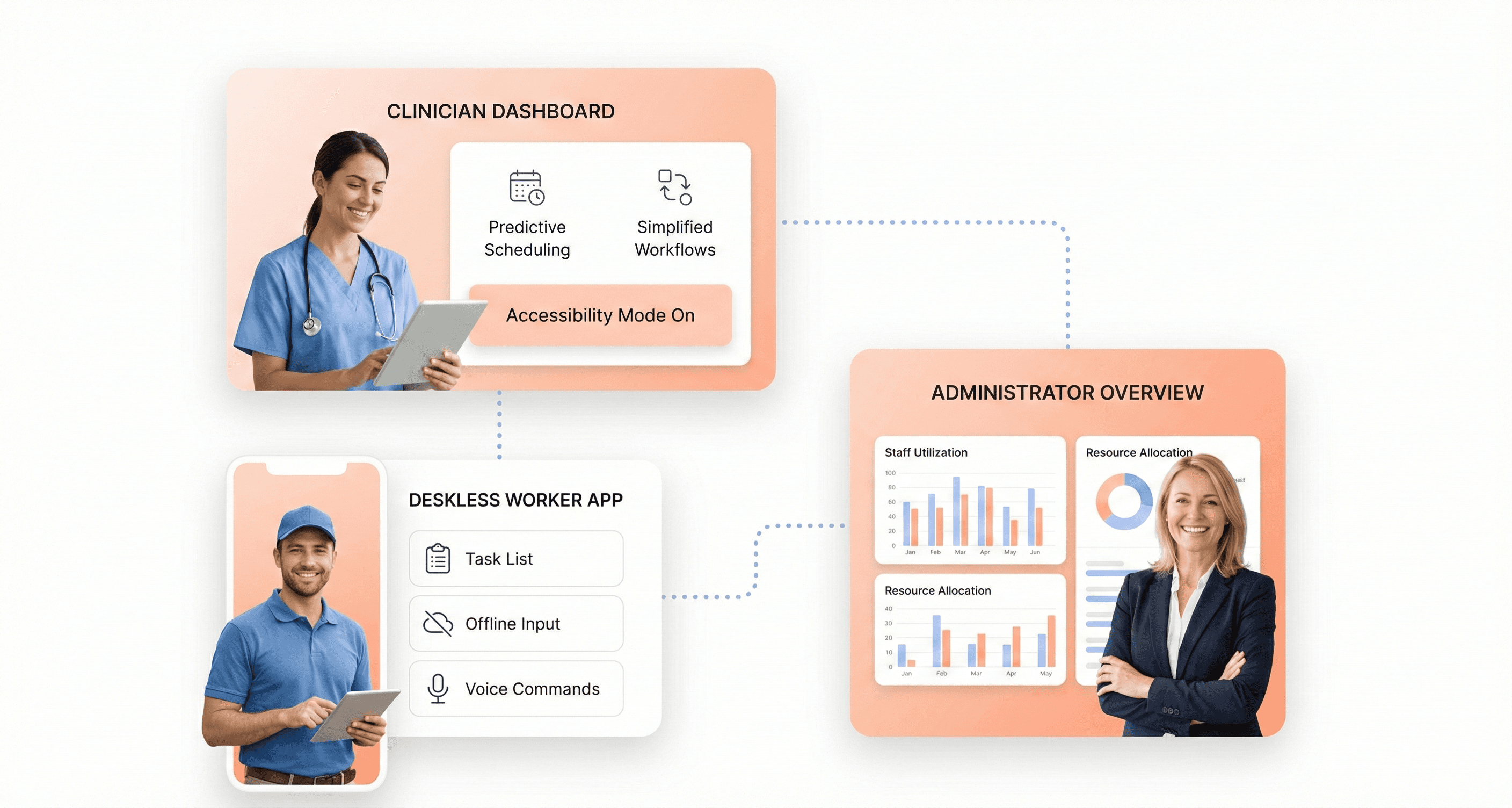
Legacy systems often present users with overwhelming amounts of information, creating inefficient workflows and reducing productivity. Modern legacy UX modernization requires implementing role-based interfaces that deliver precisely the information and functionality each user type needs to perform their specific tasks effectively.
Role-based interface design focuses on understanding the distinct workflows of different user personas within an organization. For deskless workers, this means creating streamlined interfaces that present only the most critical information needed for their immediate tasks. Administrative users might require comprehensive dashboards with detailed analytics, while frontline employees need simplified, action-oriented interfaces that minimize cognitive load.
The modernization process should begin with thorough user research and workflow analysis to identify the specific needs of each role. Organizations must prioritize applications based on their business value and operational impact, ensuring that the most critical user journeys receive attention first. This strategic approach aligns with best practices that emphasize stakeholder engagement throughout the modernization process.
Successful role-based interfaces eliminate information overload by presenting contextual data at the right time and place. This approach not only improves user satisfaction but also reduces training requirements and operational errors, contributing to overall business efficiency and productivity gains.
AI-Embedded UX with Predictive Inputs and Natural Language Processing
With artificial intelligence becoming increasingly accessible, legacy UX modernization strategies for 2026 must incorporate AI-driven features that enhance user productivity and decision-making capabilities. AI-embedded UX represents a significant departure from traditional interface design, offering predictive inputs and natural language processing capabilities that transform how users interact with modernized systems.
Predictive inputs leverage machine learning algorithms to anticipate user needs based on historical patterns and contextual information. These systems can pre-populate forms, suggest relevant actions, and provide intelligent recommendations that streamline workflows. For organizations dealing with complex legacy data structures, AI can help bridge the gap between old and new systems by intelligently interpreting and presenting information in more intuitive formats.
Natural language processing capabilities enable users to interact with systems using conversational interfaces, reducing the learning curve associated with complex legacy applications. This is particularly valuable for organizations modernizing systems that previously required extensive training or specialized knowledge to operate effectively.
However, organizations must remain aware that 95% of enterprise AI initiatives fail, underscoring the importance of partnering with reliable AI solution providers. Successful AI integration requires careful planning and alignment with business objectives to ensure that technological capabilities translate into measurable improvements in user experience and operational efficiency.
Mobile-First Design for Deskless Workers
The modern workforce increasingly includes deskless workers who require access to critical business applications through mobile devices. Legacy UX modernization strategies must prioritize mobile-first design principles to serve this growing segment of the workforce effectively.
Mobile-first design for legacy modernization involves reimagining traditional desktop interfaces for touch-based interactions and smaller screen sizes. This approach requires organizations to identify the most essential functions that deskless workers need to perform and optimize these workflows for mobile consumption. The process often reveals opportunities to simplify complex legacy workflows that may have accumulated unnecessary complexity over years of incremental updates.
Organizations implementing mobile-first approaches should leverage low-code platforms that enable rapid development and integration, effectively mitigating the challenges commonly associated with modernizing older systems. These platforms allow teams to iterate quickly on mobile interface designs while maintaining connections to existing backend infrastructure.
The mobile-first approach also supports the broader trend toward cloud migration, with 83% of mid-sized businesses having moved over half of their workloads to the cloud. This convergence enables organizations to create responsive, scalable mobile experiences that can adapt to varying user needs and device capabilities while maintaining performance standards expected in modern business applications.
The Hidden Integration Challenge in Medical Device UX
EHR and Hospital IT Ecosystem Requirements
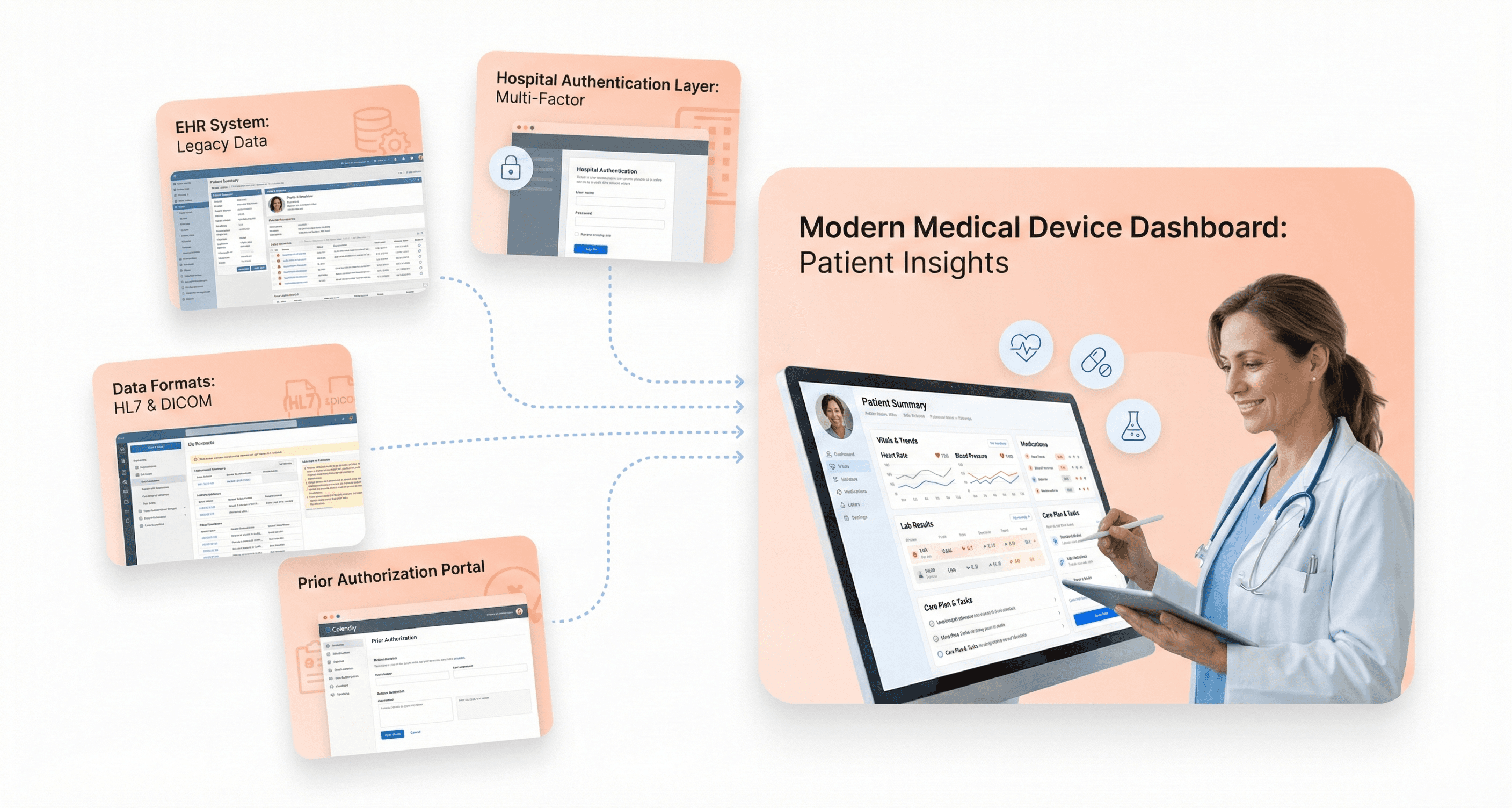
Medical device UX modernization cannot exist in isolation from existing hospital IT infrastructure. The electronic medical records (EMR) ecosystem presents a complex web of integration challenges that directly impact how clinicians interact with medical devices. Doctors typically have only 90 seconds to review patient records before each appointment, yet many EMR systems force providers to navigate through 10-20 data blocks or screens to access critical information.
Modern medical device interfaces must seamlessly integrate with these dense, often archaic EMR systems while providing intuitive data visualization that builds clinician confidence. The challenge becomes even more pronounced when considering that healthcare IT infrastructure is approximately a decade behind other industries in technological advancement. Device manufacturers must design UX solutions that can communicate effectively with outdated hospital systems while maintaining modern usability standards.
The integration complexity extends beyond simple data exchange. Medical devices must accommodate varying hospital network protocols, different authentication systems, and diverse data formats across healthcare facilities. This technical fragmentation means UX designers must create interfaces flexible enough to adapt to multiple IT environments while maintaining consistent user experiences.
Workflow Integration That Respects Clinical Time Constraints
Healthcare environments demand UX solutions that eliminate friction rather than add complexity to clinical workflows. The reality of medical practice shows that healthcare providers spend approximately two hours on computer work for every hour of direct patient interaction, contributing significantly to physician burnout and reduced care quality.
Effective medical device UX must streamline these digital interactions by reducing unnecessary clicks, simplifying navigation paths, and presenting information hierarchically based on clinical urgency. Unlike consumer applications, medical device interfaces cannot afford the luxury of multi-factor authentication delays or complex verification processes during emergency situations. In operating rooms and emergency departments, immediate access to device controls and patient data can be life-critical.
The democratization of medical devices, accelerated by the COVID-19 pandemic, has shifted caregiving beyond hospital walls into homes and smaller clinics. This transition means device interfaces must accommodate both trained medical professionals and untrained caregivers, requiring adaptive UX designs that can adjust complexity levels based on user credentials and clinical context.
Data Visualization That Builds Clinician Trust
Trust in medical device interfaces directly correlates with patient safety outcomes. Poor data visualization contributes to dangerous use errors, device misuse, and caregiver frustration, ultimately putting patients at risk. The challenge intensifies when considering that patients increasingly receive medical data directly without proper interpretation context, creating what experts describe as turning "the whole pyramid of data upside-down."
Effective medical device UX must present complex diagnostic information through clear visual hierarchies, intuitive color coding, and simplified data interpretation tools. For instance, blood pressure or glucose readings must be displayed not only accurately but with immediate context about normal ranges and recommended actions. This approach helps bridge the gap between raw data and actionable clinical insights.
Modern medical software development must also accommodate strict regulatory frameworks including EU MDR, FDA requirements, and emerging accessibility directives. These compliance requirements demand that data visualization remains both intuitive and legally compliant across diverse user scenarios. Advanced UI/UX design principles have been shown to significantly reduce user errors, making thoughtful data visualization a critical component of device reliability and clinical effectiveness.
Building Internal UX Capabilities While Modernizing
Addressing the Talent Gap Between Hardware Engineering and Digital Design
Previously, we've established that UX-first modernization drives superior market outcomes. However, one of the most significant obstacles organizations face is the fundamental talent gap between traditional hardware engineering teams and modern digital design capabilities. This divide extends far beyond technical skills—it encompasses entirely different approaches to problem-solving, user interaction, and product development.
Hardware engineers typically focus on functional specifications, regulatory compliance, and system reliability. Their expertise lies in creating robust, technically sound solutions that meet strict performance criteria. In contrast, UX professionals approach problems through user research, iterative design, and human-centered methodologies. They prioritize usability, accessibility, and user satisfaction over purely technical considerations.
The challenge becomes particularly acute when hardware-focused teams must suddenly embrace user experience principles. As noted in building successful UX teams, this transition requires more than just hiring designers—it demands creating a culture where different skill sets can collaborate effectively. Engineers may initially resist UX methodologies that seem to conflict with established development processes, while UX professionals must learn to work within the constraints of existing hardware systems and regulatory requirements.
Skills-based hiring emerges as a critical strategy for bridging this gap. Rather than focusing solely on years of experience, organizations should identify candidates who demonstrate both technical competency and collaborative adaptability. This approach allows teams to assemble diverse skill sets that can effectively translate between hardware constraints and user needs, ultimately creating more cohesive product development processes.
Hybrid Partnership Approaches for Immediate Results
Now that we have covered the fundamental talent challenges, implementing hybrid partnership models offers a practical solution for organizations needing immediate UX capabilities while building internal capacity. This two-pronged approach combines external UX expertise with internal team development, creating a bridge between current capabilities and future goals.
External UX agencies bring established workflows, proven methodologies, and extensive project experience that can deliver immediate results. They possess collective expertise spanning the entire UX process, from research to final implementation, along with monitoring mechanisms to ensure effective execution. However, the most strategic value lies in having in-house teams work alongside these external partners to absorb industry best practices and accelerate the internal learning curve.
This collaborative model addresses several critical considerations identified in enterprise UX transformations. In the short term, agencies can handle urgent modernization projects while internal teams observe and participate in professional UX processes. The external perspective also provides clinical, unbiased insights that may challenge internal assumptions and drive innovation beyond what purely internal teams might achieve.
Long-term considerations favor building internal capabilities that understand company culture, customer needs, and business objectives intimately. The hybrid approach facilitates this transition by allowing internal team members to gain hands-on experience with real projects under expert guidance. This practical learning environment proves far more effective than theoretical training alone.
Organizations implementing this model should structure partnerships to maximize knowledge transfer, ensuring that external collaborators actively mentor internal staff rather than simply delivering completed work. This approach creates sustainable UX capabilities that persist beyond the partnership period.
Upskilling Existing Teams Through Embedded Coaching
With hybrid partnerships establishing foundational UX practices, embedded coaching represents the most effective method for developing long-term internal capabilities. This approach involves integrating experienced UX practitioners directly within existing teams to provide real-time guidance, skill development, and cultural transformation.
Embedded coaching addresses the critical challenge of adaptation to company culture that can significantly impact UX team effectiveness. Internal team members often become frustrated when company culture forces them to compromise established UX methodologies or when senior management requests changes based on personal preferences rather than user data. This cultural friction can lead to demotivation, turnover, and ultimately dysfunctional UX departments.
Successful embedded coaching programs focus on creating safe, collaborative environments where team members feel comfortable experimenting with new approaches. This includes establishing feedback loops for constructive criticism, promoting less hierarchical structures that encourage idea sharing, and recognizing innovative thinking within the organization's existing framework.
The coaching process must emphasize transparency and open communication about why changes are occurring and what those changes entail. People naturally resist change when they fear impacts to their job security or compensation. Embedded coaches help navigate these concerns by clearly explaining the value of UX integration and demonstrating how individual roles evolve rather than disappear.
Effective programs also incorporate skills-based development that allows existing team members to grow into UX-adjacent roles. This might involve product managers learning user research techniques, engineers understanding usability principles, or designers expanding into interaction design. The goal is building a more UX-literate organization where user-centered thinking becomes embedded across disciplines rather than confined to a separate UX team.
Proven Audit Framework for Legacy UX Assessment
Stakeholder Interviews to Identify Real User Pain Points
Previously, we've established why UX-first modernization drives better outcomes. With this framework in mind, let's examine the foundational step of any legacy UX assessment: gathering authentic user insights through stakeholder interviews.
Conduct comprehensive interviews across all user types to uncover critical pain points that technical metrics alone cannot reveal. Focus on finance teams who depend on payment processing and GL systems with critical business impact, operations personnel who rely on inventory management and order systems with high operational impact, HR staff who use personnel records and payroll systems with medium impact, and marketing teams who utilize CRM and email platforms with variable impact levels.
Document specific workflow disruptions including delayed customer responses caused by slower processing speeds, increased error rates from manual workarounds, information isolation due to poor system integration, and productivity interruptions from frequent system downtime. Pay particular attention to extended training requirements for complex interfaces and limited remote work capabilities that restrict mobile access.
Heuristic Evaluation Against 10 Usability Standards
Now that we have gathered user feedback, the next step involves systematic evaluation against established usability principles. Conduct thorough heuristic evaluations focusing on visibility of system status, match between system and real world, user control and freedom, consistency and standards, error prevention, recognition rather than recall, flexibility and efficiency of use, aesthetic and minimalist design, help users recognize and recover from errors, and comprehensive help and documentation.
Identify common legacy system issues including complex interfaces that lead to confusion and inefficiency, limited scalability that struggles to adapt to modern needs, and outdated designs that reduce user satisfaction and adoption rates. Document how these usability violations directly impact user productivity and create barriers to efficient task completion.
Click-Stream Analysis to Find Drop-Off Points
With usability standards evaluated, we'll examine actual user behavior through data analysis. Track critical performance metrics including response times that measure transaction processing speed, system uptime percentages for business continuity, error rates that impact operations and data integrity, and resource usage monitoring CPU, memory, and storage efficiency.
Focus on identifying problem areas where users encounter increased processing time causing tasks to take minutes instead of seconds, memory leaks requiring frequent system restarts, database bottlenecks creating slower queries and data retrieval delays, integration failures requiring manual intervention, and outdated dependencies creating security risks and compatibility issues. Peak load testing reveals maximum concurrent users the system can handle, exposing scalability limits that constrain business growth.
ADA Compliance and WCAG 2.2 Accessibility Requirements
Previously, I've outlined the importance of comprehensive usability evaluation. Next, we'll address critical accessibility standards that ensure inclusive system design. Prioritize accessibility by implementing WCAG standards to make systems inclusive and designing for various devices and platforms to maximize usability across different user needs.
Legacy systems often fail to meet modern accessibility requirements, creating barriers for users with disabilities. Evaluate current compliance gaps and document necessary improvements to meet ADA requirements and WCAG 2.2 standards, ensuring equal access to system functionality for all users.
Technical Debt Assessment for Frontend-Backend Compatibility
With accessibility requirements documented, the final component examines the technical foundation supporting UX improvements. Evaluate technical architecture limitations that prevent handling more transactions and restrict revenue growth potential. Document database design constraints that create storage limits and data management difficulties, along with integration capabilities incompatible with modern cloud services that limit innovation potential.
Assess user capacity issues causing slower performance as more users join the system, constraining business expansion opportunities. Identify feature expansion difficulties that make adding new functionality challenging, reducing competitiveness in the market. Map system connections by documenting data flows between systems, integration points including APIs and file transfers, and service dependencies that affect system reliability. This technical debt assessment provides the foundation for understanding frontend-backend compatibility challenges that must be addressed during UX modernization efforts.
Measuring ROI and Business Impact of UX-First Modernization
Productivity Gains: 90 Minutes Daily Time Savings Per Employee
According to NN Group research, employee information retrieval on legacy systems can be extraordinarily time-consuming and costly. In 2001, outdated intranet systems required extensive PDF searches and often delivered potentially outdated data, costing a 10,000-person company over $750,000 annually. By 2005, improvements like open text-based employee searches reduced task completion time to one minute and six seconds, but this still cost the organization $475,000 per year. Modern UX implementations have transformed this landscape dramatically, the same processes now take just two seconds, costing a 10,000-person company less than $14,500 annually.
This dramatic improvement in task completion rates translates directly to measurable productivity gains. Studies consistently show that around 78% represents the average task completion rate for legacy systems, but UX-first modernization approaches routinely exceed these industry benchmarks. When employees can complete routine tasks in seconds rather than minutes, the cumulative time savings across an organization becomes substantial—often reaching 90 minutes per employee daily when comprehensive UX modernization is implemented effectively.
Task Success Rate (TSR) serves as the ultimate UX performance indicator, providing clear metrics that are easy to understand and represent the UX bottom line. These metrics prove integral for benchmarking programs and can assess whether investments in redesign projects deliver measurable value to the organization.
$100 Return for Every $1 Invested in UX Design
Forrester research has established one of the most compelling business cases for UX modernization: every dollar invested in UX yields an impressive return of $100, resulting in an outstanding ROI of 9,900%. This extraordinary return rate positions UX investment as one of the highest-performing business initiatives available to organizations today.
The quantitative evidence supporting this ROI calculation comes from multiple business metrics that directly link UX improvements to revenue outcomes. Conversion rate optimization represents a critical component. Forrester research demonstrates that a well-crafted user interface can boost website conversion rates by up to 200%, with some implementations achieving remarkable increases of up to 400% for businesses.
Companies prioritizing design consistently outperform their competitors across key financial metrics. Organizations with design-focused approaches demonstrate 32% higher revenue growth and 56% higher total return to shareholders compared to competitors. Design-focused businesses, often termed "design unicorns," typically experience significant sales increases of 75%.
Real-world examples validate these impressive figures. A small change in form design enabled one e-commerce website to increase revenue by $300 million annually. After thorough research and implemented UX changes, the company's income reached $300,000,000 per year, demonstrating how strategic UX investments can deliver transformational business results.
Reduced Training Costs and Faster New Hire Onboarding
Error rate reduction represents a critical factor in achieving reduced training costs and accelerated onboarding timelines. Error rate measures how frequently users make mistakes while using websites or applications, including opening wrong pages, mistyping information into form fields, or clicking non-interactive areas. Understanding and reducing error rates helps identify pain points in the user experience that directly impact training efficiency.
A decrease in user mistakes leads to improved satisfaction and lower support costs for both users and the business. When systems are intuitively designed through UX-first modernization, new employees require significantly less training time to achieve proficiency. This reduction in training overhead translates to substantial cost savings, particularly for organizations with high employee turnover or frequent onboarding cycles.
Error rate calculations provide measurable insights into training efficiency improvements. For single error scenarios, organizations can track error occurrence rates—for example, if five out of 100 users incorrectly enter email addresses in repeat fields, the error occurrence rate calculates as 5/100 = 0.05 x 100 = 5%. When UX modernization reduces these error rates, new employees make fewer mistakes during initial training periods, accelerating their path to full productivity.
The compound effect of reduced error rates extends beyond initial training. Employees working with well-designed systems require less ongoing support, reducing the burden on IT help desks and subject matter experts who traditionally spend significant time resolving user confusion and mistakes.
Value-Based Care Model Alignment and Reimbursement Benefits
Customer Lifetime Value (CLV) impact measurements demonstrate how UX modernization aligns with value-based care models and enhances reimbursement opportunities. CLV measures the total value a customer brings to a business over the course of their relationship, and UX design improvements directly influence this critical metric in healthcare environments.
User Experience directly shapes customer satisfaction and retention, which prove critical to long-term business success in value-based care models. When healthcare systems implement UX-first modernization, they typically observe significant improvements in patient engagement metrics. Research shows that 74% of visitors are likely to return to sites with good mobile UX, and 90% of smartphone users indicate they're more likely to continue using services when experiencing great user experiences.
Net Promoter Score (NPS) provides another valuable metric for measuring value-based care alignment. NPS measures customer loyalty and satisfaction by asking patients to rate their likelihood of recommending services to others on a scale of 0 to 10. Higher NPS scores in healthcare correlate with better patient outcomes and increased reimbursement opportunities under value-based care models.
Conversion rate optimization in healthcare contexts translates to improved patient portal adoption, better medication adherence tracking, and enhanced care plan compliance. These improvements directly support value-based care objectives by providing healthcare organizations with better patient data and engagement metrics that insurance providers increasingly require for optimal reimbursement rates.
Customer retention improvements through UX modernization create sustainable competitive advantages in value-based care environments, where long-term patient relationships and outcomes determine financial success more than individual transaction volumes.
Conclusion
The evidence is overwhelming: MedTech companies that modernize legacy systems without reimagining user experience are fundamentally missing the transformation opportunity. As healthcare shifts toward value-based care models and 73% of providers still rely on outdated systems, the organizations that will thrive understand that backend improvements alone cannot drive adoption or competitive differentiation. The neurological device manufacturer's $50 million investment at risk due to poor usability demonstrates that even breakthrough technology fails without workflow integration and user-centered design.
The path forward requires experience-led transformation that starts with user research, addresses the hidden integration challenges in medical device ecosystems, and builds internal UX capabilities alongside technical upgrades. With healthcare IT integration markets projected to reach $12.97 billion by 2032 and regulatory environments increasingly supportive of innovation, companies have both the opportunity and imperative to modernize holistically. The question isn't whether to modernize legacy systems. It's whether to approach modernization with the strategic thinking that positions your organization for sustainable growth in an increasingly competitive healthcare technology landscape.
Most MedTech executives know their legacy systems need updating, but they're approaching modernization backwards. Organizations typically pour resources into backend infrastructure while leaving user experience as an afterthought, and it's costing them millions in failed adoption and lost market opportunities.
This guide is for VPs of Product, CTOs, and digital transformation leaders at medical device companies who want to maximize ROI from their modernization investments. You'll discover why starting with user experience creates better business outcomes than traditional backend-first approaches.
We'll explore the critical flaws that make backend-first modernization fail in healthcare settings, examine real-world success stories where UX-led transformations drove measurable market wins, and walk through proven strategies for parallel modernization that reduces risk while accelerating time-to-market. You'll also get a practical audit framework to assess your current systems and build internal capabilities that sustain long-term competitive advantage.
The Critical Flaws of Backend-First Modernization
Why 73% of Healthcare Organizations Waste Money on Legacy Systems
The statistics paint a sobering picture: 79% of organizations report that at least one of their modernization projects has failed, with the average modernization project costing nearly $1.5 million according to vFunction research. This failure rate becomes even more alarming when we consider that more than half of enterprise IT spending will shift from traditional solutions to the cloud by 2025, driven by long-term modernization initiatives.
The root cause of this widespread waste stems from a fundamental misunderstanding of what modernization actually requires. Most organizations treat modernization like any other IT project, focusing exclusively on technical transformation while ignoring the organizational changes required for success. They assume that if the technology works, the project succeeds, a costly misconception that leads to massive budget overruns and failed implementations.

Healthcare organizations are particularly vulnerable to this trap because they often prioritize backend infrastructure improvements without considering how these changes will impact end-user adoption and workflow efficiency. The result is technically sound systems that fail to deliver the promised business value, creating what industry experts call "modernized legacy systems" that perpetuate the same operational constraints as the original applications.
The Paving the Cow Path Problem: New Technology, Same Friction
One of the most insidious antipatterns in legacy modernization is what's known as the "modernized legacy" trap. This occurs when organizations choose lift-and-shift or replatforming approaches that move applications to modern infrastructure without addressing underlying architectural limitations. Microsoft's 2025 survey revealed that 74% of workloads that have already migrated are candidates for modernization, indicating that most initial migrations fail to fully leverage cloud-native capabilities.
These systems create a deceptive appearance of progress, they look modern on paper and run on contemporary infrastructure, but they fail to deliver the scalability, agility, and cost benefits that drove the modernization initiative in the first place. Organizations frequently experience "cloud shock" when they discover their infrastructure costs have increased while deployment bottlenecks, integration challenges, and maintenance burdens remain unchanged.
The paving the cow path phenomenon occurs when teams simply recreate existing workflows and user interfaces using newer technologies, without questioning whether those processes were optimal in the first place. This approach preserves all the friction points and inefficiencies of the legacy system while adding the complexity of new technology stacks. Users find themselves navigating the same cumbersome processes, just wrapped in a more modern-looking interface.

How Perfect Engineering Fails Without User Adoption
The most technically sophisticated backend modernization efforts can fail catastrophically if they ignore user needs and adoption patterns. A compelling example from Thoughtworks illustrates this perfectly: a client product team envisioned building a faster, more intuitive experience that surfaces all key information in real-time, but the engineering team prioritized backend efficiency, focusing on minimizing unnecessary load by updating data only when explicitly requested.
While both approaches were technically sound, the lack of shared domain understanding led to teams solving different versions of the same problem. Meetings became tense, alignment calls turned into debates, and the core problem, what are we solving for and why? faded into the background. Crucially, metrics such as user adoption, completion time, and basic usability never appeared in the conversation.
After a prolonged period with no delivery, pressure from leadership forced a release that was called a "phased rollout" but added no real user value. The team had to revisit parts of the experience later under deadline pressure, demonstrating how perfect engineering without user-centric thinking leads to waste and rework.
This pattern repeats across organizations because technical teams often assume that superior performance and reliability will automatically translate to user satisfaction and business success. However, users don't experience backend efficiency directly they experience it through interfaces, workflows, and response times. When modernization efforts prioritize technical excellence over user experience, they create a dangerous disconnect between engineering achievement and business impact.
The failure to incorporate user feedback early and often compounds this problem. Big releases delay feedback, while small iterations drive learning. Organizations that aren't shipping fast aren't learning fast, leaving them vulnerable to building sophisticated systems that nobody wants to use.

Real-World Evidence: When UX-First Approaches Drive Market Success
Case Study: $50M Neurological Device Saved by User Research
When a major medical device manufacturer faced the potential failure of their $50 million neurological monitoring system, they discovered that technical specifications weren't the primary concern. Despite having cutting-edge backend capabilities and meeting all regulatory requirements, the device was experiencing widespread rejection in clinical settings. Healthcare professionals found the interface so cognitively demanding that it actually hindered patient care rather than enhancing it.
The company's initial modernization approach had focused entirely on backend improvements, upgrading processing power, enhancing data accuracy, and streamlining regulatory compliance. However, comprehensive user research revealed that clinicians were struggling with information overload, unclear visual hierarchies, and workflow disruptions that added precious minutes to critical procedures. In neurological emergencies where every second counts, these usability issues weren't just inconvenient, they were potentially life-threatening.
Through targeted UX research and iterative design improvements, the company transformed the user interface to align with natural clinical workflows. They simplified data visualization, implemented contextual information displays, and redesigned alert systems to reduce cognitive burden. The modernization effort, which prioritized user experience over technical specifications, not only saved the $50 million investment but positioned the device as a market leader.
From Clinical Rejection to Market Leadership Through Design
Euro Car Parts provides a compelling example of how UX-first modernization can transform market position. The Fortune 500 company dominated brick-and-mortar auto parts distribution but struggled online due to legacy eCommerce technology that lacked scalable platforms and failed to optimize conversions. Rather than focusing solely on backend infrastructure improvements, they prioritized comprehensive user experience redesign.
The transformation included software design development that improved both the website's UI and overall functionality, country-specific websites tailored to local user behaviors, and click-and-collect functionality that bridged online and offline experiences. They implemented same-day delivery capabilities, improved website speeds and search functionality, and modern data collection to support Conversion Rate Optimization efforts.
This UX-first approach produced unprecedented results. Euro Car Parts achieved exponential online revenue growth, moving into the IRUK Top 500 within the first phase of modernization. Within two years, they advanced to the prestigious IRUK Top 50 list, demonstrating how prioritizing user experience can accelerate market dominance even in competitive industries.
Similarly, 2XU's international expansion efforts were initially hampered by legacy systems that weren't optimized for mobile browsing and couldn't handle global traffic. Their modernization focused on responsive design, streamlined user workflows, and localized transaction experiences rather than just backend scalability. This user-centric approach enabled successful competition in foreign markets and rapid international scaling.
Why Cognitive Load Matters More Than Technical Specifications
The case studies reveal a critical insight: reducing cognitive load often delivers greater business impact than improving technical performance. IMG's internal licensing system modernization exemplifies this principle. Despite having functional backend systems, their monolithic architecture created workflow inefficiencies that frustrated users and limited productivity.
Instead of focusing purely on technical upgrades, the modernization effort prioritized understanding user journeys and streamlining workflows. The new system provided stronger admin controls, custom workflow capabilities, and exceptional reporting that gave leadership clear visibility into business operations. By reducing the cognitive burden on users, IMG achieved improved productivity and gained a powerful competitive advantage.
American Golf's transformation further illustrates this principle. Their 50-year legacy brand struggled online not because of inadequate server capacity, but due to missing core functionality that modern customers expected. The modernization prioritized secure payment systems, automated fulfillment, personalized user experiences, and intuitive navigation over raw technical performance improvements.
The results validated the cognitive load approach: increased traffic, higher conversion rates, centralized event management for physical stores, and seamless order handling. These outcomes demonstrate that when users can accomplish their goals efficiently and without friction, business metrics improve dramatically—often more than pure technical optimizations would achieve.

Strategic Advantages of Parallel UX-Backend Modernization
Risk Mitigation Through Co-Existence Strategies
With the understanding that backend-first modernization creates critical vulnerabilities, parallel UX-backend modernization offers powerful risk mitigation through co-existence strategies. This approach enables organizations to maintain operational stability while progressively transforming both user experience and underlying infrastructure.
The parallel development model allows teams to prototype and validate solutions simultaneously, significantly reducing technical risk. As demonstrated in complex projects, when design and engineering work concurrently rather than sequentially, teams uncover feasibility constraints, technical challenges, and edge cases early in the process—when adaptation is easier and more cost-effective. This early risk detection prevents costly rework and eliminates the surprise issues that typically emerge during final engineering reviews.
Co-existence strategies enable controlled rollouts using feature flags and progressive deployment techniques. These tools allow organizations to safely test new UX implementations with user subsets while maintaining backend stability, providing instant fallback capabilities to protect existing user experiences. This approach transforms modernization from a high-stakes replacement to a measured, reversible evolution.
User-Centric Development from First Principles
Now that we've established risk mitigation foundations, parallel modernization enables authentic user-centric development by integrating user feedback and performance metrics directly into both UX and backend development cycles. This approach ensures that backend functionality is designed with user interactions at its core, creating smooth data flow, optimal performance, and reliable services that genuinely empower frontend interfaces.
The parallel model facilitates real-time collaboration where user-centric metrics guide backend development priorities. Teams can leverage API response times, error rates, throughput metrics, and feature usage analytics to inform both UX improvements and backend optimizations simultaneously. This creates a feedback loop where backend performance directly correlates with measurable user experience improvements.
By embedding user feedback tools and conducting joint retrospectives focusing on UX-impacting backend issues, teams develop shared empathy and accountability for user success. This cultural shift ensures that technical decisions consistently align with user needs rather than internal convenience.
Competitive Differentiation While Others Focus on Infrastructure
Previously established parallel approaches create significant competitive advantages while competitors remain locked in traditional infrastructure-focused modernization cycles. When organizations modernize UX and backend simultaneously, they can deliver market-differentiating user experiences while building robust technical foundations, a combination that purely backend-focused competitors cannot match quickly.
The parallel development workflow enables faster time-to-market through accelerated iteration cycles. Teams begin testing real user interactions earlier, shortening overall development timelines while maintaining technical quality. This speed advantage compounds over time, creating sustainable competitive moats.
Additionally, parallel modernization produces higher-quality outcomes by testing real interactions rather than theoretical designs. Teams catch usability and performance issues before production deployment, resulting in superior user experiences that drive market differentiation and customer retention.
Regulatory Compliance Through Incremental Validation
With competitive positioning established, parallel UX-backend modernization provides critical advantages for regulatory compliance through incremental validation capabilities. This approach is especially valuable in regulated industries where compliance requirements intersect with both user experience and technical infrastructure.
The parallel model enables continuous documentation and validation of both UX improvements and backend changes, creating comprehensive audit trails required for regulatory review. Teams can implement robust monitoring and incident response systems targeted at compliance-relevant user experience impacts, ensuring that modernization efforts enhance rather than compromise regulatory standing.
Through coordinated backend and frontend development, organizations can maintain regulatory compliance while progressively improving user experiences. The ability to implement controlled rollouts and instant fallback mechanisms provides the safety nets necessary for compliance-critical applications, enabling innovation within regulatory constraints rather than despite them.

Modern Legacy UX Modernization Strategies for 2026
Encapsulation and Strangler Fig Patterns for De-Risking
Now that we have established the critical importance of UX-first modernization, organizations need proven architectural patterns to minimize risk during the transformation process. The encapsulation and strangler fig patterns represent two of the most effective strategies for legacy UX modernization, allowing teams to gradually replace outdated interfaces while maintaining operational continuity.
The encapsulation pattern involves wrapping legacy functionality within modern API layers, enabling new user interfaces to interact with existing backend systems without requiring complete system rewrites. This approach allows organizations to focus on creating contemporary UX designs while preserving the underlying business logic that has been refined over years of operation.
The strangler fig pattern, borrowed from nature where one plant gradually replaces another, provides a systematic approach to modernization. Organizations can implement new UX components alongside legacy interfaces, gradually redirecting user traffic to the modernized sections. This method has proven particularly valuable in healthcare and financial services, where system downtime must be minimized.
A practical example involves side-by-side development, where financial services providers have successfully modernized customer front-ends, resulting in a remarkable 50% reduction in time to market and a 30% increase in sales within the first year. This demonstrates how strategic modernization patterns can deliver measurable business outcomes while reducing technical risks.
Role-Based Interfaces That Eliminate Information Overload
Legacy systems often present users with overwhelming amounts of information, creating inefficient workflows and reducing productivity. Modern legacy UX modernization requires implementing role-based interfaces that deliver precisely the information and functionality each user type needs to perform their specific tasks effectively.
Role-based interface design focuses on understanding the distinct workflows of different user personas within an organization. For deskless workers, this means creating streamlined interfaces that present only the most critical information needed for their immediate tasks. Administrative users might require comprehensive dashboards with detailed analytics, while frontline employees need simplified, action-oriented interfaces that minimize cognitive load.
The modernization process should begin with thorough user research and workflow analysis to identify the specific needs of each role. Organizations must prioritize applications based on their business value and operational impact, ensuring that the most critical user journeys receive attention first. This strategic approach aligns with best practices that emphasize stakeholder engagement throughout the modernization process.
Successful role-based interfaces eliminate information overload by presenting contextual data at the right time and place. This approach not only improves user satisfaction but also reduces training requirements and operational errors, contributing to overall business efficiency and productivity gains.
AI-Embedded UX with Predictive Inputs and Natural Language Processing
With artificial intelligence becoming increasingly accessible, legacy UX modernization strategies for 2026 must incorporate AI-driven features that enhance user productivity and decision-making capabilities. AI-embedded UX represents a significant departure from traditional interface design, offering predictive inputs and natural language processing capabilities that transform how users interact with modernized systems.
Predictive inputs leverage machine learning algorithms to anticipate user needs based on historical patterns and contextual information. These systems can pre-populate forms, suggest relevant actions, and provide intelligent recommendations that streamline workflows. For organizations dealing with complex legacy data structures, AI can help bridge the gap between old and new systems by intelligently interpreting and presenting information in more intuitive formats.
Natural language processing capabilities enable users to interact with systems using conversational interfaces, reducing the learning curve associated with complex legacy applications. This is particularly valuable for organizations modernizing systems that previously required extensive training or specialized knowledge to operate effectively.
However, organizations must remain aware that 95% of enterprise AI initiatives fail, underscoring the importance of partnering with reliable AI solution providers. Successful AI integration requires careful planning and alignment with business objectives to ensure that technological capabilities translate into measurable improvements in user experience and operational efficiency.
Mobile-First Design for Deskless Workers
The modern workforce increasingly includes deskless workers who require access to critical business applications through mobile devices. Legacy UX modernization strategies must prioritize mobile-first design principles to serve this growing segment of the workforce effectively.
Mobile-first design for legacy modernization involves reimagining traditional desktop interfaces for touch-based interactions and smaller screen sizes. This approach requires organizations to identify the most essential functions that deskless workers need to perform and optimize these workflows for mobile consumption. The process often reveals opportunities to simplify complex legacy workflows that may have accumulated unnecessary complexity over years of incremental updates.
Organizations implementing mobile-first approaches should leverage low-code platforms that enable rapid development and integration, effectively mitigating the challenges commonly associated with modernizing older systems. These platforms allow teams to iterate quickly on mobile interface designs while maintaining connections to existing backend infrastructure.
The mobile-first approach also supports the broader trend toward cloud migration, with 83% of mid-sized businesses having moved over half of their workloads to the cloud. This convergence enables organizations to create responsive, scalable mobile experiences that can adapt to varying user needs and device capabilities while maintaining performance standards expected in modern business applications.
The Hidden Integration Challenge in Medical Device UX
EHR and Hospital IT Ecosystem Requirements
Medical device UX modernization cannot exist in isolation from existing hospital IT infrastructure. The electronic medical records (EMR) ecosystem presents a complex web of integration challenges that directly impact how clinicians interact with medical devices. Doctors typically have only 90 seconds to review patient records before each appointment, yet many EMR systems force providers to navigate through 10-20 data blocks or screens to access critical information.
Modern medical device interfaces must seamlessly integrate with these dense, often archaic EMR systems while providing intuitive data visualization that builds clinician confidence. The challenge becomes even more pronounced when considering that healthcare IT infrastructure is approximately a decade behind other industries in technological advancement. Device manufacturers must design UX solutions that can communicate effectively with outdated hospital systems while maintaining modern usability standards.
The integration complexity extends beyond simple data exchange. Medical devices must accommodate varying hospital network protocols, different authentication systems, and diverse data formats across healthcare facilities. This technical fragmentation means UX designers must create interfaces flexible enough to adapt to multiple IT environments while maintaining consistent user experiences.
Workflow Integration That Respects Clinical Time Constraints
Healthcare environments demand UX solutions that eliminate friction rather than add complexity to clinical workflows. The reality of medical practice shows that healthcare providers spend approximately two hours on computer work for every hour of direct patient interaction, contributing significantly to physician burnout and reduced care quality.
Effective medical device UX must streamline these digital interactions by reducing unnecessary clicks, simplifying navigation paths, and presenting information hierarchically based on clinical urgency. Unlike consumer applications, medical device interfaces cannot afford the luxury of multi-factor authentication delays or complex verification processes during emergency situations. In operating rooms and emergency departments, immediate access to device controls and patient data can be life-critical.
The democratization of medical devices, accelerated by the COVID-19 pandemic, has shifted caregiving beyond hospital walls into homes and smaller clinics. This transition means device interfaces must accommodate both trained medical professionals and untrained caregivers, requiring adaptive UX designs that can adjust complexity levels based on user credentials and clinical context.
Data Visualization That Builds Clinician Trust
Trust in medical device interfaces directly correlates with patient safety outcomes. Poor data visualization contributes to dangerous use errors, device misuse, and caregiver frustration, ultimately putting patients at risk. The challenge intensifies when considering that patients increasingly receive medical data directly without proper interpretation context, creating what experts describe as turning "the whole pyramid of data upside-down."
Effective medical device UX must present complex diagnostic information through clear visual hierarchies, intuitive color coding, and simplified data interpretation tools. For instance, blood pressure or glucose readings must be displayed not only accurately but with immediate context about normal ranges and recommended actions. This approach helps bridge the gap between raw data and actionable clinical insights.
Modern medical software development must also accommodate strict regulatory frameworks including EU MDR, FDA requirements, and emerging accessibility directives. These compliance requirements demand that data visualization remains both intuitive and legally compliant across diverse user scenarios. Advanced UI/UX design principles have been shown to significantly reduce user errors, making thoughtful data visualization a critical component of device reliability and clinical effectiveness.

Building Internal UX Capabilities While Modernizing
Addressing the Talent Gap Between Hardware Engineering and Digital Design
Previously, we've established that UX-first modernization drives superior market outcomes. However, one of the most significant obstacles organizations face is the fundamental talent gap between traditional hardware engineering teams and modern digital design capabilities. This divide extends far beyond technical skills—it encompasses entirely different approaches to problem-solving, user interaction, and product development.
Hardware engineers typically focus on functional specifications, regulatory compliance, and system reliability. Their expertise lies in creating robust, technically sound solutions that meet strict performance criteria. In contrast, UX professionals approach problems through user research, iterative design, and human-centered methodologies. They prioritize usability, accessibility, and user satisfaction over purely technical considerations.
The challenge becomes particularly acute when hardware-focused teams must suddenly embrace user experience principles. As noted in building successful UX teams, this transition requires more than just hiring designers—it demands creating a culture where different skill sets can collaborate effectively. Engineers may initially resist UX methodologies that seem to conflict with established development processes, while UX professionals must learn to work within the constraints of existing hardware systems and regulatory requirements.
Skills-based hiring emerges as a critical strategy for bridging this gap. Rather than focusing solely on years of experience, organizations should identify candidates who demonstrate both technical competency and collaborative adaptability. This approach allows teams to assemble diverse skill sets that can effectively translate between hardware constraints and user needs, ultimately creating more cohesive product development processes.
Hybrid Partnership Approaches for Immediate Results
Now that we have covered the fundamental talent challenges, implementing hybrid partnership models offers a practical solution for organizations needing immediate UX capabilities while building internal capacity. This two-pronged approach combines external UX expertise with internal team development, creating a bridge between current capabilities and future goals.
External UX agencies bring established workflows, proven methodologies, and extensive project experience that can deliver immediate results. They possess collective expertise spanning the entire UX process, from research to final implementation, along with monitoring mechanisms to ensure effective execution. However, the most strategic value lies in having in-house teams work alongside these external partners to absorb industry best practices and accelerate the internal learning curve.
This collaborative model addresses several critical considerations identified in enterprise UX transformations. In the short term, agencies can handle urgent modernization projects while internal teams observe and participate in professional UX processes. The external perspective also provides clinical, unbiased insights that may challenge internal assumptions and drive innovation beyond what purely internal teams might achieve.
Long-term considerations favor building internal capabilities that understand company culture, customer needs, and business objectives intimately. The hybrid approach facilitates this transition by allowing internal team members to gain hands-on experience with real projects under expert guidance. This practical learning environment proves far more effective than theoretical training alone.
Organizations implementing this model should structure partnerships to maximize knowledge transfer, ensuring that external collaborators actively mentor internal staff rather than simply delivering completed work. This approach creates sustainable UX capabilities that persist beyond the partnership period.
Upskilling Existing Teams Through Embedded Coaching
With hybrid partnerships establishing foundational UX practices, embedded coaching represents the most effective method for developing long-term internal capabilities. This approach involves integrating experienced UX practitioners directly within existing teams to provide real-time guidance, skill development, and cultural transformation.
Embedded coaching addresses the critical challenge of adaptation to company culture that can significantly impact UX team effectiveness. Internal team members often become frustrated when company culture forces them to compromise established UX methodologies or when senior management requests changes based on personal preferences rather than user data. This cultural friction can lead to demotivation, turnover, and ultimately dysfunctional UX departments.
Successful embedded coaching programs focus on creating safe, collaborative environments where team members feel comfortable experimenting with new approaches. This includes establishing feedback loops for constructive criticism, promoting less hierarchical structures that encourage idea sharing, and recognizing innovative thinking within the organization's existing framework.
The coaching process must emphasize transparency and open communication about why changes are occurring and what those changes entail. People naturally resist change when they fear impacts to their job security or compensation. Embedded coaches help navigate these concerns by clearly explaining the value of UX integration and demonstrating how individual roles evolve rather than disappear.
Effective programs also incorporate skills-based development that allows existing team members to grow into UX-adjacent roles. This might involve product managers learning user research techniques, engineers understanding usability principles, or designers expanding into interaction design. The goal is building a more UX-literate organization where user-centered thinking becomes embedded across disciplines rather than confined to a separate UX team.
Proven Audit Framework for Legacy UX Assessment
Stakeholder Interviews to Identify Real User Pain Points
Previously, we've established why UX-first modernization drives better outcomes. With this framework in mind, let's examine the foundational step of any legacy UX assessment: gathering authentic user insights through stakeholder interviews.
Conduct comprehensive interviews across all user types to uncover critical pain points that technical metrics alone cannot reveal. Focus on finance teams who depend on payment processing and GL systems with critical business impact, operations personnel who rely on inventory management and order systems with high operational impact, HR staff who use personnel records and payroll systems with medium impact, and marketing teams who utilize CRM and email platforms with variable impact levels.
Document specific workflow disruptions including delayed customer responses caused by slower processing speeds, increased error rates from manual workarounds, information isolation due to poor system integration, and productivity interruptions from frequent system downtime. Pay particular attention to extended training requirements for complex interfaces and limited remote work capabilities that restrict mobile access.
Heuristic Evaluation Against 10 Usability Standards
Now that we have gathered user feedback, the next step involves systematic evaluation against established usability principles. Conduct thorough heuristic evaluations focusing on visibility of system status, match between system and real world, user control and freedom, consistency and standards, error prevention, recognition rather than recall, flexibility and efficiency of use, aesthetic and minimalist design, help users recognize and recover from errors, and comprehensive help and documentation.
Identify common legacy system issues including complex interfaces that lead to confusion and inefficiency, limited scalability that struggles to adapt to modern needs, and outdated designs that reduce user satisfaction and adoption rates. Document how these usability violations directly impact user productivity and create barriers to efficient task completion.
Click-Stream Analysis to Find Drop-Off Points
With usability standards evaluated, we'll examine actual user behavior through data analysis. Track critical performance metrics including response times that measure transaction processing speed, system uptime percentages for business continuity, error rates that impact operations and data integrity, and resource usage monitoring CPU, memory, and storage efficiency.
Focus on identifying problem areas where users encounter increased processing time causing tasks to take minutes instead of seconds, memory leaks requiring frequent system restarts, database bottlenecks creating slower queries and data retrieval delays, integration failures requiring manual intervention, and outdated dependencies creating security risks and compatibility issues. Peak load testing reveals maximum concurrent users the system can handle, exposing scalability limits that constrain business growth.
ADA Compliance and WCAG 2.2 Accessibility Requirements
Previously, I've outlined the importance of comprehensive usability evaluation. Next, we'll address critical accessibility standards that ensure inclusive system design. Prioritize accessibility by implementing WCAG standards to make systems inclusive and designing for various devices and platforms to maximize usability across different user needs.
Legacy systems often fail to meet modern accessibility requirements, creating barriers for users with disabilities. Evaluate current compliance gaps and document necessary improvements to meet ADA requirements and WCAG 2.2 standards, ensuring equal access to system functionality for all users.
Technical Debt Assessment for Frontend-Backend Compatibility
With accessibility requirements documented, the final component examines the technical foundation supporting UX improvements. Evaluate technical architecture limitations that prevent handling more transactions and restrict revenue growth potential. Document database design constraints that create storage limits and data management difficulties, along with integration capabilities incompatible with modern cloud services that limit innovation potential.
Assess user capacity issues causing slower performance as more users join the system, constraining business expansion opportunities. Identify feature expansion difficulties that make adding new functionality challenging, reducing competitiveness in the market. Map system connections by documenting data flows between systems, integration points including APIs and file transfers, and service dependencies that affect system reliability. This technical debt assessment provides the foundation for understanding frontend-backend compatibility challenges that must be addressed during UX modernization efforts.
Measuring ROI and Business Impact of UX-First Modernization
Productivity Gains: 90 Minutes Daily Time Savings Per Employee
According to NN Group research, employee information retrieval on legacy systems can be extraordinarily time-consuming and costly. In 2001, outdated intranet systems required extensive PDF searches and often delivered potentially outdated data, costing a 10,000-person company over $750,000 annually. By 2005, improvements like open text-based employee searches reduced task completion time to one minute and six seconds, but this still cost the organization $475,000 per year. Modern UX implementations have transformed this landscape dramatically, the same processes now take just two seconds, costing a 10,000-person company less than $14,500 annually.
This dramatic improvement in task completion rates translates directly to measurable productivity gains. Studies consistently show that around 78% represents the average task completion rate for legacy systems, but UX-first modernization approaches routinely exceed these industry benchmarks. When employees can complete routine tasks in seconds rather than minutes, the cumulative time savings across an organization becomes substantial—often reaching 90 minutes per employee daily when comprehensive UX modernization is implemented effectively.
Task Success Rate (TSR) serves as the ultimate UX performance indicator, providing clear metrics that are easy to understand and represent the UX bottom line. These metrics prove integral for benchmarking programs and can assess whether investments in redesign projects deliver measurable value to the organization.
$100 Return for Every $1 Invested in UX Design
Forrester research has established one of the most compelling business cases for UX modernization: every dollar invested in UX yields an impressive return of $100, resulting in an outstanding ROI of 9,900%. This extraordinary return rate positions UX investment as one of the highest-performing business initiatives available to organizations today.
The quantitative evidence supporting this ROI calculation comes from multiple business metrics that directly link UX improvements to revenue outcomes. Conversion rate optimization represents a critical component. Forrester research demonstrates that a well-crafted user interface can boost website conversion rates by up to 200%, with some implementations achieving remarkable increases of up to 400% for businesses.
Companies prioritizing design consistently outperform their competitors across key financial metrics. Organizations with design-focused approaches demonstrate 32% higher revenue growth and 56% higher total return to shareholders compared to competitors. Design-focused businesses, often termed "design unicorns," typically experience significant sales increases of 75%.
Real-world examples validate these impressive figures. A small change in form design enabled one e-commerce website to increase revenue by $300 million annually. After thorough research and implemented UX changes, the company's income reached $300,000,000 per year, demonstrating how strategic UX investments can deliver transformational business results.

Reduced Training Costs and Faster New Hire Onboarding
Error rate reduction represents a critical factor in achieving reduced training costs and accelerated onboarding timelines. Error rate measures how frequently users make mistakes while using websites or applications, including opening wrong pages, mistyping information into form fields, or clicking non-interactive areas. Understanding and reducing error rates helps identify pain points in the user experience that directly impact training efficiency.
A decrease in user mistakes leads to improved satisfaction and lower support costs for both users and the business. When systems are intuitively designed through UX-first modernization, new employees require significantly less training time to achieve proficiency. This reduction in training overhead translates to substantial cost savings, particularly for organizations with high employee turnover or frequent onboarding cycles.
Error rate calculations provide measurable insights into training efficiency improvements. For single error scenarios, organizations can track error occurrence rates—for example, if five out of 100 users incorrectly enter email addresses in repeat fields, the error occurrence rate calculates as 5/100 = 0.05 x 100 = 5%. When UX modernization reduces these error rates, new employees make fewer mistakes during initial training periods, accelerating their path to full productivity.
The compound effect of reduced error rates extends beyond initial training. Employees working with well-designed systems require less ongoing support, reducing the burden on IT help desks and subject matter experts who traditionally spend significant time resolving user confusion and mistakes.
Value-Based Care Model Alignment and Reimbursement Benefits
Customer Lifetime Value (CLV) impact measurements demonstrate how UX modernization aligns with value-based care models and enhances reimbursement opportunities. CLV measures the total value a customer brings to a business over the course of their relationship, and UX design improvements directly influence this critical metric in healthcare environments.
User Experience directly shapes customer satisfaction and retention, which prove critical to long-term business success in value-based care models. When healthcare systems implement UX-first modernization, they typically observe significant improvements in patient engagement metrics. Research shows that 74% of visitors are likely to return to sites with good mobile UX, and 90% of smartphone users indicate they're more likely to continue using services when experiencing great user experiences.
Net Promoter Score (NPS) provides another valuable metric for measuring value-based care alignment. NPS measures customer loyalty and satisfaction by asking patients to rate their likelihood of recommending services to others on a scale of 0 to 10. Higher NPS scores in healthcare correlate with better patient outcomes and increased reimbursement opportunities under value-based care models.
Conversion rate optimization in healthcare contexts translates to improved patient portal adoption, better medication adherence tracking, and enhanced care plan compliance. These improvements directly support value-based care objectives by providing healthcare organizations with better patient data and engagement metrics that insurance providers increasingly require for optimal reimbursement rates.
Customer retention improvements through UX modernization create sustainable competitive advantages in value-based care environments, where long-term patient relationships and outcomes determine financial success more than individual transaction volumes.
Conclusion
The evidence is overwhelming: MedTech companies that modernize legacy systems without reimagining user experience are fundamentally missing the transformation opportunity. As healthcare shifts toward value-based care models and 73% of providers still rely on outdated systems, the organizations that will thrive understand that backend improvements alone cannot drive adoption or competitive differentiation. The neurological device manufacturer's $50 million investment at risk due to poor usability demonstrates that even breakthrough technology fails without workflow integration and user-centered design.
The path forward requires experience-led transformation that starts with user research, addresses the hidden integration challenges in medical device ecosystems, and builds internal UX capabilities alongside technical upgrades. With healthcare IT integration markets projected to reach $12.97 billion by 2032 and regulatory environments increasingly supportive of innovation, companies have both the opportunity and imperative to modernize holistically. The question isn't whether to modernize legacy systems. It's whether to approach modernization with the strategic thinking that positions your organization for sustainable growth in an increasingly competitive healthcare technology landscape.

Why MedTech legacy modernization should start with UX, not backend, to improve adoption, reduce risk, and unlock real ROI from digital transformation.

Stuck with slow releases and high IT costs?
▶︎
Launch 2.5x faster with our AI-driven frontend workflows, specialized for SaaS.
▶︎
Cut IT costs by up to 50% and boost user adoption by 2x with our proprietary frameworks.

Stuck with slow releases and high IT costs?
▶︎
Launch 2.5x faster with our AI-driven frontend workflows, specialized for SaaS.
▶︎
Cut IT costs by up to 50% and boost user adoption by 2x with our proprietary frameworks.

Stuck with slow releases and high IT costs?
▶︎
Launch 2.5x faster with our AI-driven frontend workflows, specialized for SaaS.
▶︎
Cut IT costs by up to 50% and boost user adoption by 2x with our proprietary frameworks.
Frequently Asked Questions
We're ready to answer your questions
Slow releases, clunky dashboards, and frustrated users? You've got questions about how to fix them. We have the Frontend-First answers that unlock growth. Let's talk solutions.
Legacy modernization is the process of improving older systems so they perform better, scale smoothly, and deliver a faster and more usable experience, without being limited by outdated architecture.
Answer
What is legacy system modernization?
Question
Modernization often fails when it is treated like a big-bang rebuild or a high-risk transformation without phased execution, which increases complexity, timeline risks, and cost. Industry research also highlights that modernization initiatives commonly fail and can be expensive.
Answer
Why do so many modernization projects fail?
Question
Yes. Cloud migration does not automatically remove legacy complexity. Microsoft reports that 74% of workloads already migrated were still candidates for modernization, which means modernization is often required even after moving to cloud infrastructure.
Answer
If we already migrated to the cloud, do we still need modernization?
Question
The Strangler Fig pattern is a modernization approach where you gradually replace a legacy system by building and shipping new parts around the old system, reducing risk and avoiding a full rewrite.
Answer
What is the Strangler Fig pattern and why is it used?
Question
Yes. Forrester has reported that improved UI can increase conversion rates up to 200%, and improved UX can increase conversions up to 400%, showing that experience improvements can directly impact business outcomes.
Answer
Can better UI and UX actually improve conversions?
Question
Frequently Asked Questions
We're ready to answer your questions
Slow releases, clunky dashboards, and frustrated users? You've got questions about how to fix them. We have the Frontend-First answers that unlock growth. Let's talk solutions.
Legacy modernization is the process of improving older systems so they perform better, scale smoothly, and deliver a faster and more usable experience, without being limited by outdated architecture.
Answer
What is legacy system modernization?
Question
Modernization often fails when it is treated like a big-bang rebuild or a high-risk transformation without phased execution, which increases complexity, timeline risks, and cost. Industry research also highlights that modernization initiatives commonly fail and can be expensive.
Answer
Why do so many modernization projects fail?
Question
Yes. Cloud migration does not automatically remove legacy complexity. Microsoft reports that 74% of workloads already migrated were still candidates for modernization, which means modernization is often required even after moving to cloud infrastructure.
Answer
If we already migrated to the cloud, do we still need modernization?
Question
The Strangler Fig pattern is a modernization approach where you gradually replace a legacy system by building and shipping new parts around the old system, reducing risk and avoiding a full rewrite.
Answer
What is the Strangler Fig pattern and why is it used?
Question
Yes. Forrester has reported that improved UI can increase conversion rates up to 200%, and improved UX can increase conversions up to 400%, showing that experience improvements can directly impact business outcomes.
Answer
Can better UI and UX actually improve conversions?
Question
Frequently Asked Questions
We're ready to answer your questions
Slow releases, clunky dashboards, and frustrated users? You've got questions about how to fix them. We have the Frontend-First answers that unlock growth. Let's talk solutions.
Legacy modernization is the process of improving older systems so they perform better, scale smoothly, and deliver a faster and more usable experience, without being limited by outdated architecture.
Answer
What is legacy system modernization?
Question
Modernization often fails when it is treated like a big-bang rebuild or a high-risk transformation without phased execution, which increases complexity, timeline risks, and cost. Industry research also highlights that modernization initiatives commonly fail and can be expensive.
Answer
Why do so many modernization projects fail?
Question
Yes. Cloud migration does not automatically remove legacy complexity. Microsoft reports that 74% of workloads already migrated were still candidates for modernization, which means modernization is often required even after moving to cloud infrastructure.
Answer
If we already migrated to the cloud, do we still need modernization?
Question
The Strangler Fig pattern is a modernization approach where you gradually replace a legacy system by building and shipping new parts around the old system, reducing risk and avoiding a full rewrite.
Answer
What is the Strangler Fig pattern and why is it used?
Question
Yes. Forrester has reported that improved UI can increase conversion rates up to 200%, and improved UX can increase conversions up to 400%, showing that experience improvements can directly impact business outcomes.
Answer
Can better UI and UX actually improve conversions?
Question


About the author
Author Name:
Parth G
|
Founder of
Hashbyt
I’m the founder of Hashbyt, an AI-first frontend and UI/UX SaaS partner helping 200+ SaaS companies scale faster through intelligent, growth-driven design. My work focuses on building modern frontend systems, design frameworks, and product modernization strategies that boost revenue, improve user adoption, and help SaaS founders turn their UI into a true growth engine.
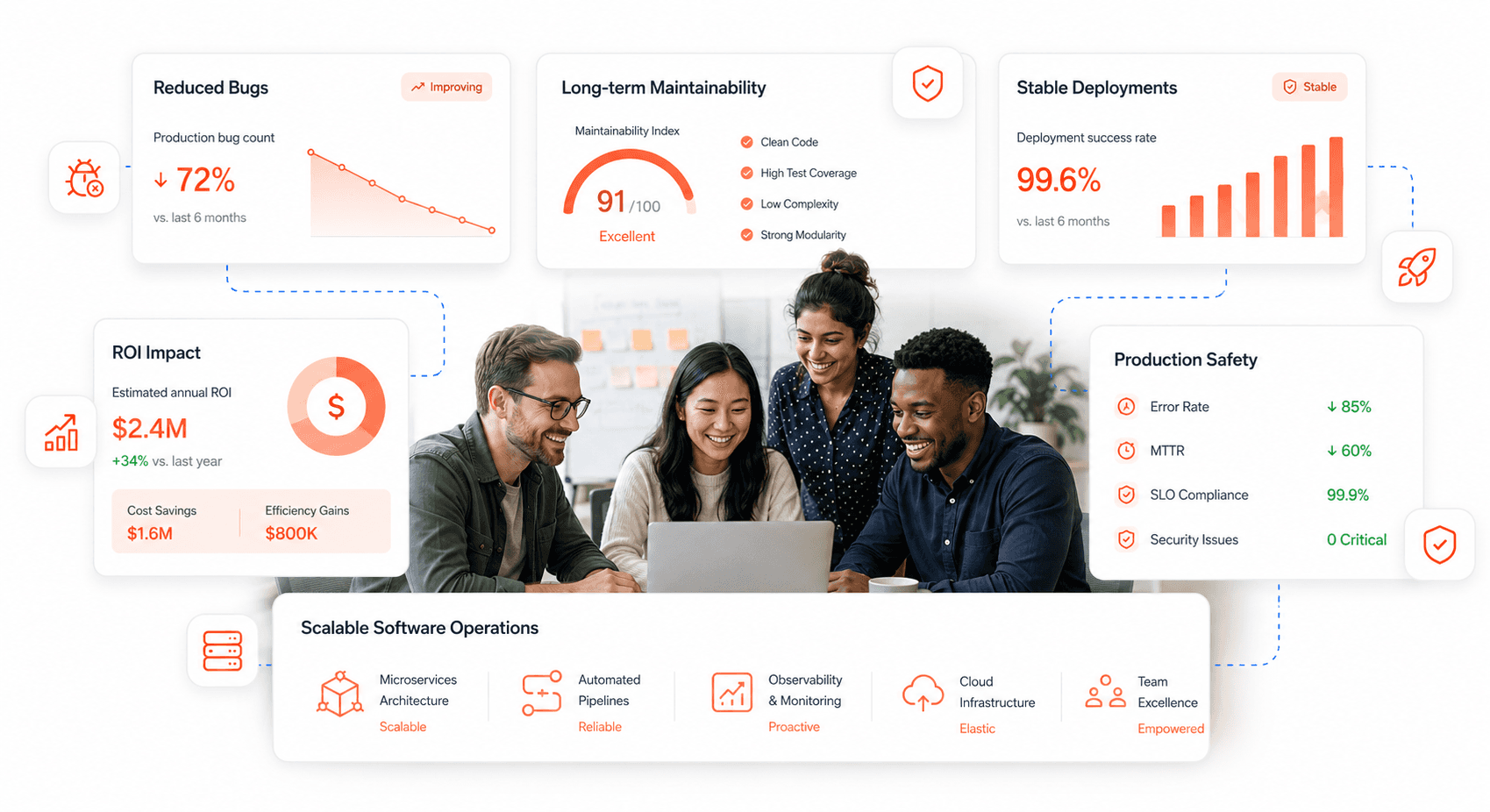
Related Blogs
Related Blogs
Is a clunky UI holding back your growth?
▶︎
Transform slow, frustrating dashboards into intuitive interfaces that ensure effortless user adoption.
▶︎
Transform slow, frustrating dashboards into intuitive interfaces that ensure effortless user adoption.
Is a clunky UI holding back your growth?
▶︎
Transform slow, frustrating dashboards into intuitive interfaces that ensure effortless user adoption.
▶︎
Transform slow, frustrating dashboards into intuitive interfaces that ensure effortless user adoption.
Is a clunky UI holding back your growth?
▶︎
Transform slow, frustrating dashboards into intuitive interfaces that ensure effortless user adoption.
▶︎
Transform slow, frustrating dashboards into intuitive interfaces that ensure effortless user adoption.